Dataify AI Web API 1.0 hands-on: search, extraction and page discovery
A CSDN author demonstrates Search, Extract and Map endpoints for web results, Markdown content and link lists. Outputs still need task-specific filtering; these examples do not establish complete extraction across all sites or dynamic pages.
Editorial correction (November 19, 2026): The term RAG has been corrected to retrieval-augmented generation. The examples are demonstrations from the original article and have not been run by this site.
As AI agents begin reading web pages, conducting research and running automated workflows for people, the industry’s real bottleneck is shifting from “the model’s capabilities themselves” to “whether it can obtain enough accurate, clean information at the right time.”
Deep Research, browser agents and various automated workflows are essentially doing the same thing: reading web pages on people’s behalf. Yet today’s pages are designed for human eyes: navigation, ads, pop-ups, scripts, dynamic rendering and more. People can ignore these at a glance, but models pay for every unhelpful token. Timeliness is even trickier: a model’s memory stops in the past, while an agent must answer about the present.
For an agent, this means two priorities: filtering out clean content and finding the latest information.
A new infrastructure layer is therefore taking shape: web interfaces designed for AI.
Dataify’s newly released AI Web API 1.0 targets precisely this layer.
Now for the hands-on tests.
We tested AI Web API’s three capabilities
First, the metrics everyone is most interested in, followed by the tests:

After testing all three interfaces, my clearest impression was this: search results include titles, snippets and sources; page bodies can be converted to Markdown as needed; and a site’s pages can first be organized into a list. Users have a clear path from receiving results to further filtering, reading and processing them.
Feature 1: Search API
Search selects the tool with unique_id=search_web, passes keywords through query and sets the search type with source, which is web in this example. max_results, country and language control the result count, region and language.
Input · Python
import os
import requests
url = "https://aiwebapi.dataify.com/search"
headers = {
"Authorization": f"Bearer {os.environ['DATAIFY_API_TOKEN']}",
"Content-Type": "application/x-www-form-urlencoded",
}
data = [
("unique_id", "search_web"),
("query", "什么是AI?"),
("source", "web"),
("max_results", "3"),
("country", "us"),
("language", "en"),
("extract_content", "false"),
]
response = requests.post(url, headers=headers, data=data)
print(response.status_code)
print(response.text)
Example response · JSON
[
{
"position":1,
"title":"什么是人工智能(AI)?",
"url":"https://cloud.google.com/learn/what-is-artificial-intelligence?hl=zh-CN",
"snippet":"人工智能(AI) 是一组技术,使计算机能够学习、推理并执行各种高级任务……"
},
{
"position":2,
"title":"1-1. AI 是什麼?|你的第一堂AI 課",
"url":"https://www.youtube.com/watch?v=JKLdpfdhRnc",
"snippet":"歡迎來到「全民AI 通識課」!……用簡單的方式定義AI,其實就是AI系統了!",
"date":"2 years ago"
},
{
"position":3,
"title":"什么是人工智能(AI)?",
"url":"https://aws.amazon.com/cn/what-is/artificial-intelligence/",
"snippet":"人工智能(AI)是一项变革性技术,它使机器能够和人类一样解决问题……"
}
]
Click here for a free trial (opens in a new tab)
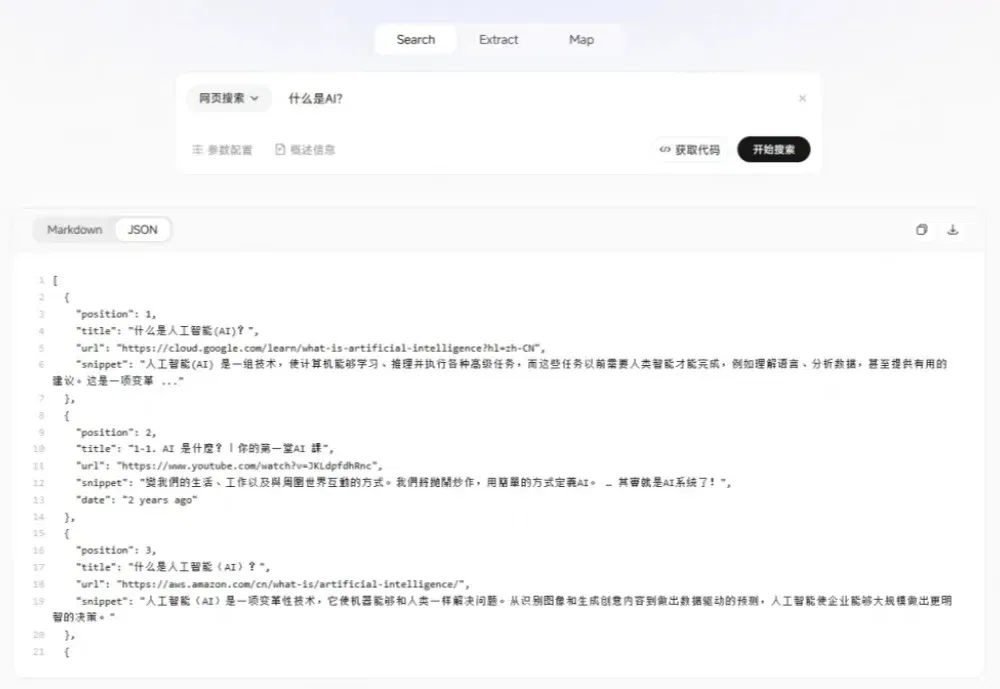
It directly returns a deduplicated, ranked array. Each entry contains title, url and snippet; some results also include date.
Setting extract_content to true also retrieves page bodies alongside the search results, so users do not have to assemble separate search API, web-scraping and body-parsing workflows. Search can become the starting point for content processing rather than merely returning a list of URLs.
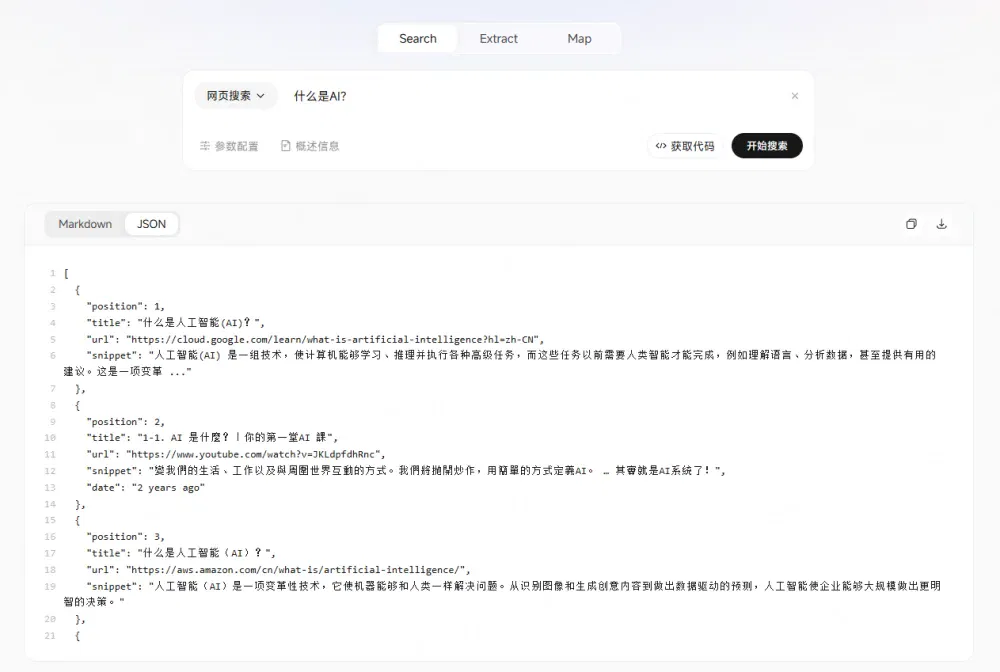
Figure 1 | Search console results, JSON view
Feature 2: Extract API
Once a page has been found, the next question is: how should it actually be read?
Feeding the complete HTML directly into a model also brings navigation bars, buttons, scripts and footers into its context. There may be plenty of information, but only part of it is genuinely useful.
Extract takes a straightforward approach: supply a URL and select the content format required for the task.
It currently supports extraction as Markdown, raw HTML, cleaned HTML and page links. Enabling only_main_content focuses further on the main-content region.
For example, to fetch dataify.com:
Input · Python
import os
import requests
url = "https://aiwebapi.dataify.com/extract"
headers = {
"Authorization": f"Bearer {os.environ['DATAIFY_API_TOKEN']}",
"Content-Type": "application/x-www-form-urlencoded",
}
data = [
("unique_id", "extract"),
("url", "https://dataify.com/"),
("formats", "markdown"),
("formats", "raw_html"),
("formats", "clean_html"),
("formats", "links"),
("advanced_mode", "true"),
("country", "US"),
("only_main_content", "true"),
("timeout_ms", "60000"),
("wait_for_ms", "0"),
("max_age_ms", "172800000"),
]
response = requests.post(url, headers=headers, data=data)
print(response.status_code)
print(response.text)
Example response · Markdown excerpt
# 让 AI 看见此刻世界
Dataify 将最新的网页清洗为结构化数据,让智能体的回答有据可依
[开始免费试用](https://dashboard.dataify.com/web-api?tool=search)
在
Agent 中使用
SearchExtractMap
示例:
AI 领域的最新新闻 AI 开发工具 AI 行业动态
正在请求
…
MarkdownJSON
## AI Web API . Search
Search根据关键词检索相关网页,为 AI Agent 提供实时数据
[立即体验](https://dashboard.dataify.com/web-api?tool=search)
…(后略:完整返回还包含该页面的其他正文与链接)
Click here for a free trial (opens in a new tab)
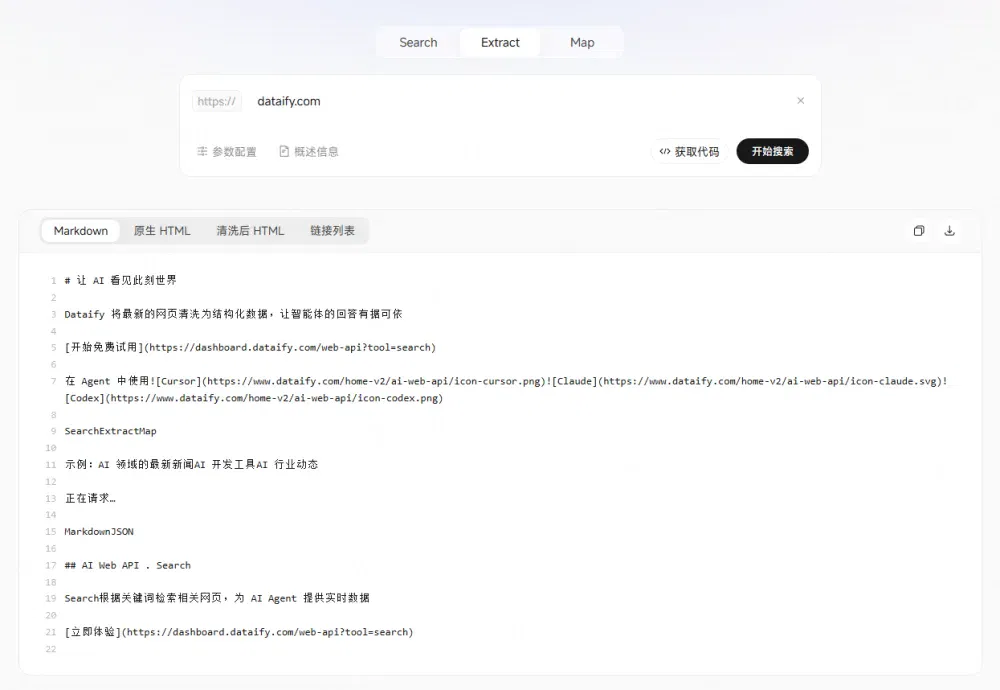
Figure 2 | Extract console results, Markdown view
The returned page content has been converted to Markdown, eliminating the need to parse the HTML yourself. The example still includes interface text such as “Requesting…,” so users can continue filtering it for their particular tasks.
This content can be passed to a model for summarization or further chunked, embedded and stored by the application. The returned page links can also serve as entry points for subsequent collection.
Feature 3: Map API
Extract retrieves a single page’s content; Map helps discover pages within a site.
Given a starting URL, Map can discover page addresses, titles and descriptions within the site. Parameters such as domain_filter, limit and sitemap control the discovery scope, number of results and use of sitemaps.
It suits a different question: “What pages does this documentation site actually contain?”
When building a product-documentation knowledge base, for example, Map can first find page entry points, then Extract can retrieve the body of each page. For competitor research, users can first inventory the official site’s content before selecting pages for deeper analysis.
For example, to fetch dataify.com:
Input · Python
import os
import requests
url = "https://aiwebapi.dataify.com/map"
headers = {
"Authorization": f"Bearer {os.environ['DATAIFY_API_TOKEN']}",
"Content-Type": "application/x-www-form-urlencoded",
}
data = [
("unique_id", "map"),
("url", "https://dataify.com"),
("country", "US"),
("domain_filter", "all"),
("limit", "20"),
("sitemap", "include"),
]
response = requests.post(url, headers=headers, data=data)
print(response.status_code)
print(response.text)
Example response · Links view
https://dataify.com/
https://www.dataify.com/
https://www.dataify.com/about
https://www.dataify.com/careers
https://www.dataify.com/products/dataset/store/dataset-shein
https://www.dataify.com/products/dataset/store/dataset-linkedin_company_v2
https://www.dataify.com/products/dataset/store/dataset-linkedin_prospect_v2
https://www.dataify.com/products/dataset/store/dataset-walmart_products
https://www.dataify.com/products/dataset/store/dataset-instagram_video_info
https://www.dataify.com/products/dataset/store/dataset-youtube_videos
https://www.dataify.com/products/dataset/store/dataset-tiktok_post_v2
https://www.dataify.com/products/dataset/store/dataset-netflix
https://www.dataify.com/products/dataset/store/dataset-tiktok_shop
https://www.dataify.com/products/dataset/store/dataset-tiktok_goods
https://www.dataify.com/products/dataset/store/dataset-vimeo_user_result
Click here for a free trial (opens in a new tab)
The console’s Links view displays results line by line. The raw API response is a JSON array, [{"url": "..."}], with the maximum number of results controlled by limit.
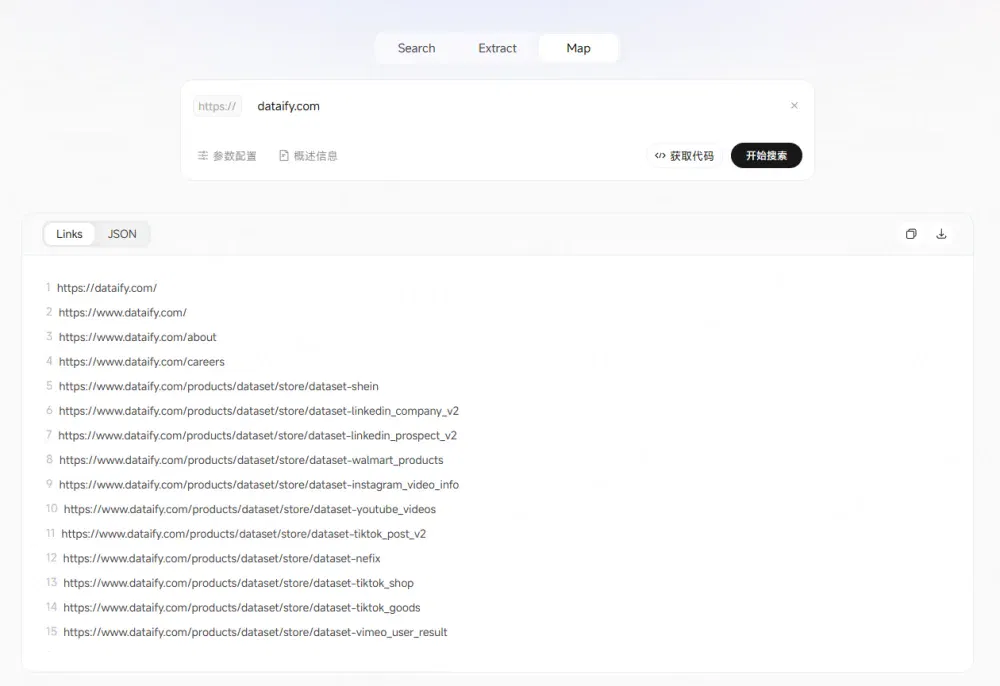
Figure 3 | Map console results, Links view
The division of work among the three capabilities is now clear:
Search finds relevant web pages, Extract retrieves page content, and Map discovers pages within a site.
What can these two types of users do with AI Web API?
Large-model developers
Reinforcement learning, or RL, stage
For reinforcement-learning tasks requiring online retrieval, Search finds relevant web pages and their bodies can then be extracted as needed. This supplies data for training information retrieval, evidence use and complex problem solving.
AI agent developers
Retrieval-augmented generation, or RAG, stage
Extract clean page bodies as needed to give agents more current, focused reference material, improving information quality and timeliness.
In practice, after a user asks a question, the agent first decides whether it needs additional real-time information. If so, it calls Search to find relevant pages and, as needed, Extract to retrieve their bodies. The data is deduplicated, reranked and cleaned for the agent’s subsequent reasoning and answer.
What is the real value of Dataify AI Web API 1.0?
Dataify AI Web API gives AI agents and applications access to real-time, structured public-web data. Through MCP/Skills and multimodal data services, it also helps teams turn external data into usable data assets more quickly.
Version 1.0 is only the beginning. I hope subsequent releases continue improving structured output, batch scheduling and access to more data sources, making “letting AI see the world as it is now” a reality. AI will eventually need a real-time data connection like this. I hope Dataify builds it solidly and takes it further.
If you are building an agent, an industry-research tool or a RAG knowledge base, how would you use AI Web API?
If you need clean, real-time web data for large-model training or AI agent applications and would like to discuss testing requirements and integration options, you can contact the Dataify team:

Dataify Director of Customer Development: Senlina
WeChat ID: lisiyuDZML
This article was originally published by CSDN. Author: CSDN.
Related topics
After reading
Join the AINRK community
Read how to join the community and connect with people working in AI.
Related articles
Continue reading related topics and articles in this category.
Four Chinese AI models compared on investment research deliverables (opens in a new tab)
AI Tech Review tests Qwen4-Max, Hy4, Kimi and DeepSeek using frozen market data, comparing workpapers, Excel formula compatibility and API costs. Price forecasts remain unverified; this small test does not establish trading returns or predictive reliability.
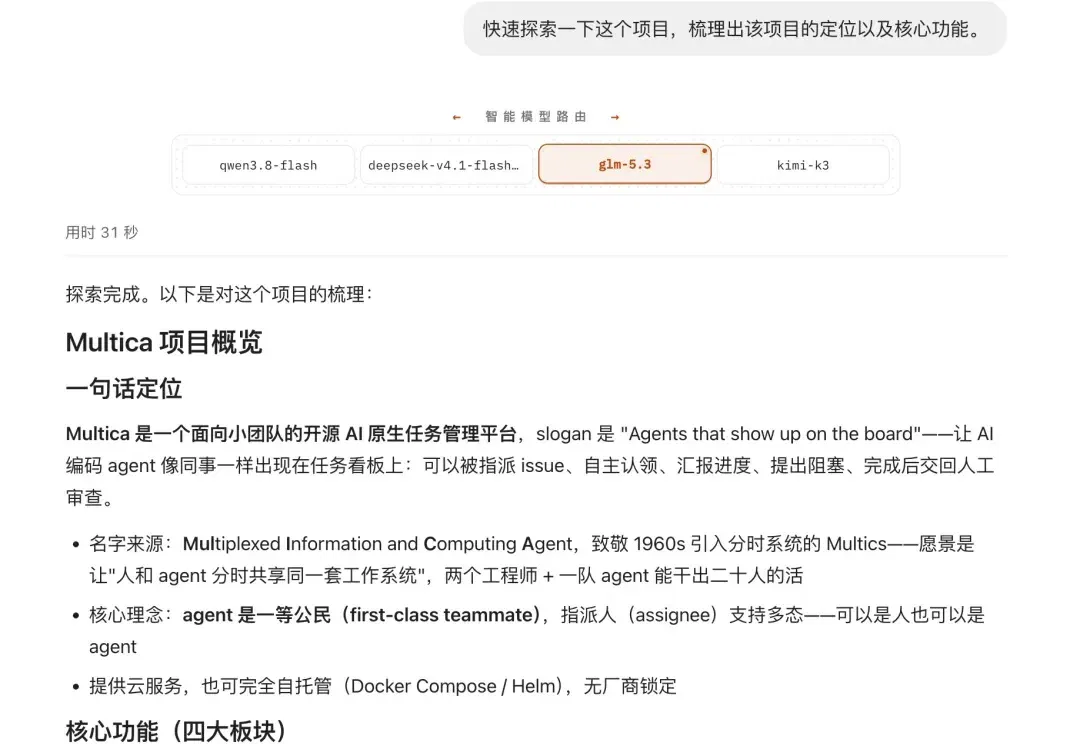
Trying OpenSquilla’s model router: task tiers, model switching and costs (opens in a new tab)
The author tests OpenSquilla on project exploration and documentation. Reported cost and quality results depend on the benchmark and model pool; monthly tier recommendations still need validation for each use case.
Xiaohongshu tests Dada, turning personal expertise into interactive agents (opens in a new tab)
A media hands-on report uses Xiaohongshu's Dada beta to build a cooking assistant, exploring knowledge bases, tools, widgets, group chats and paid services. The product is still in testing; access may change and the commercial outlook is the author's interpretation.

Kling Image 4.0 hands-on: 8K images, editing and sequential storyboards (opens in a new tab)
Zhidx tests Kling's image model on portraits, posters, text edits and sets of up to ten images. The report also records errors in dense text, excessive detail changes and some plastic-looking results. Output quality depends on the task and the individual generation.
Kazike tests GPT-6.2: mixed results in code review, planning and 3D creation (opens in a new tab)
The author compares GPT-6.2 and other models using a personal code-review set and creative tasks, finding better reviews but limited planning readability. Results depend on those tasks and configurations and do not establish universal capability or cost rankings.