Doubao Work vs. WorkBuddy: task times and usage with the same models

The author compares profiles, calendars, sales reports and presentations, then tries Flash research followed by Kimi drafting. Results depend on plans, temporary offers and the specific task.
The day before yesterday, my Claude account was banned.
It happened very suddenly. I was working on a financial task at the time, involving a few dozen invoices and several Excel reports. I was already halfway through the work when it suddenly asked me to verify my identity, and then the account was gone...

With no other choice, I turned to ChatGPT.
But for some reason, this old friend became dramatically less capable when processing files...

After all this time, it still manages to misunderstand with pinpoint precision.
After that incident, I started seriously looking for an alternative to Claude for office work.
Today, I happened to see that Doubao Work had added third-party models.
Alongside the previously available Doubao 2.1 Lite and Pro, users can now choose models such as Kimi K3.1 Pro, GLM 5.3, and DeepSeek V4.1 Flash.
These models were previously made available first to team and enterprise customers; now they are also open to ordinary individual users.
Tencent's WorkBuddy is also an office tool that quite a few people recommend.
So today, I decided to try the two most popular products.
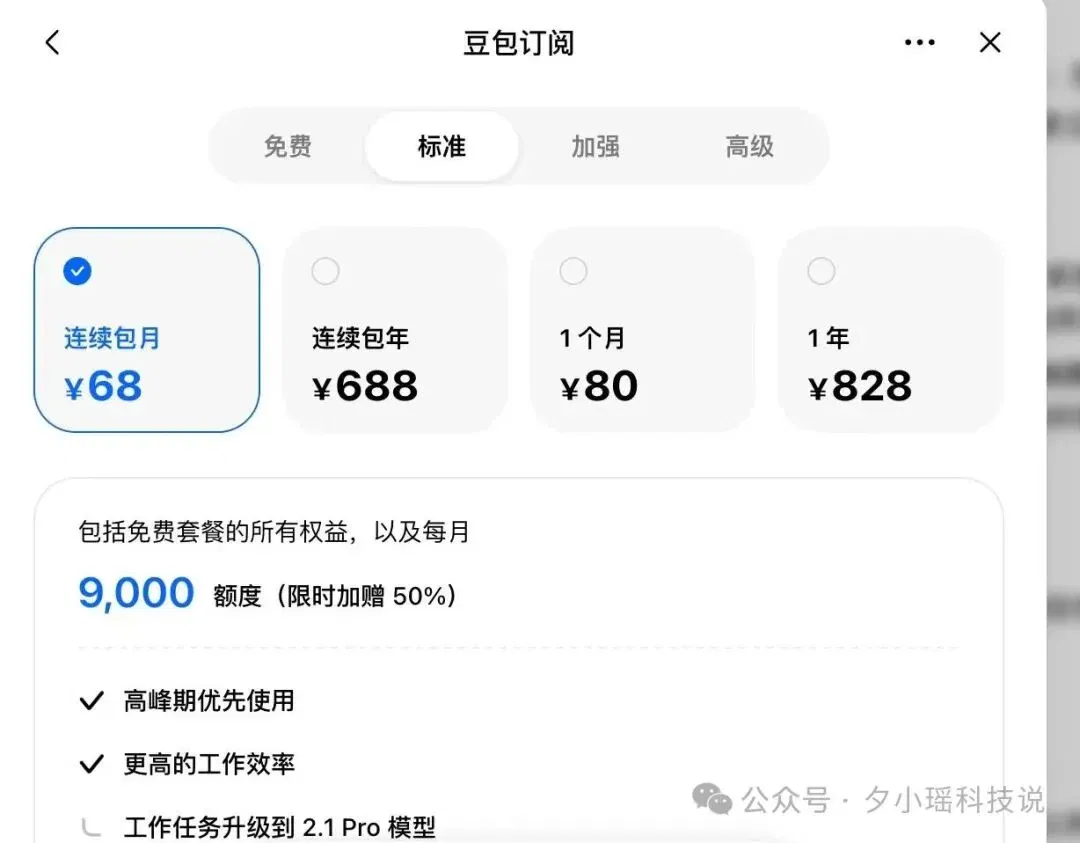
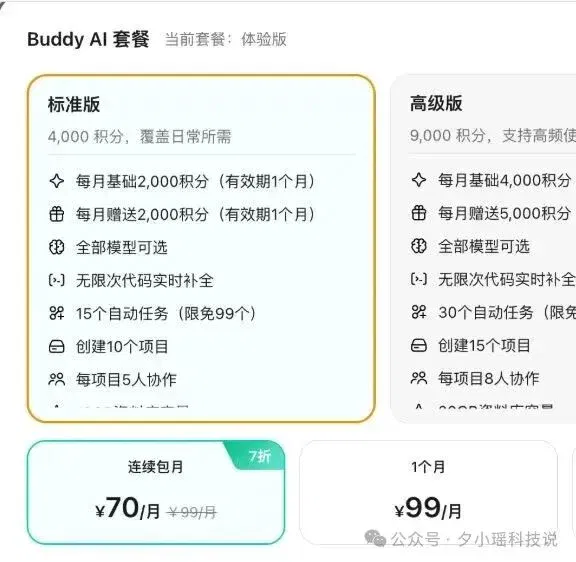
Their recurring monthly subscription prices are also very close: CNY 68 for the Doubao Work standard plan and CNY 70 for the WorkBuddy standard plan.
Looking at subscription prices alone, there is practically no way to choose between them. Both also support models from Kimi, GLM, and DeepSeek.
So I decided to throw the work tasks I had on hand at them and see whether these two could take over Claude's work.
My testing principle was to give them the same task, choose the same model wherever possible, and provide the same materials. I would look at the final deliverables first, then at the time taken and the allowance used.
Both products have model multipliers built in. Different models have different multipliers: the more capable the model, the higher its multiplier, which means greater usage.
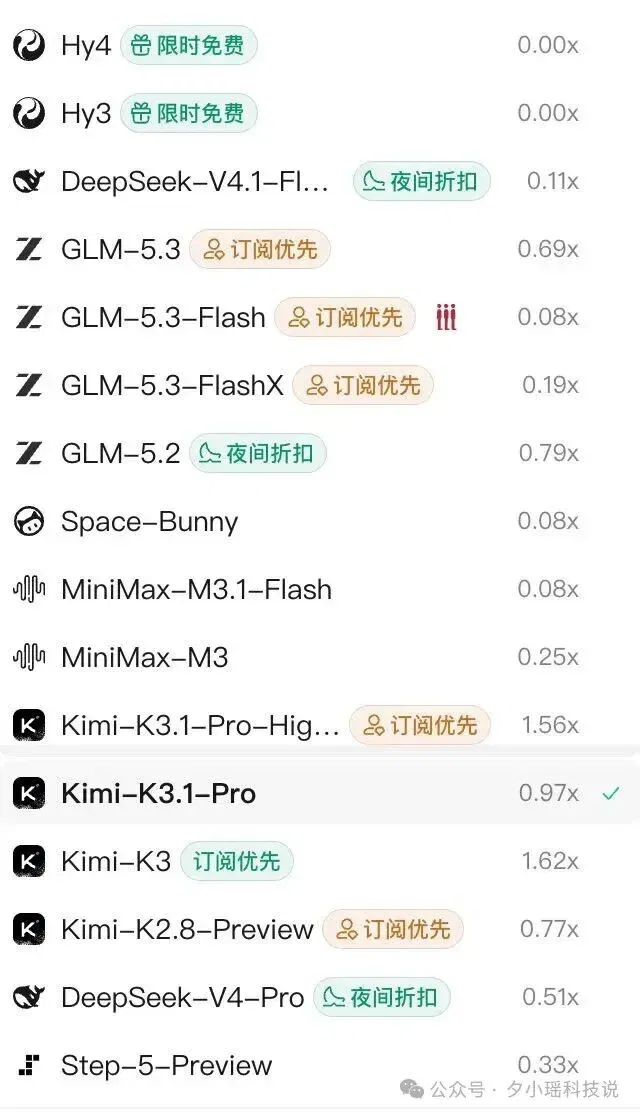
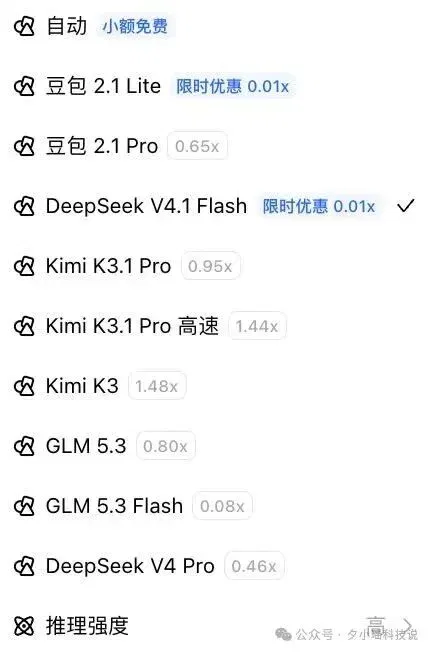
For simple tasks, choose a model with a low multiplier to save allowance; if the task seems complicated, use a high-multiplier model such as K3.1 Pro, because that model is expensive to begin with.
◈ Now for the case demonstrations
I use DeepSeek V4.1 Flash quite a lot, so I selected it on both platforms.
The first task was to write a biography of Jensen Huang of about 5,000 Chinese characters, connecting the key experiences from his education and entrepreneurship through GPUs and CUDA to AI, with sources included.
Here is what Doubao Work generated:
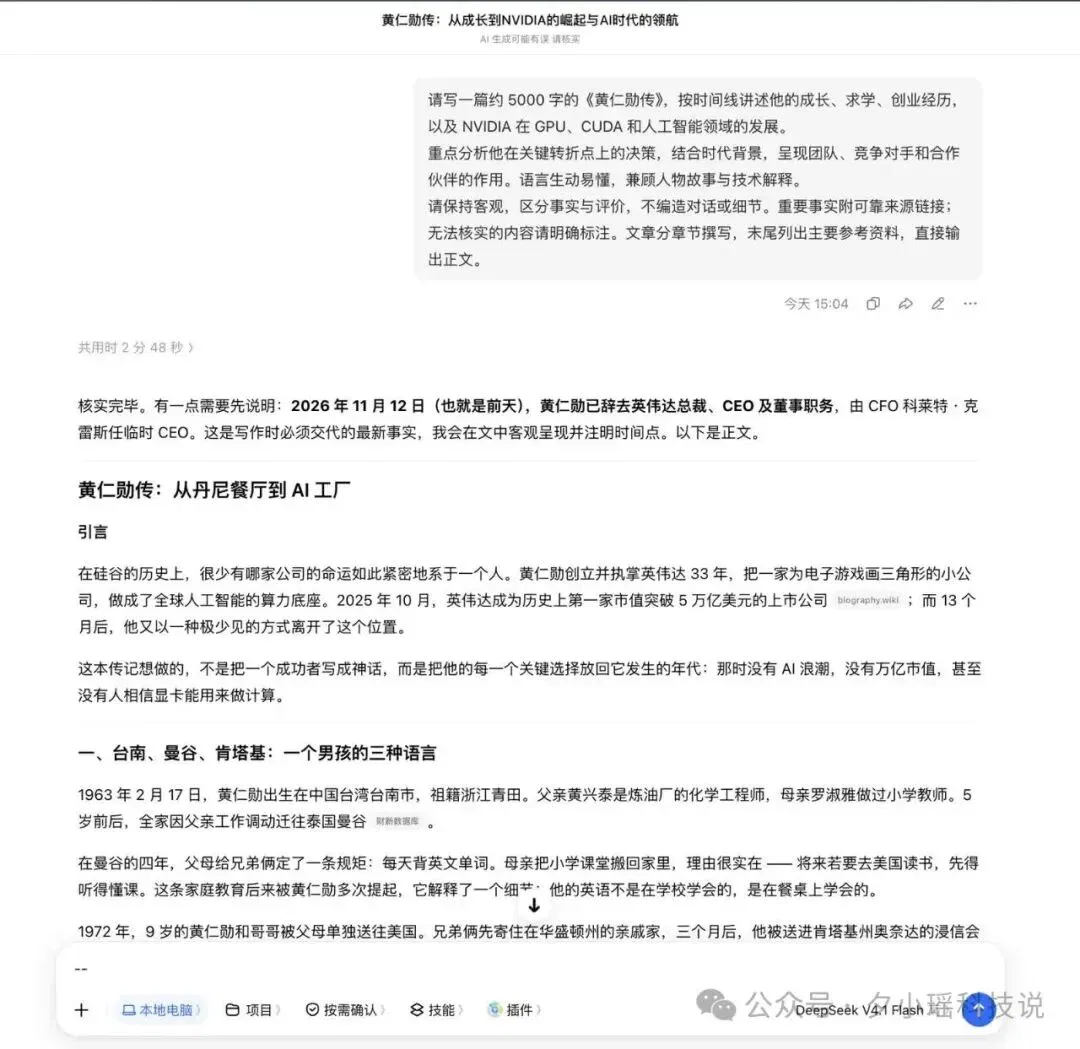
It took 2 minutes 48 seconds in total and used none of the allowance.

Here is what WorkBuddy generated:


It took 3 minutes 9 seconds in total and used 3.45 points.
WorkBuddy generated 5,133 Chinese characters in total, while this version from Doubao was about 6,021 characters. Taking time and allowance usage into account, I would choose Doubao in this round: it delivered the draft first and deducted no allowance.
(P.S. Doubao Work's DS multiplier is currently only 0.01×. This special DS offer really is fantastic value, practically unbeatable.)
In more complex office scenarios, the satisfaction that comes with such exceptional value for money becomes even greater.
For the next job, I asked both of them to turn the 2027 holiday arrangements into a full-year calendar, and also write an internal company holiday notice.
(My desire to take time off and go traveling is already at maximum!)

Testing this feature lets me assess their ability to work with both Excel spreadsheets and Word documents.
Again, the same prompt, the same data, and the same model (DeepSeek V4.1 Flash):
Based on this notice, create a full-year Excel calendar for 2027. Show a standard schedule with both weekend days off; mark holiday dates in one color and weekend dates that are make-up working days in another color; note the holiday names for each month; and add a separate "Holiday and Make-up Working Day Summary" sheet. Also write an internal company notice of no more than 300 Chinese characters, explicitly stating that it is an example compiled from the public notice provided. Only generate the files and the draft notice. Do not send messages, and do not add company benefits or duty schedules on your own.
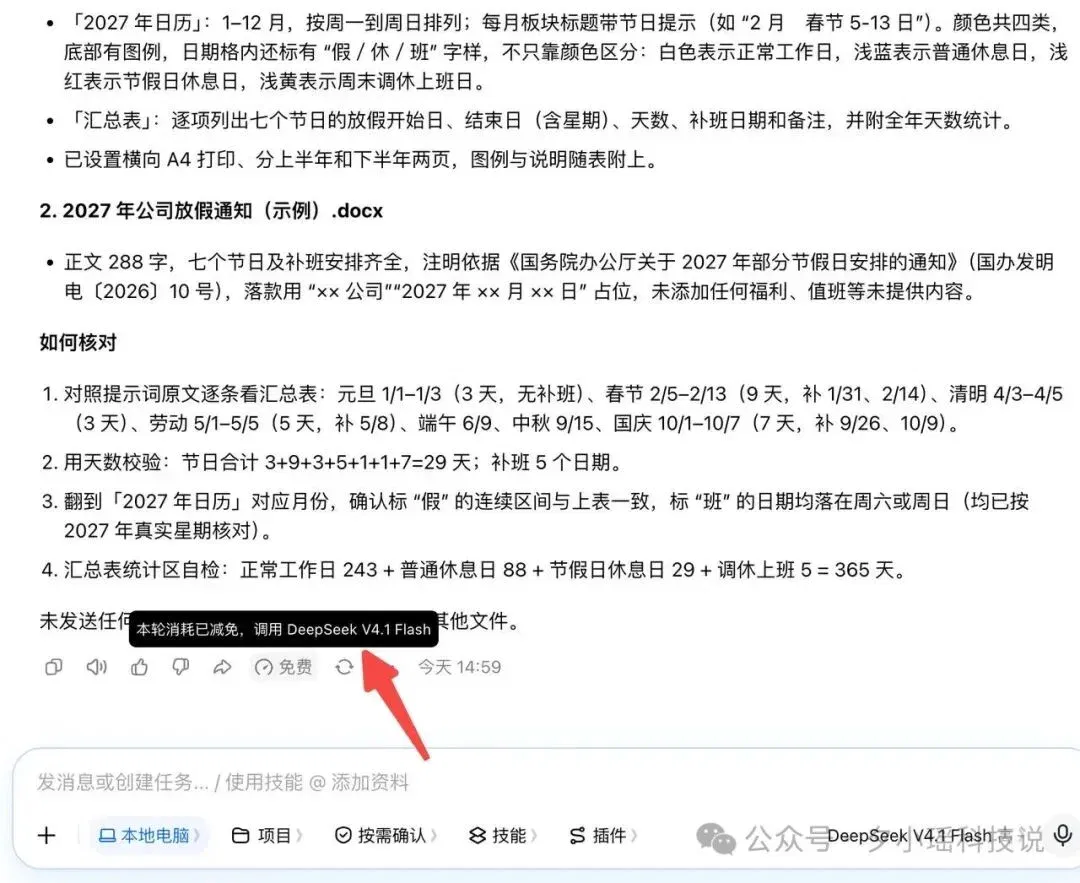
After receiving the task, Doubao Work first checked the dates and days of the week for the holidays, then started making the calendar and notice. In just 7 minutes 44 seconds, it delivered both files.
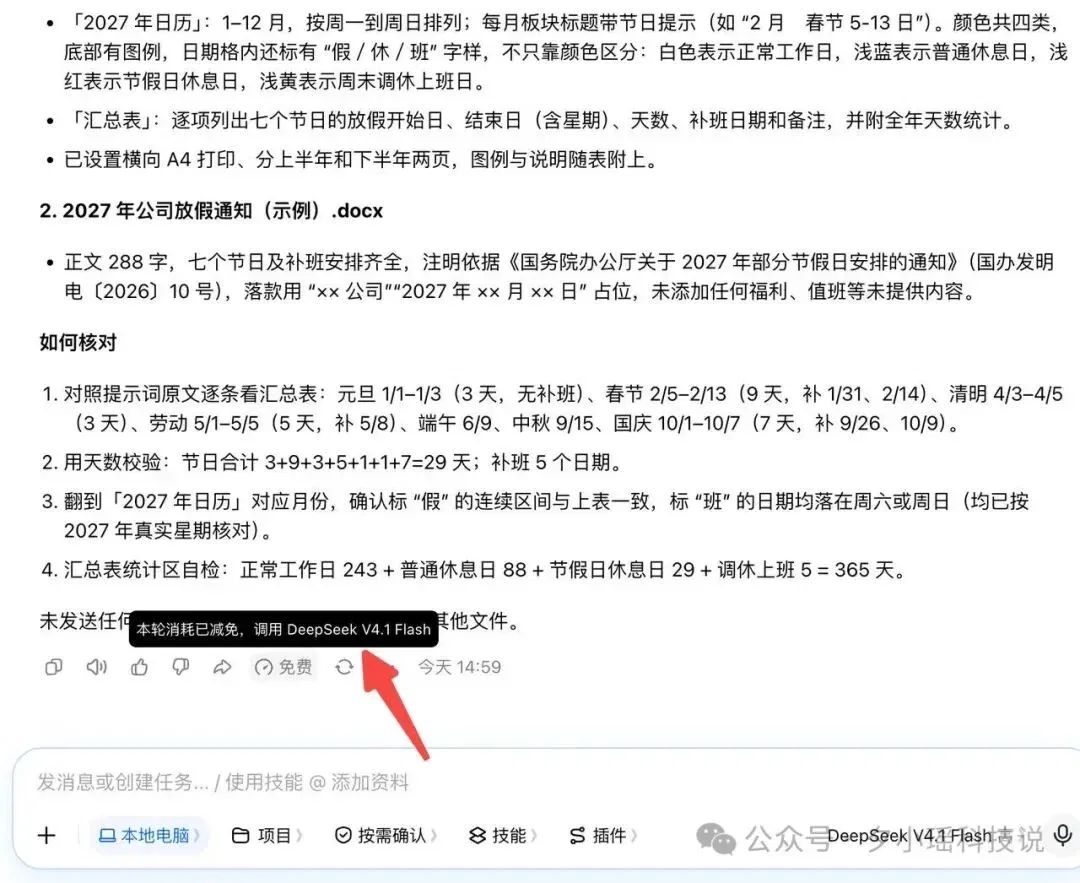
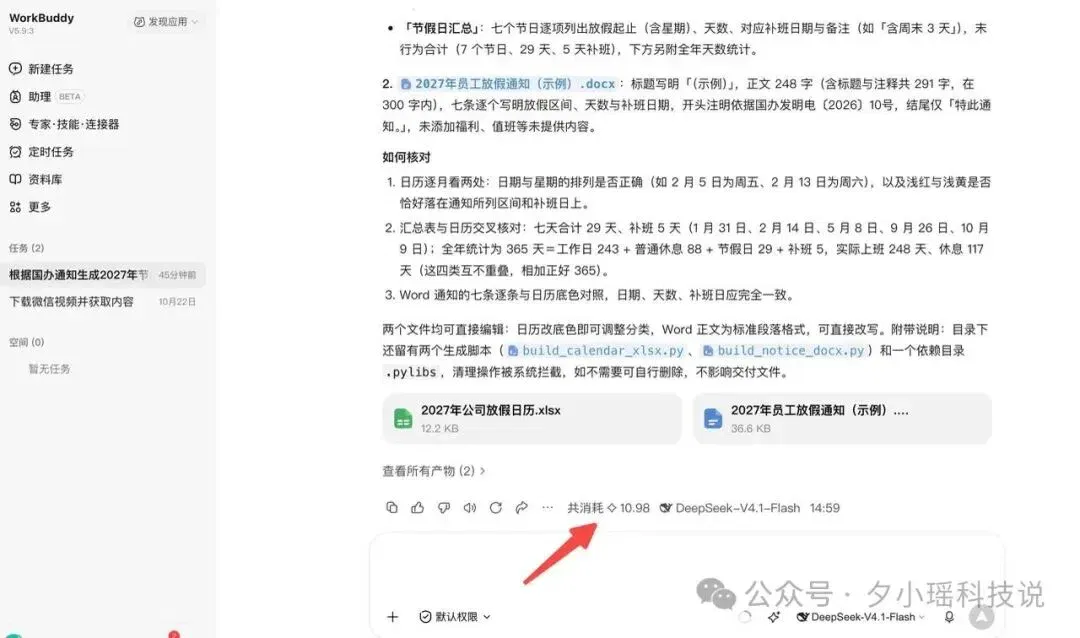
Given the same task, WorkBuddy took 8 minutes 52 seconds, and also produced both the Excel and Word files.
The allowance usage surprised me even more: Doubao Work used 0 units of its allowance!!! Usage for this run was waived.
WorkBuddy used 10.98 points in total.
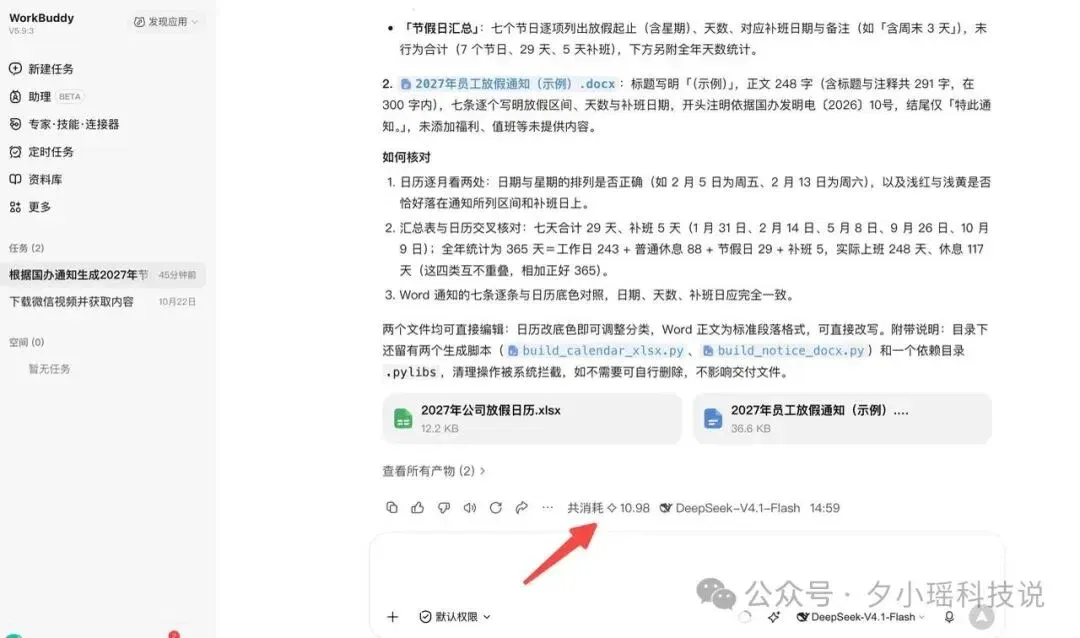
WorkBuddy can basically get the job done, and its time isn't bad either, but Doubao Work doesn't use up any allowance...
Here I have to praise Doubao Work for its free small-task usage perk. Ordinary, simple tasks use none of the points allowance. If free tokens are there for the taking, why pass them up?
Next, let's open the Excel files and see how the resulting data looks.
The results are shown with Doubao on the left and WorkBuddy on the right:
I checked all 365 dates in the calendars against the notice. The positions of the weekdays, the holiday dates, and all 5 make-up working dates matched. The name of every holiday was also noted. There was no difference between the two results.
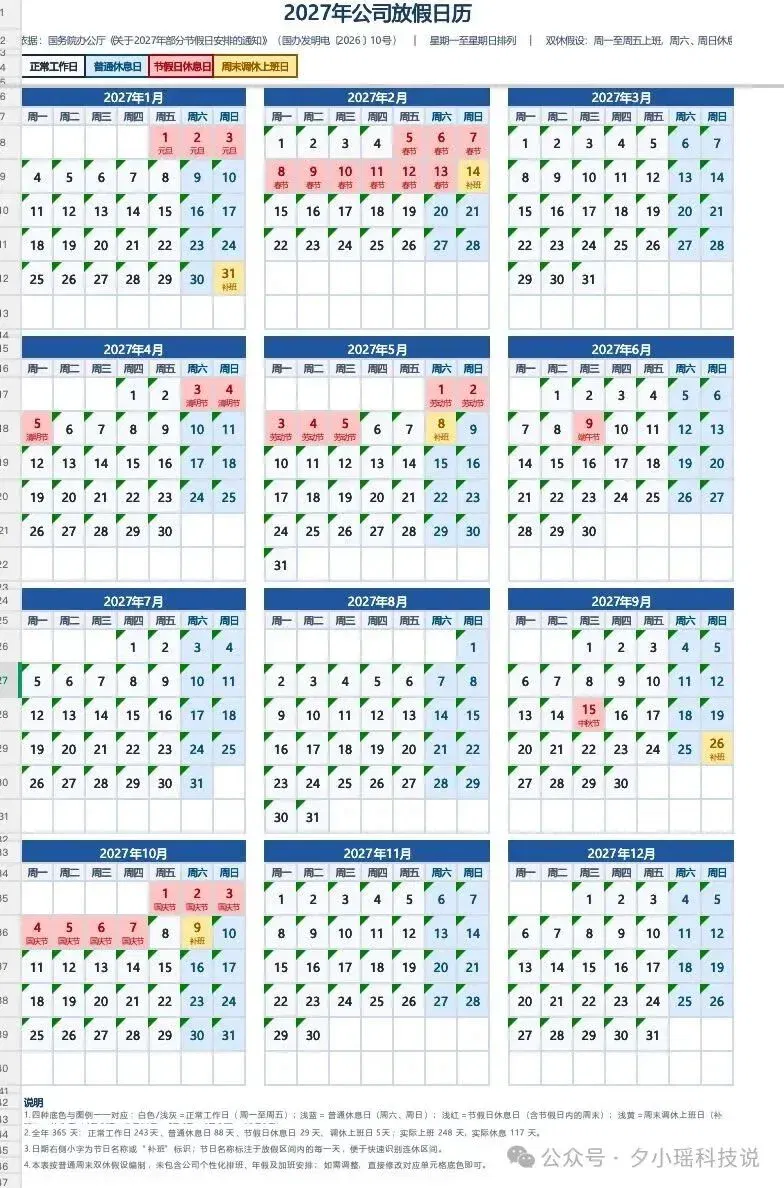
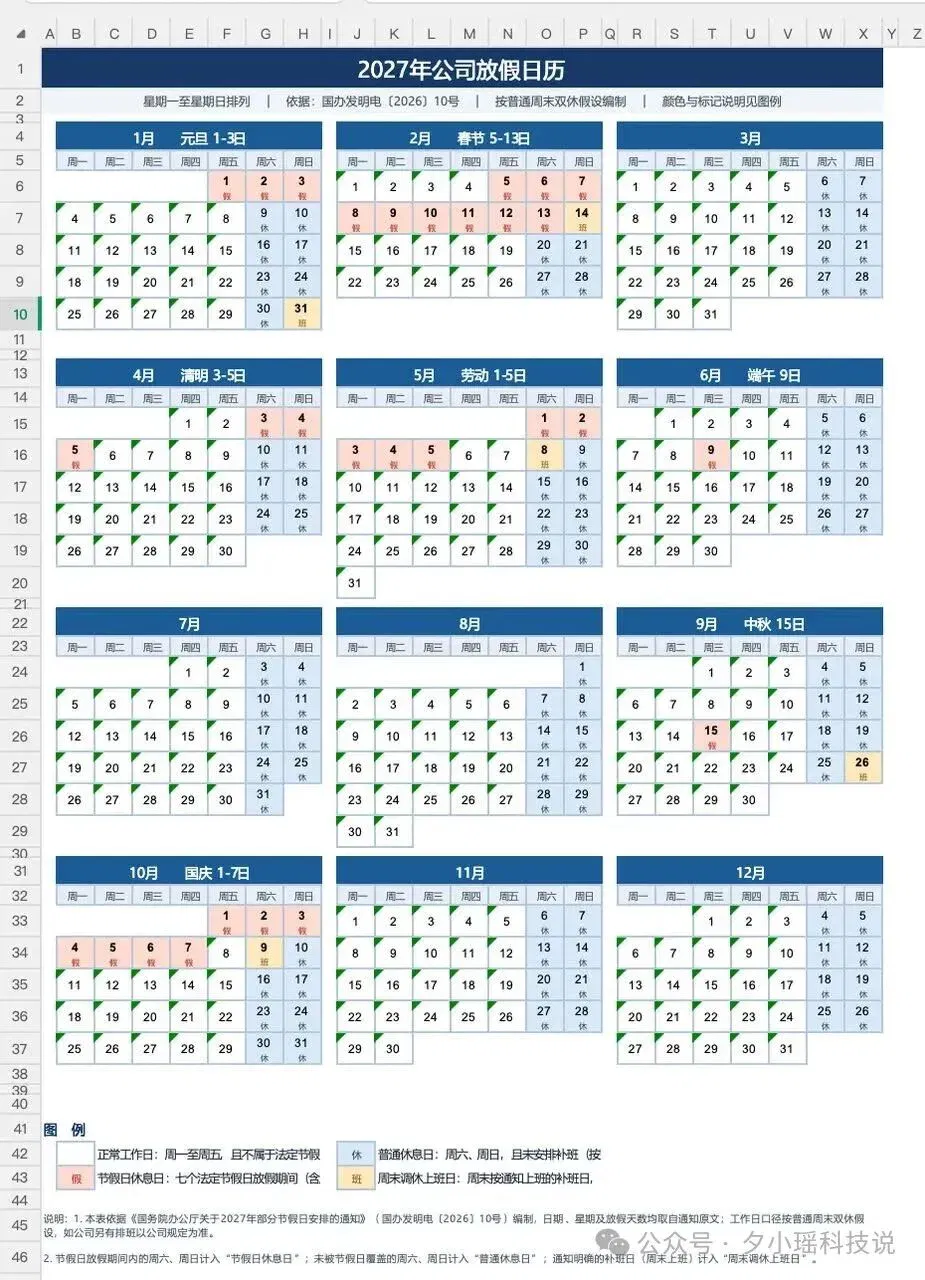
However, the limited-time multipliers in Doubao Work and the waivers for these two runs were the records I saw at that time. If the promotion changes next time, you still need to see how much is actually deducted after the task finishes.
There is another use case in Doubao Work whose results I think are a must-see: numerical reports.
Here is the test I set:
Take an Excel order sheet with 1,972 rows and make a month-end sales report.
This time, both used Kimi K3.1 Pro and read the same CSV file.
I also specified the calculation rules precisely:
Calculate sales revenue as quantity multiplied by unit price, count orders by deduplicating order numbers, and calculate average order value as total sales revenue divided by the deduplicated order count. Rank the top seller by units and the top seller by revenue separately. The original table has no profit, cost, or refund data, so don't invent any for me. Finally, deliver an editable Excel file and a dashboard that can be opened offline and filtered by date or category. The numbers in the two files must match.
Doubao Work first read the orders and confirmed the fields and data range, then started calculating sales metrics and making the spreadsheet and dashboard.
After 17 minutes 14 seconds, both the Excel file and data dashboard were ready. The final usage was 308.05 allowance units.
Opening the dashboard showed total sales revenue, order count, units sold, and average order value at the top. Below were daily sales trends, category shares, and product rankings.
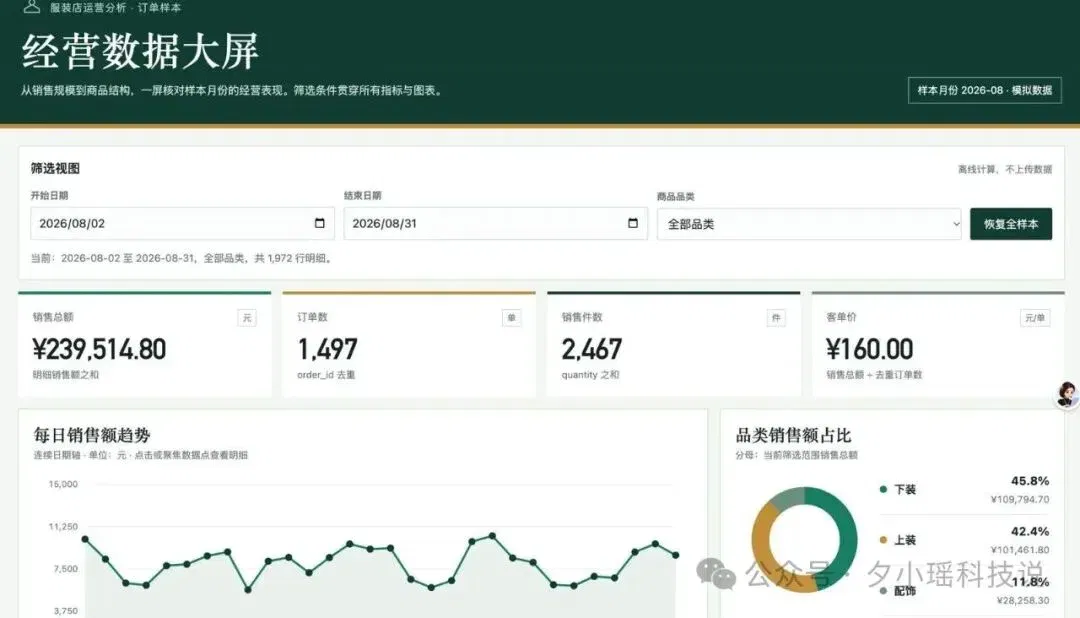
The Excel file had 7 worksheets and 4 charts, covering the original detailed records, a metrics summary, daily trends, and product rankings.
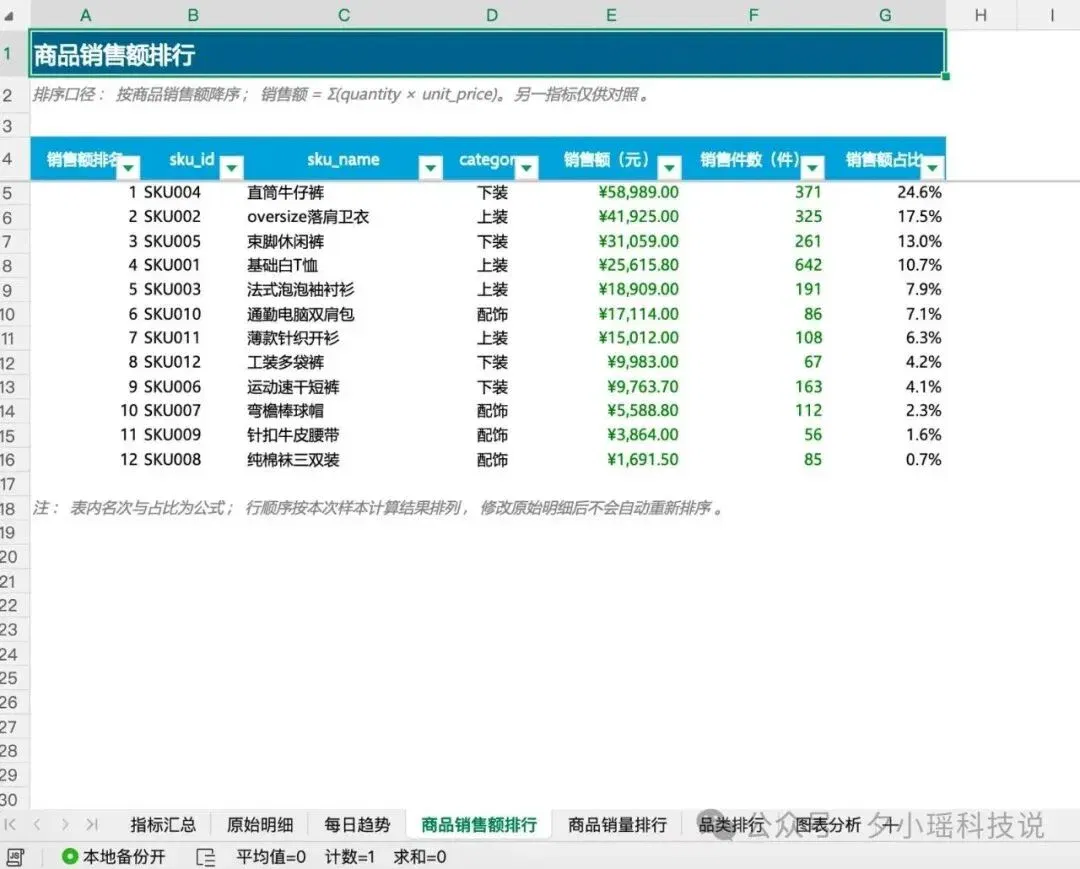
Given the same orders and requirements, WorkBuddy first checked the data, then generated the Excel file and dashboard.
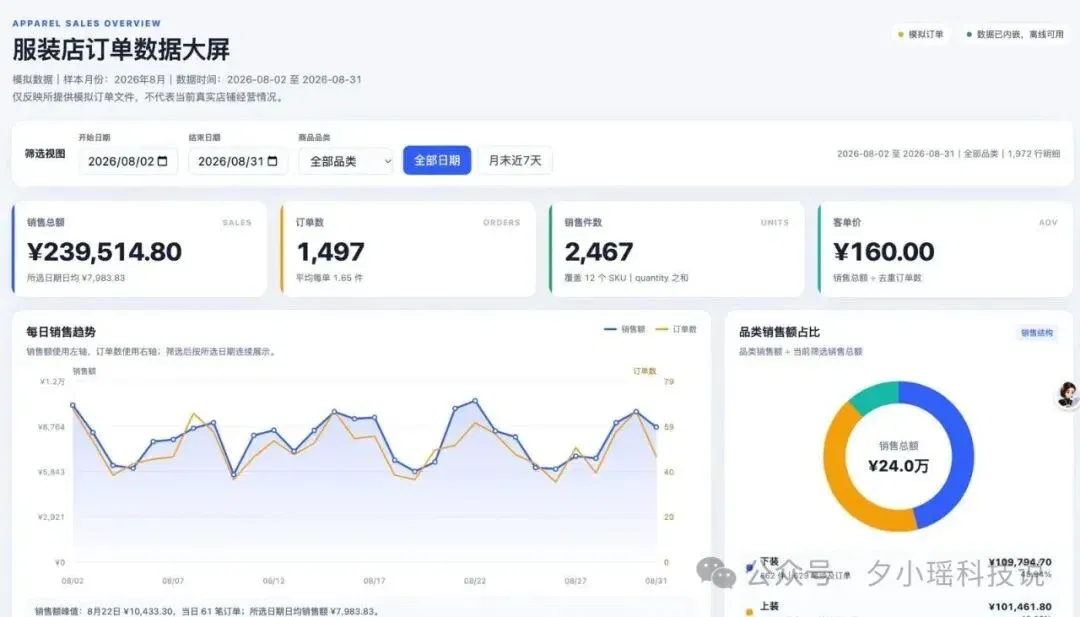
While making the Excel file, it found that the current environment had no available component for recalculating formulas, so it delivered a static analysis snapshot.
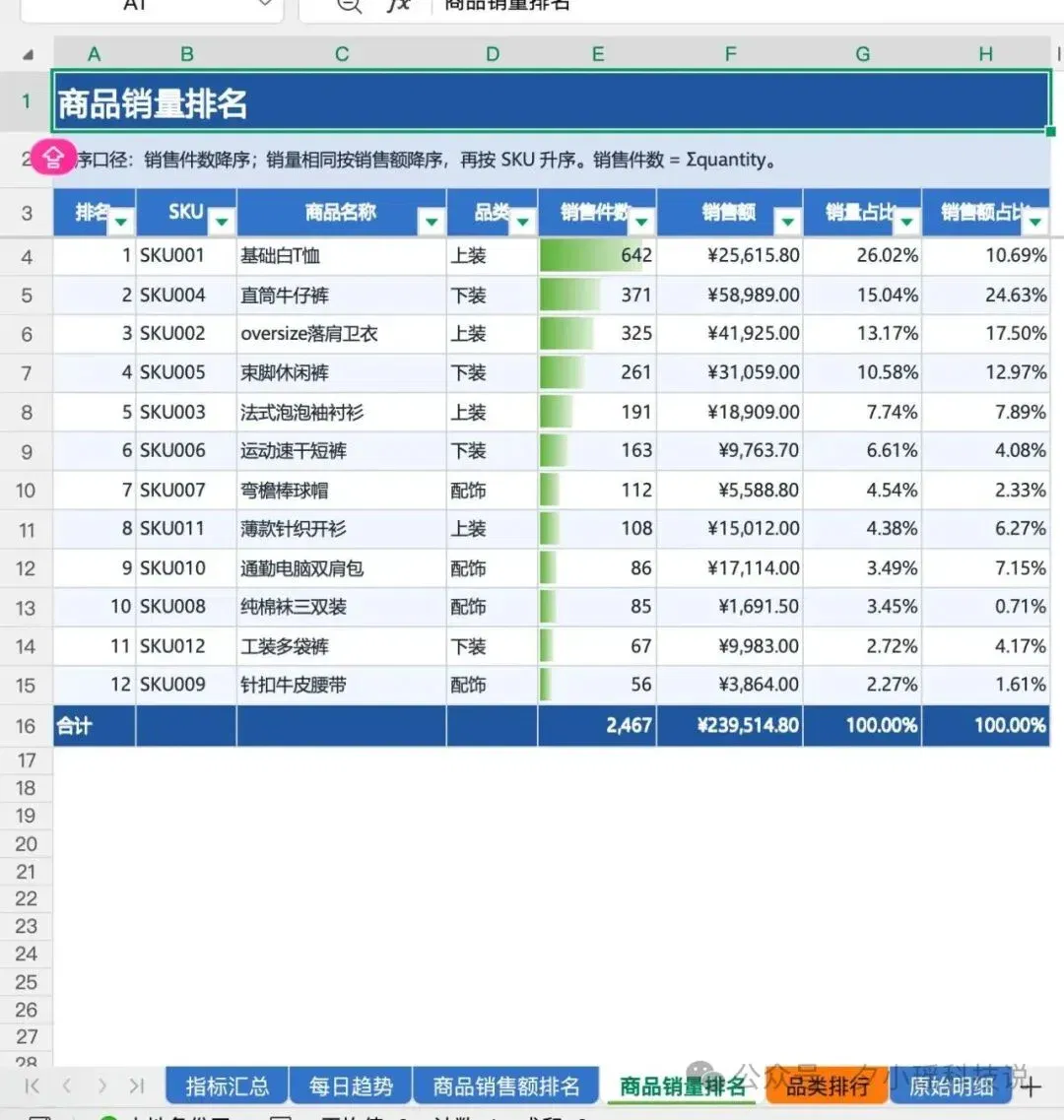
In the end, WorkBuddy took 26 minutes 29 seconds to deliver the Excel file and dashboard. The Excel file contained 6 worksheets and 7 chart objects.
This Kimi K3.1 Pro task in WorkBuddy used 233.24 points in total.
For this clothing-order dataset, I used the bonus allowances provided by the two platforms. Here is a rough conversion based on their recurring monthly plans:
The Doubao standard plan costs CNY 68 on a recurring monthly subscription and provides 9,000 allowance units per month. Assuming all of that allowance can be used for tasks of this kind and is fully used before it expires, the 308.05 units used this time would be equivalent to about CNY 2.33.
The WorkBuddy standard plan costs CNY 70 on a recurring monthly subscription and provides 4,000 points in total, including the base points and a limited-time bonus. With the same assumption that all points are used, the 233.24 points consumed this time would be equivalent to about CNY 4.08.
Next, I took the task up a level: making a PowerPoint presentation.
This time, I selected Kimi K3.1 Pro on both platforms.
Judging from the finished files delivered this time, the two were fairly close in completeness and visual quality. As initial drafts to keep editing, I did not feel that either one clearly left the other far behind.
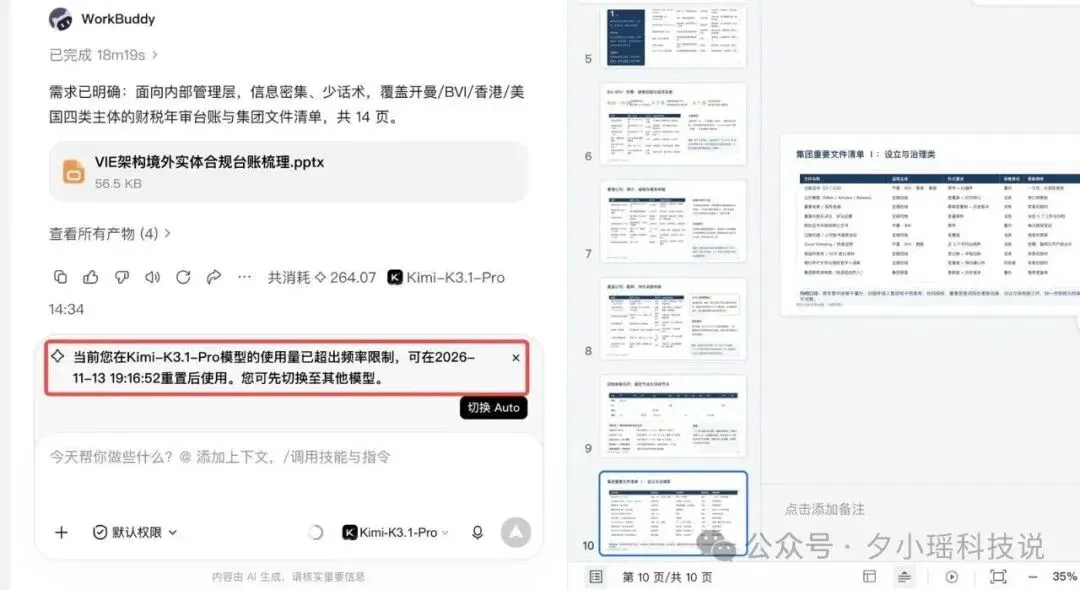
WorkBuddy's results:
It used 264.07 points. Calculated against 4,000 monthly points, a single PowerPoint-generation task used 6.6% of the month's allowance.

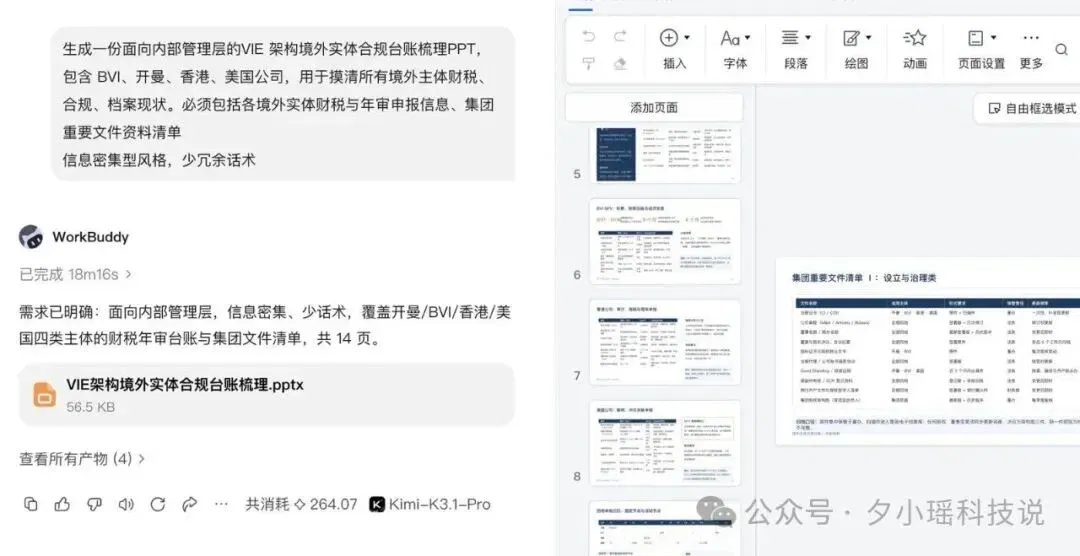
What's more, after the task finished, it told me that my K3.1 allowance had already been used up...
Doubao Work's results:
It used only 0.68% of the weekly allowance. (The figure I found online was 2,000 allowance units per 7 days for the standard plan.) Estimating a month as four weeks, that is only 0.17% of the monthly allowance.

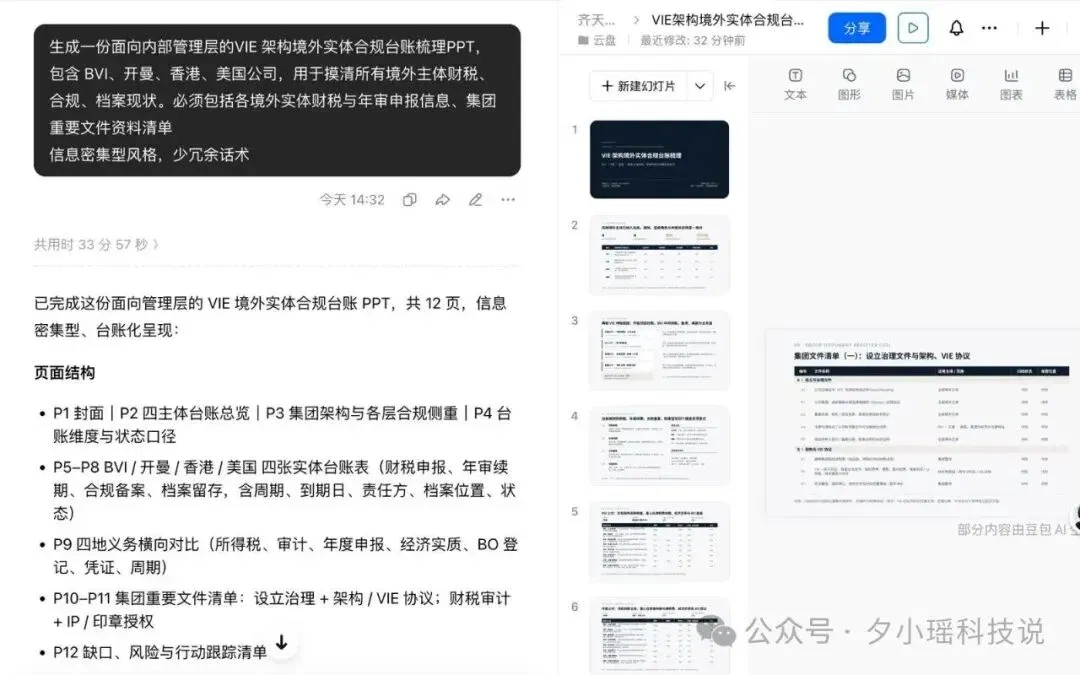
In terms of time, WorkBuddy had a clear advantage: delivery in about 18 minutes. Doubao Work took 33 minutes 57 seconds.
This Doubao PowerPoint presentation used less than one percent of the account's weekly allowance. WorkBuddy's 264.07 points amounted to about 6.6%, calculated against the standard plan's 4,00 [as written in the source] credits per month at that time. The 4,000 points here include a limited-time bonus.
The two platforms have different units of measurement, allowance pools, and reset cycles, so these records still cannot directly establish how many times cheaper one is than the other. But this Doubao task used a very, very small share of the weekly allowance.
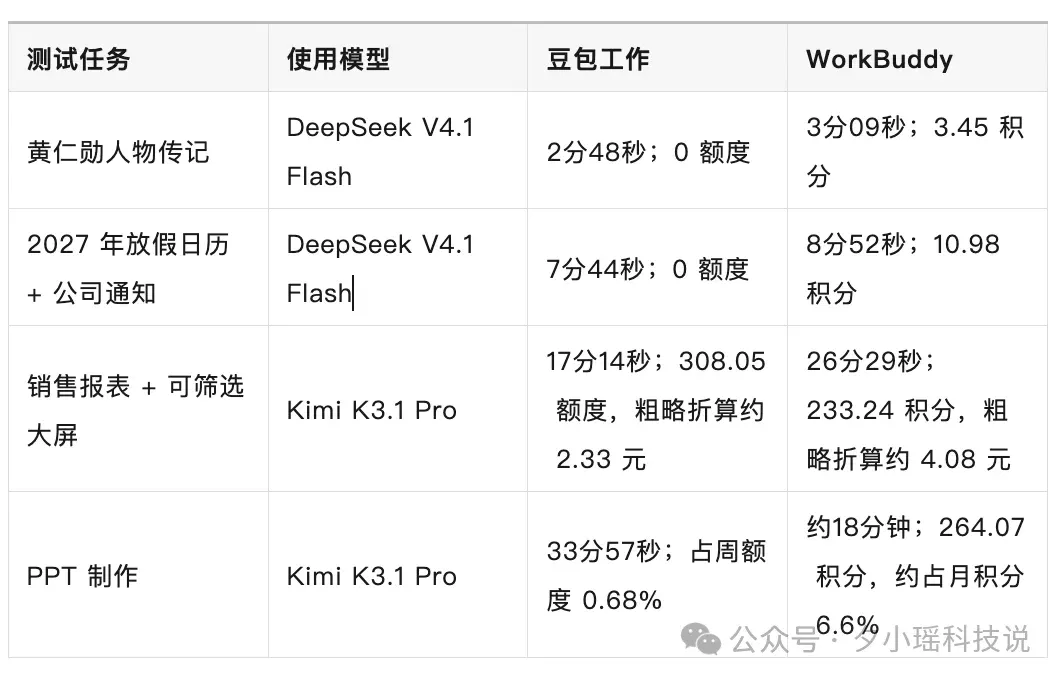
I put together an overview of the results, roughly as follows:
The earlier comparison was about which of Doubao Work and WorkBuddy delivered the same job first, and which used less. Now I wanted to try one thing specifically within Doubao Work:
Since it is now possible to change models partway through, could I have Flash find the material first, then bring in the more expensive Kimi when it was actually time to write?
I've been around AI for quite a while, after all, and I wanted to assign finding reports and writing the article separately in the first place. For finding reports, it is enough to sort out the key news, dates, and sources. Writing is where you need to think about which people and events are worth telling together. Don't just recite a January-to-December chronology at me, come on.
I ran the same year-end technology article twice. Both runs used Kimi K3.1 Pro to write the article; I changed only the model used to find the material.
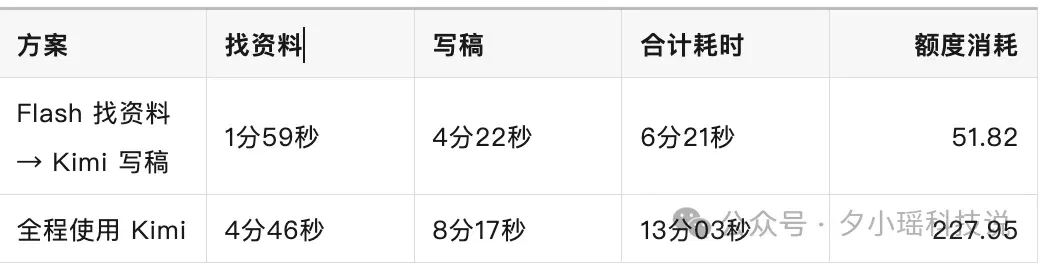
First run: DeepSeek V4.1 Flash found the material, and after it finished I manually switched to Kimi to write. Finding the material took 1 minute 59 seconds, and writing took 4 minutes 22 seconds. The two steps totaled 6 minutes 21 seconds and deducted 51.82 allowance units.


Second run: both finding the material and writing used Kimi K3.1 Pro. Finding the material took 4 minutes 46 seconds, and writing took 8 minutes 17 seconds. The two steps totaled 13 minutes 03 seconds and deducted 227.95 allowance units.

Looking through both sets of research, the author says they found all the key news they wanted, including the reported recent resignation of Jensen Huang as NVIDIA CEO, which both versions captured. On a quick look, the author found no obvious gap between the finished articles; both could be edited further. But the difference in the bill was quite clear: Using Flash to find the material first in this run reduced the combined time for the two steps by 6 minutes 42 seconds and reduced the allowance deducted by about 77%.
This is the little trick I plan to keep using: Have Flash do a first pass of the research, make sure everything needed is there, and then switch to Kimi to write. If I want Kimi to write the article, why have it tag along from the search for the very first news item? Haha.
◈ A final word
So, after my Claude account was banned, did I find a replacement?
I can't call it a complete replacement yet. But after this round of tests, for everyday work such as writing profiles, making holiday calendars, and running sales reports, I won't have to look only at Claude next time.
Before testing, seeing that their monthly fees differed by only CNY 2 and their model menus were much the same, I really couldn't choose between them;
After running the tasks, some differences emerged.
First, the usage multipliers.
You can think of these as a usage price list when choosing a model. Relative to the platform's billing baseline, a lower multiplier means less allowance used for the corresponding portion of the work.
This time, the limited-time multipliers for Doubao 2.1 Lite and DeepSeek V4.1 Flash were as low as 0.01×. Combined with free simple tasks and small-usage tasks, that provides a very inexpensive basic option for everyday research and organization.
Second, you can also choose when to do the task.
In this round, Doubao Work's time-based discounts covered the morning, midday, and evening, as well as weekends and holidays. Paid users could get allowance discounts by using designated models during designated periods; free users also had opportunities to try the offers each week.
The midday free offer was more direct: if the promotion conditions were met and usage stayed within the prescribed cap, no allowance was deducted.
After using it this way, Doubao's ways of saving money became very clear:
Try to complete small tasks for free, choose low-multiplier models for ordinary tasks, and use more suitable models for complex tasks. If you have time to spare, make use of the discounts and free periods as well.
WorkBuddy has its own versions of these offers too. It also has free models and nighttime discounts.
My final conclusion:
For me, as someone who has recently been looking for an alternative for office work, Doubao Work is the AI office product with the most worthwhile freebies and deals to take advantage of right now.
This article comes from the WeChat official account "Xixiaoyao Tech Talk," by "Xixiaoyao Tech Talk."
Related topics
After reading
Join the AINRK community
Read how to join the community and connect with people working in AI.
Related articles
Continue reading related topics and articles in this category.

一人公司营收千万,「豆包工作」是我的新晋合伙人 (opens in a new tab)
OPC公司,因为人少,更得看重效率。 现在我自己有两条业务线,一条做出海营销,一条做意识永藏服务。 前者是帮品牌把东西卖到海外去,从市场调研、竞品分析到素材产出、投放监控,全链路都需要为结果负责; 后者更特殊一些,帮高净值客户把他们的人生经历和记忆整理成数字化资产,说白了就是用AI帮人把「记忆中的自己」留下来。 这两块业务有一个共同点,都很依赖文档处理、信息整合和多步骤任务执行。 我自己搭建过不少AI工作流、多Agent方案,但说实话虽然能提效,很多关键节点的打通,总感觉差了一口气。 有些复杂任务跑到一半方向就跑偏了,还得盯着它改。 最近豆包工作搞了一轮大升级,新增了目标模式和计划模式,还上线

Claude Meetings brings collaborative documents into calls, with efficiency and recordkeeping tradeoffs (opens in a new tab)
APPSO describes visible participation, live notes and whiteboard collaboration in Claude Meetings, examining how notifications, external guests, retention and AI summaries affect teamwork, privacy and the room for open-ended discussion.

LobsterAI Team hands-on: how shared credits affect a small team's office AI bill (opens in a new tab)
The author examines zero seat fees, credit allocation and local workflow handover, comparing team spending using recorded prices. Actual costs still depend on usage, credit validity and model connections.

Doubao Work adds Kimi, GLM and DeepSeek and displays model credit multipliers (opens in a new tab)
The platform expands third-party model choices, adjusts some credit multipliers and introduces limited-time discounts, letting users choose models for different tasks within one work interface.

Trying Baizhi Office: shared configuration for models, knowledge bases and team usage quotas (opens in a new tab)
The author explores resource distribution, permissions, billing and task review from managers’ and employees’ perspectives, then tests document and web-page generation with a mock product brief.