Trying Baizhi Office: shared configuration for models, knowledge bases and team usage quotas
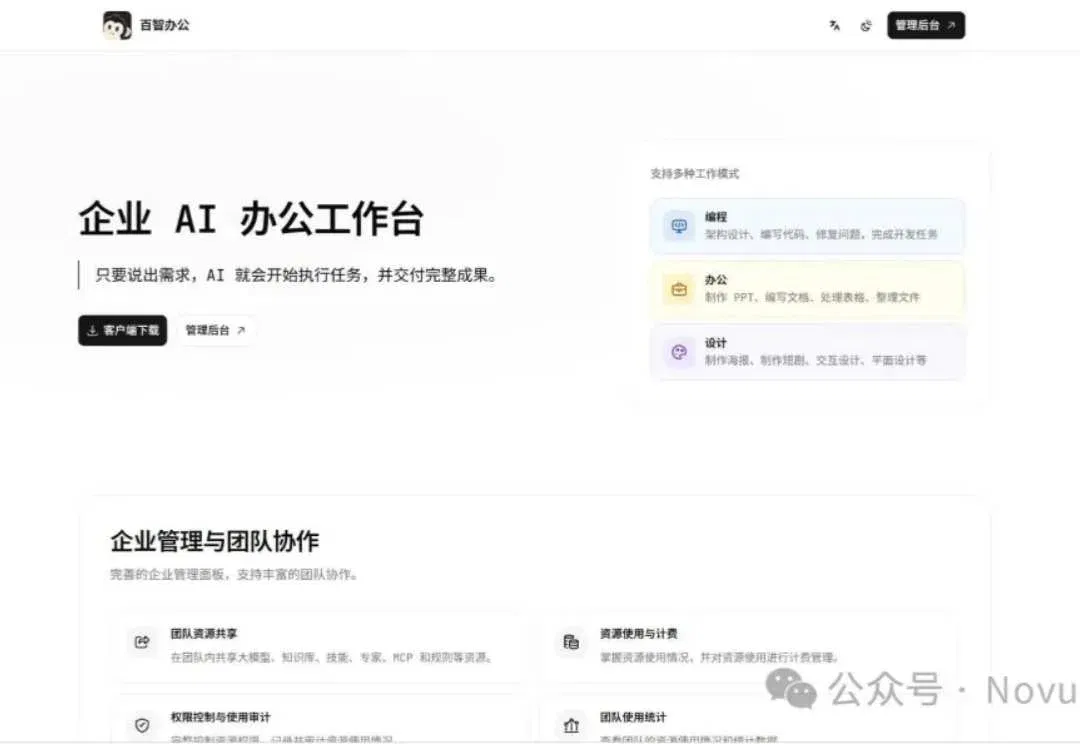
The author explores resource distribution, permissions, billing and task review from managers’ and employees’ perspectives, then tests document and web-page generation with a mock product brief.
In the past, when a new employee joined, a company had to spend a great deal of time and effort mentoring and training them.
With the arrival of AI agents, companies began putting together private knowledge bases, Skills, experts and resource packages to save costs.
But whenever a version was updated, everyone had to be notified and had to import and replace it again. Finally, someone still had to confirm that everyone was using the same version.
Training, setup and maintenance all take time and staff. Add it all up, and the company’s costs increase rather than fall.
So is there a tool that can manage resources centrally? As it happens, I recently discovered an open-source AI workbench well suited to internal teamwork, called Baizhi Office.
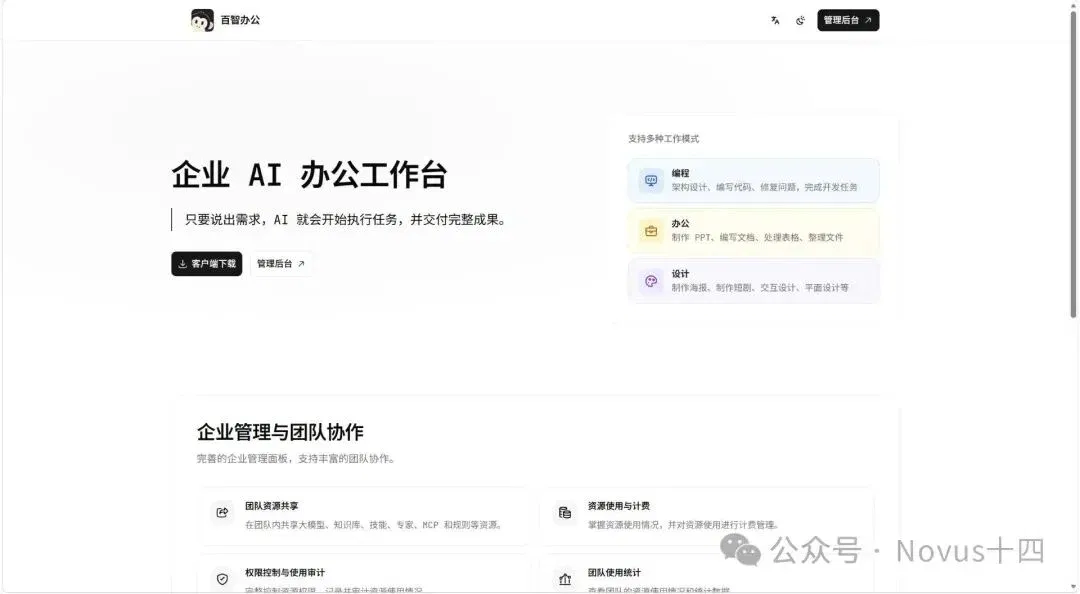
It centrally configures resources such as models, knowledge bases and Skills, then distributes them to the appropriate members. Who can use what, how much quota they have and their work-task records can all be monitored in the administration backend.
This time, Shisi will take you through this AI office workbench from both a manager’s and an employee’s perspective.
1 Keep the information and methods within the company
Managers have a dedicated administration backend. Let’s open it and first look at “Resource Management.”
Models, knowledge bases, skills, experts, connectors and rules are all here.
New resources can be added in each category. The experience and information the company has accumulated through repeated hands-on work can all be stored here and reused indefinitely in the future.
For example, a new employee writing a product introduction can find product specifications and frequently asked questions in the system knowledge base. The “Product and Service Manual” in the red box below illustrates this use.
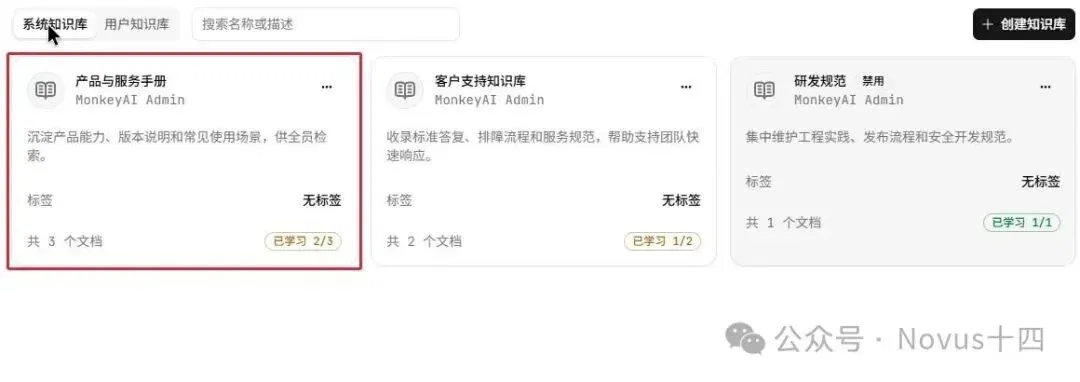
Information alone is not enough. Experienced employees know how to write the introduction, but a newcomer may not.
At this point, a proven approach can be organized into a Skill: for example, first extract the product specifications, then write about suitable use cases and finally compile frequently asked questions and answers.
Upload the skill package in the backend and set its scope of use. Colleagues who need to do this work can then invoke it.
Alongside system skills configured centrally by the company, there are user skills. Members can also pass methods they have organized themselves to colleagues through resource sharing.
Once the information and methods are in place, put the company’s commonly used wording and output formats into rules as well. This immediately lowers the barrier for new employees to get started.
If a particular type of work needs to be done regularly, use an “expert” to combine role requirements, skills and tools.
When information changes later, an administrator maintains it in the backend. Members can simply refresh their resource lists to see the updated content.
Existing organized resource packages can also be imported in bulk through the backend, after which the models, linked resources and permissions can be checked before distribution to the team.
2 Assign access by job role
After setting up company resources, you can grant access to the appropriate resources according to the needs of different roles, reducing mismatches and waste.
Under “System Settings → Members and Groups,” you can group people by department or project and set member roles.
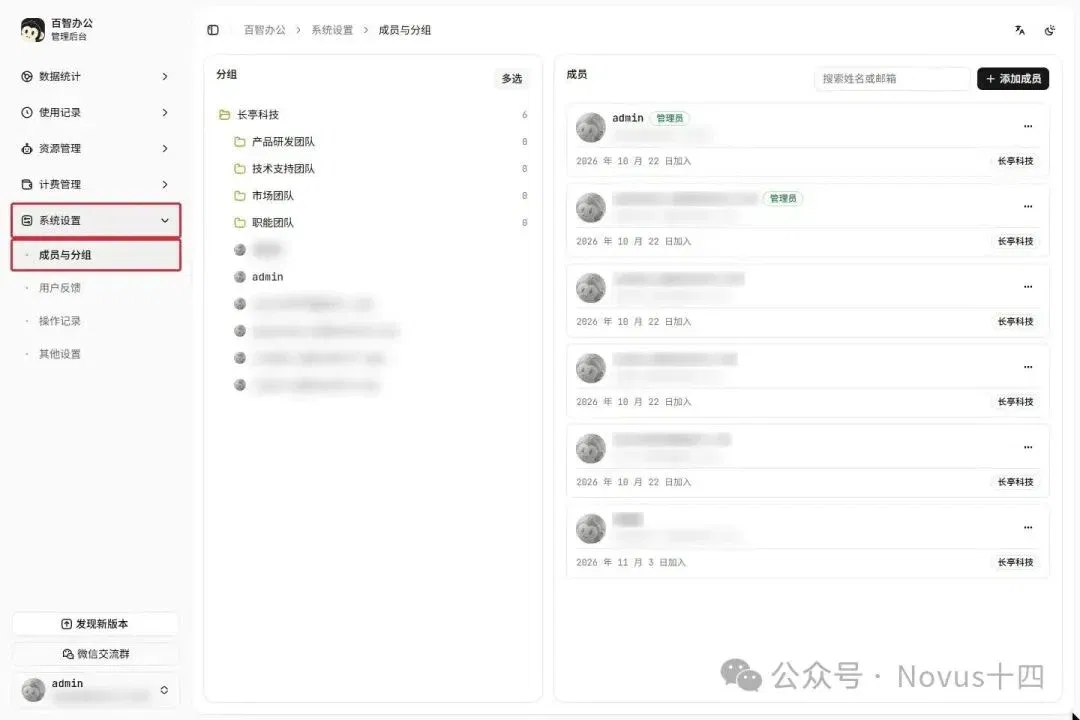
For example, product information can go to the relevant colleagues, a Skill for writing promotional copy to the marketing group and development standards to the development group.
Resources such as models, skills and experts support authorization for everyone, specified groups or specified users. Read and write permissions for knowledge bases are managed separately.
Once newcomers join the appropriate group, they can use the models, skills and other resources authorized for it. When someone changes roles or leaves, you can return here to adjust their group and account permissions.
Ordinary members work in the client, while administrators handle configuration in the backend.
3 How to allocate model quotas and view costs
Employees using AI agents to improve efficiency each have models they prefer.
By connecting models centrally, the company removes the need for everyone to apply for API access individually. Quotas and costs can also be managed centrally.
Open “Billing Management → Cost Settings.” On the left, allocate quotas to groups and members; on the right, set billing rules and the credit reset cycle.
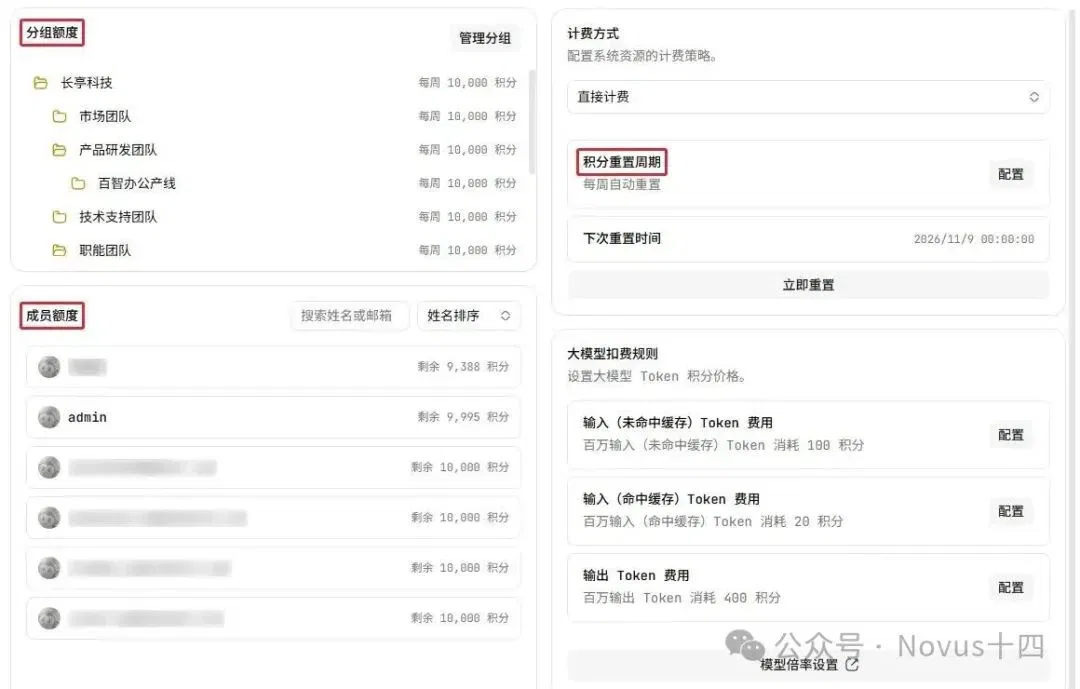
Colleagues who frequently handle long documents or write code can receive larger quotas.
When a company provides quotas, it needs to guard against certain situations, such as quota waste or even token reselling.
To see exactly where quotas have been spent, check “Charge Details.” You can find who invoked what, how many credits were deducted and how many remain. Open “Details” to see the transaction status and settlement information as well.
4 Search and review task records
If something goes wrong with a piece of work, first find the corresponding task and then review the conversation from that time.
The backend’s “Task History” can list tasks by member and time.
You can see each member’s conversation tasks, the specific conversation content and the number of conversations.
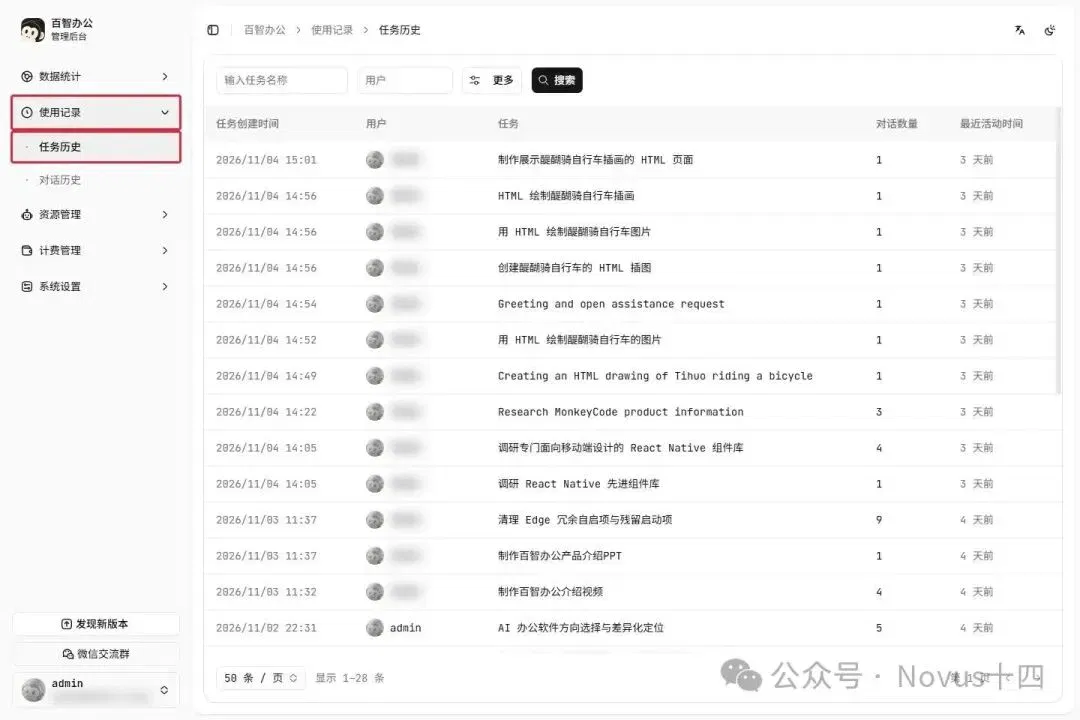
This makes it easier for company managers to trace how events unfolded and to make targeted decisions.
Next is a very important feature: the backend can manage all the company’s data and materials. To check operation records, go to “System Settings → Operation Records” in the backend.
There are corresponding fields for the operation time, operator, result, type and source IP.
The image below shows records of administrator logins.
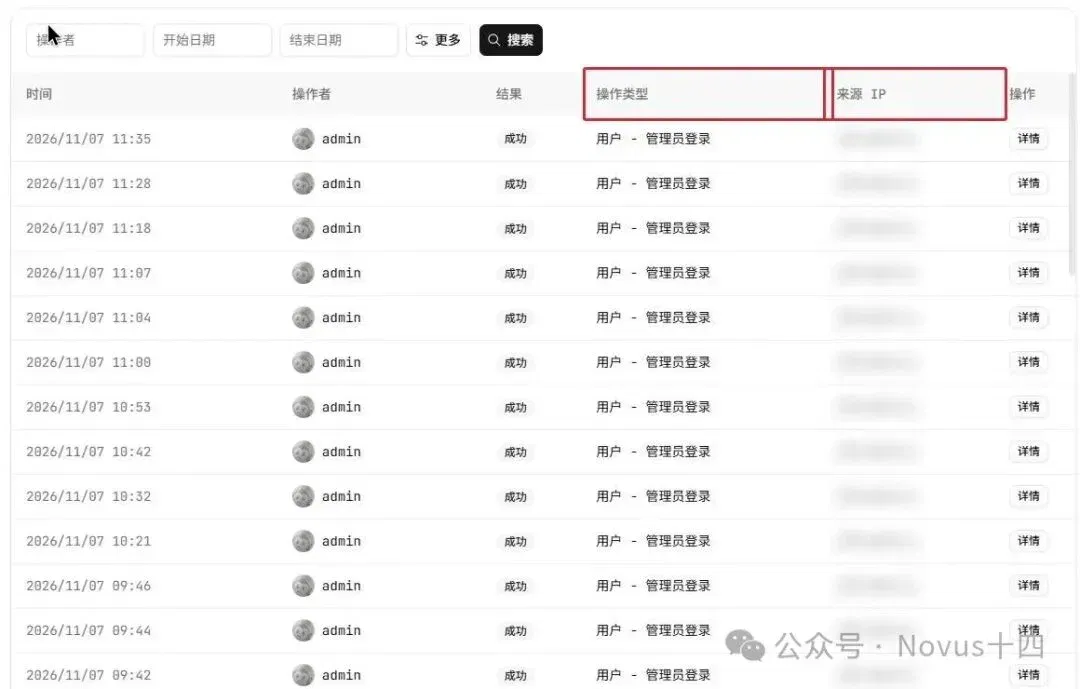
You can review the work process while also checking backend operations. When a problem arises, there are specific records to trace and correct it.
5 What employees use it for
Having looked at the administration backend, let’s look at the employee side.
Employees have a dedicated AI agent client, mainly for office work, programming and design. Its use is separate from the administration backend.

I took a brief for a simulated product, the “Qinghe Fold folding laptop stand,” and asked it to make a product introduction document and a web page separately.
Currently, 1,000 free credits are provided every week.
(1) Product introduction document
First, I uploaded the brief and asked it to deliver a DOCX file for introducing the product to new colleagues.
Generating the document took 12 minutes. During the process, it also repeatedly checked the tables and wording.
All the content in Word had consistent formatting and highlighted key points.
(2) Product introduction web page
Next, I used the same brief to make a product introduction web page. I added some difficulty by requiring “View Specifications” to navigate to its destination and the questions and answers to expand and collapse.
It delivered HTML, CSS and JavaScript files, taking 45 minutes in total.
Opening the local web page showed product illustrations, specifications and color options. Clicking “View Specifications” scrolled to the specifications section, and the frequently asked questions could also expand and collapse.
Finally
I think businesses are only just beginning to improve efficiency with AI.
Many companies are already encouraging employees to use AI more for writing documents, building web pages and handling everyday work.
But in the future, companies need to consider how to centrally manage resources, methods and access permissions across the whole organization.
Good methods that individual employees discover can remain within the company for other colleagues to reuse. Information accumulated by the company can be maintained centrally and distributed to the roles that need it. Someone can also coordinate model usage quotas and costs.
To achieve all this, simply saying “everyone should use AI more” is not enough. A tool capable of carrying out this management work is also needed.
Baizhi Office provides just such an entry point. Employees complete tasks in the client, while management configures resources, assigns permissions and reviews usage in the backend, helping the company lower costs and avoid some unnecessary trouble.
What stage has your company reached?
This article comes from “Novus Shisi,” by Novus Shisi.
Related topics
After reading
Join the AINRK community
Read how to join the community and connect with people working in AI.
Related articles
Continue reading related topics and articles in this category.

Claude Meetings brings collaborative documents into calls, with efficiency and recordkeeping tradeoffs (opens in a new tab)
APPSO describes visible participation, live notes and whiteboard collaboration in Claude Meetings, examining how notifications, external guests, retention and AI summaries affect teamwork, privacy and the room for open-ended discussion.

Doubao Work vs. WorkBuddy: task times and usage with the same models (opens in a new tab)
The author compares profiles, calendars, sales reports and presentations, then tries Flash research followed by Kimi drafting. Results depend on plans, temporary offers and the specific task.

LobsterAI Team hands-on: how shared credits affect a small team's office AI bill (opens in a new tab)
The author examines zero seat fees, credit allocation and local workflow handover, comparing team spending using recorded prices. Actual costs still depend on usage, credit validity and model connections.

Claude 推出表格与白板工具,更新数据分析和应用连接 (opens in a new tab)
Anthropic 公布 Claude Sheets、Whiteboards 及 Data 更新,覆盖表格编辑、团队构思和数据解读。部分能力分批推出,连接器及账号条件各有不同。
TeleAgent V3.0 加入 Windows 云电脑,体验企业微信与 Blender (opens in a new tab)
体验者用 TeleAgent 的 Windows 云电脑配置企业微信,并在处理两次启动问题后完成 Blender 汽车模型渲染。文章比较云端和本机执行方式。