Google's Gemini API CLI Gives Existing Agents Models, Media and Managed Research Tools

gemini-api-cli exposes Gemini models, media generation and managed agents through a stateless Go binary with schemas and offline checks. It uses developer API billing; subscription allowances, promotional credits and paid balances are distinct, with eligibility and version limits.
Editorial check (2026-11-26): gemini-api-cli is currently in beta. Single-file describes its local execution format; actual calls still require a network connection, eligible API credentials, model access and the corresponding billing. Personal subscription allowances, promotional Google Cloud credits and paid API balances are different mechanisms. Official documentation confirms $10/$40/$100 monthly grants valid for 12 months. New Prepay accounts may need a minimum $5 deposit and a positive paid balance before promotional credits can apply. Check the installed version's documentation for Gemini CLI's current positioning and authentication; MCP overhead also depends on implementation. The prompts, installation scripts and rules files below are the original author's examples; check versions and local configuration before adopting them. Google Gemini API CLI official README (opens in a new tab)Gemini CLI's current positioning and non-interactive use (opens in a new tab)AI Studio: Google AI plan credits and limitations (opens in a new tab)AI Studio Billing: Prepay and promotional-credit conditions (opens in a new tab)
Last week I recommended T3 Code in an article. A few days later, discussion remained lively, but I noticed people mostly talked about using Gemini models directly. Because they found Antigravity's coding-agent experience poor, many used T3 Code to orchestrate Google models instead.
To me, that reflects another fact: Gemini models are excellent; Antigravity is disappointing...
There are Carbon, Neon and Hydrogen for coding and long-horizon reasoning; Nano Banana 2.1 for images; 3.8 Flash TTS for voice; Lyria 3.5 for music; Omni 1.2 Flash for video; and Deep Research for million-token context and automated in-depth research. They cover almost every multimodal capability developers might use daily.
T3 Code, however, uses antigravity-acp, addressing the need for a more convenient interface with Gemini as the main agent.
Recently I have been considering another frequent problem: what if I already work primarily with Claude Code, Codex, ZCode or DeepSeek Harness and do not want to switch windows or interrupt the context I have built up? How can I simply let the agent already working on my task call Gemini when needed?
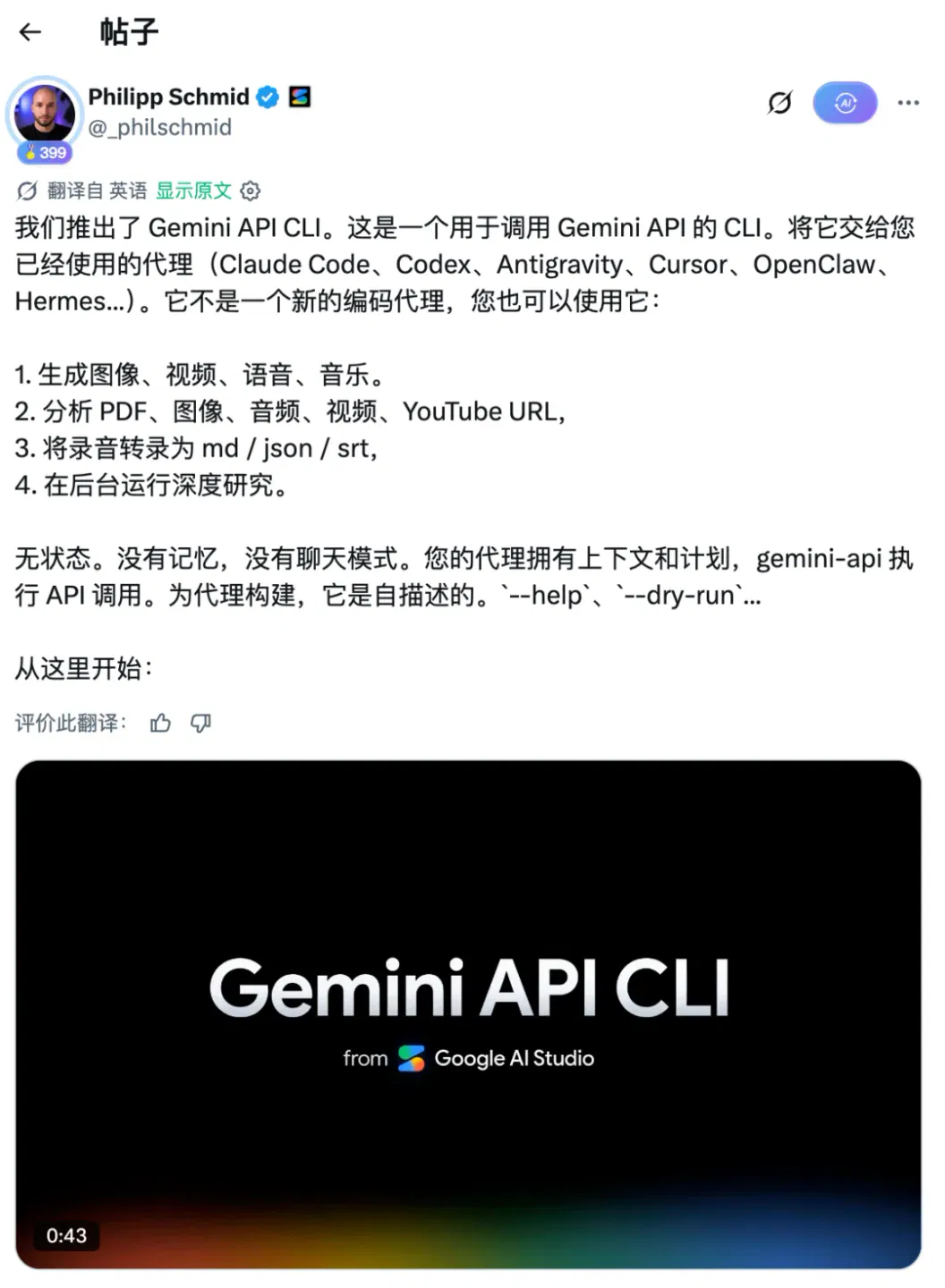
Browsing GitHub, I found that Google apparently had the same idea. Instead of trying to change people's Claude Code and Codex habits, it packaged Gemini API and managed-agent access into a zero-dependency, stateless, single-file command-line tool.
This is Google's open-source project gemini-api-cli.
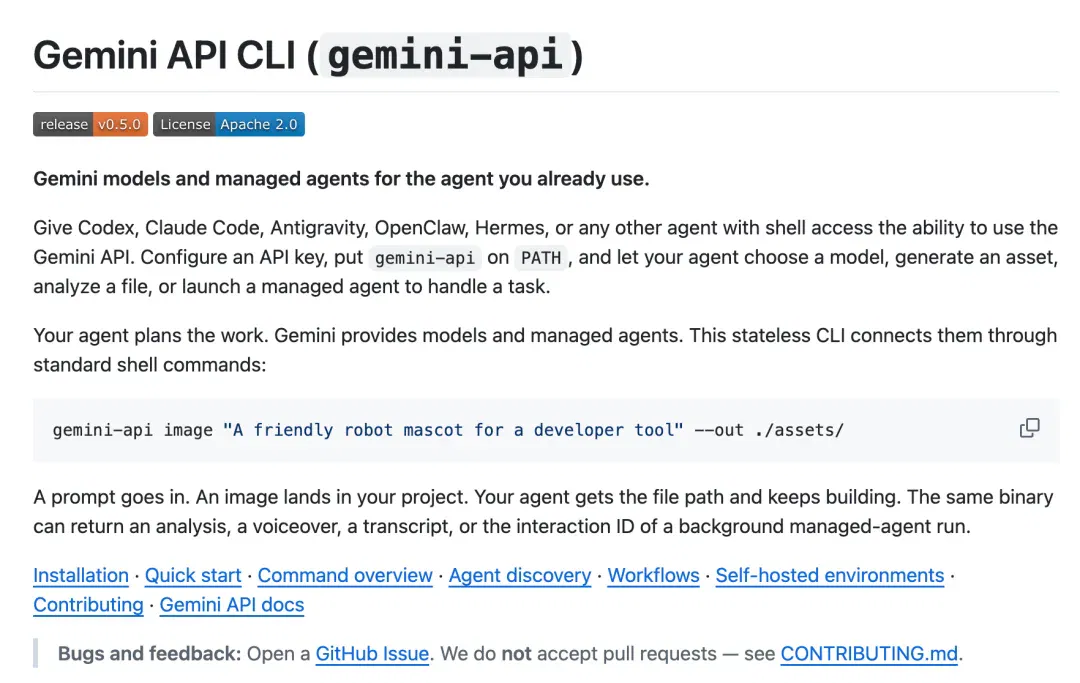
You configure an API key, put gemini-api on your system's PATH, and add a line to your rules file.
Then your existing main agent can generate images, analyze PDFs or launch background research with a command.
Philipp from the Google DeepMind team released the project on October 26.
This article discusses gemini-api-cli, how it differs from the familiar gemini-cli, and how to add it as an auxiliary toolkit to the agents you use daily.
How does it differ from gemini-cli and conventional MCP?
The project name may puzzle readers familiar with Google's open-source projects: didn't Google already release gemini-cli? Why build another?
Their positioning differs completely. Including T3 Code, there are essentially three approaches to calling Gemini locally:
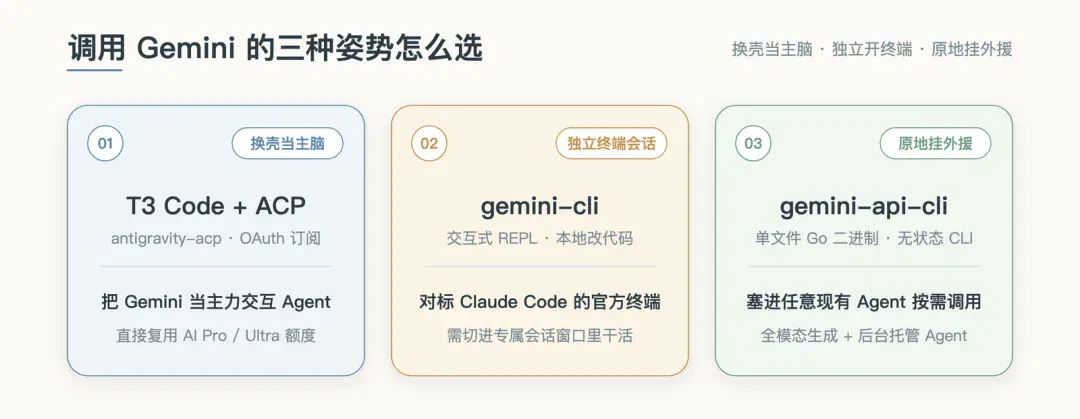
•T3 Code + ACP: suited to someone with a personal AI Pro/Ultra subscription who wants a more comfortable interface than Antigravity and uses Gemini as the main interactive agent;
•gemini-cli (command: gemini) is a Google-maintained interactive terminal agent; it also supports non-interactive execution. According to the current README checked for this review, it targets enterprise Code Assist, while free personal and Google AI Pro/Ultra use has moved to Antigravity CLI;
•gemini-api-cli (command: gemini-api): as the official README's opening line puts it—“Gemini models and managed agents for the agent you already use.”It does not compete for the main entry point. Compiled in Go into a stateless single-file binary, it serves as underlying support for your existing Claude Code, Codex, OpenClaw, Hermes or CI scripts.
Once it is in your local environment, you need not memorize complicated API parameters yourself. Give your coding agent natural-language tasks, for example:
• Generate a full set of multimodal assets while building a frontend:
Prompt
“Build a modern landing page for this new tool. Call local gemini-api to generate a mascot hero image and a two-person welcome voiceover. Save them directly in ./assets, then embed them in the page components using the returned paths.”
• Analyze large PDFs and meeting recordings, or visually compare designs:
Prompt
“Use gemini-api to analyze product-brief.pdf in the current directory, compare the visual changes between before.png and after.png, transcribe interview.mp4 into timestamped SRT subtitles, and consolidate the results into a first-stage development schedule in plan.md.”
• Delegate long-running background research and cross-model reviews:
Prompt
“First launch a deep-research managed agent through gemini-api to investigate mainstream competitors' caching approaches in the background, recording the returned interaction ID. Meanwhile, ask gemini-4-neon to independently review the current cache module for concurrent-deadlock risks. When the research finishes, combine both sets of conclusions.”
Given such a task, the host agent does not have to guess the interface format. It follows gemini-api's built-in machine interface through a clean four-step loop.
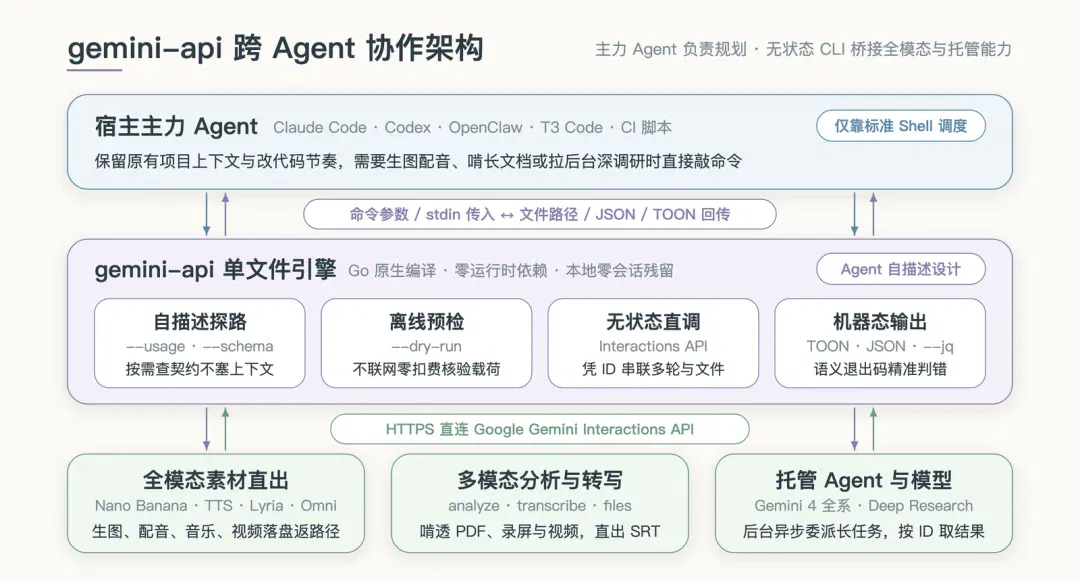
The diagram above captures the collaboration logic, with three key points:
•Discover tool interfaces on demand: some MCP configurations that load every tool definition occupy substantial context. By contrast, gemini-api remains silent until needed, when the main agent invokes --usage or --schema to look up parameters on demand.
•Check offline before making real calls: before sending a request, the agent can add --dry-run to validate locally and preview the complete HTTP request body.
•Feed results directly into the main workflow: generated images, voices, music and videos are saved to disk, with a clean local path on standard output. Document analysis and background Deep Research return compact TOON/JSON results that the main agent can use to continue coding.
How to use it
Next, let's look at installing gemini-api-cli and adding it to your familiar coding agent.
1. Installation, API keys and Pro/Ultra promotional credits
The tool is a native Go binary with no external runtime dependencies, supporting macOS, Linux and Windows.
The easiest option is the one-command installation script:
# One-command installation on macOS/Linux
curl -fsSL https://raw.githubusercontent.com/google-gemini/gemini-api-cli/main/scripts/install.sh | bash
Windows PowerShell users can use this line:
iwr -useb https://raw.githubusercontent.com/google-gemini/gemini-api-cli/main/scripts/install.ps1 | iex
If you already have Go locally, you can also use go install, or download a precompiled archive for your architecture from GitHub Releases and put it on PATH:
go install github.com/google-gemini/gemini-api-cli/cmd/gemini-api@latest
After installation, authentication and quotas deserve attention, since subscription users often run into problems here:
I specifically examined gemini-api's auth login source code. Underneath, it uses the developer API channel exclusively; API keys can be provided through environment variables, the OS keychain or a configuration file, for example GEMINI_API_KEY. These developer API requests authenticate and bill through their API project and do not automatically consume personal-subscription interactive allowances.
But if you subscribe to Google AI Pro or Ultra, don't waste the official monthly API credits!
Google has integrated developer-program Cloud credit redemption into Google AI Studio. Primary Pro and Ultra subscribers can claim monthly API credit, well suited to powering gemini-api-cli:
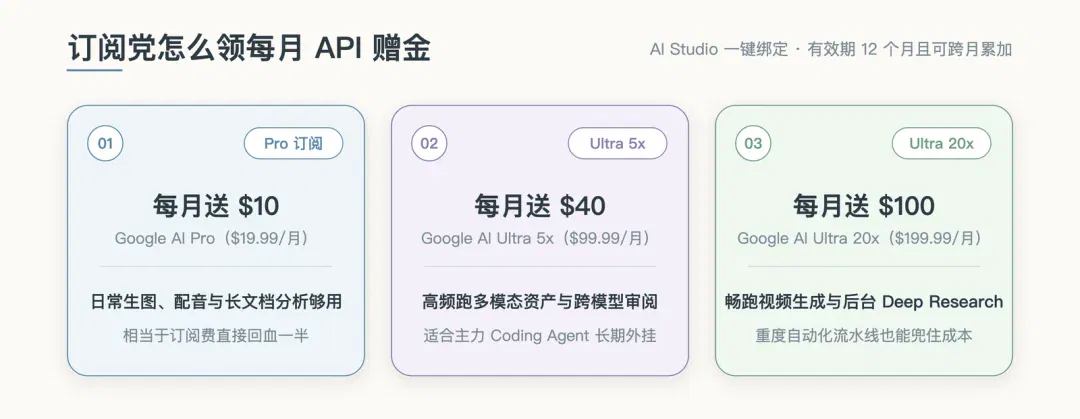
Here are the redemption and offset rules:
•Monthly credits across three tiers: Google AI Pro provides $10 per month, Google AI Ultra 5x provides $40, and the top Google AI Ultra 20x plan ($199.99/month) provides $100. The $4.99 AI Plus plan does not qualify. Only the primary subscriber can claim; family-sharing members cannot.
•Unused credits can accumulate: each grant is valid for 12 months, so unused credit carries forward across months within its validity period.
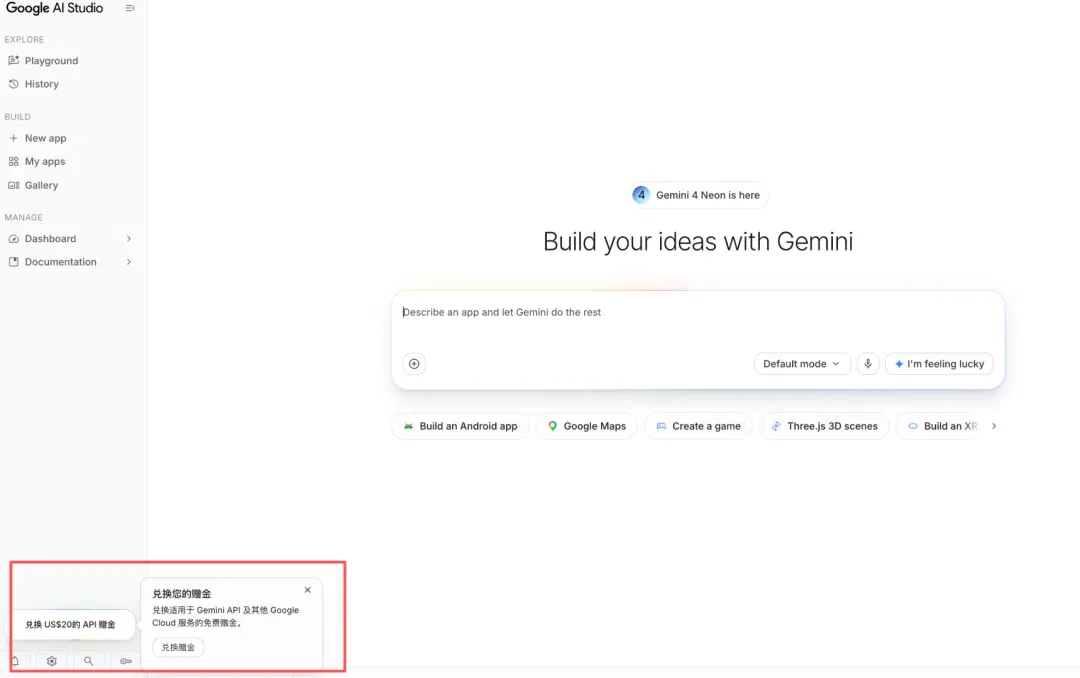
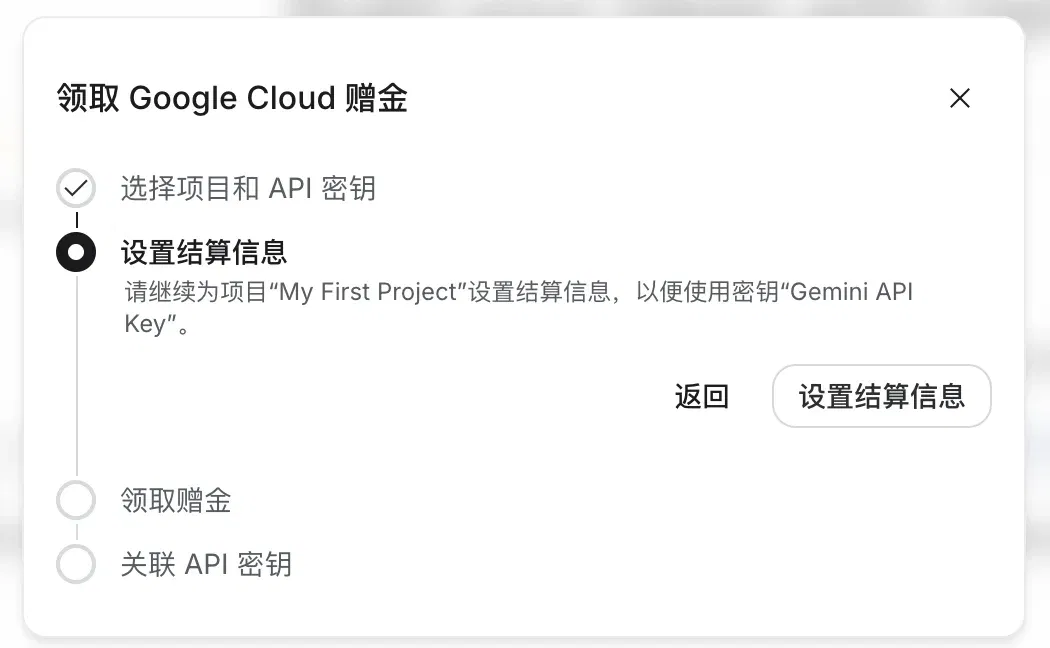
•Claiming and using them: sign into Google AI Studio with the primary subscriber's account, click Claim free API credits in the left menu, follow the billing and API-key setup, and leave automatic application of future monthly credits enabled if desired.
Once you have an API key, for a temporary script test you can simply use export GEMINI_API_KEY="你的Key". For ongoing use on your main development machine, I recommend the native OS keychain—macOS Keychain or Windows Credential Manager.
# Save to the OS keychain; --interactive also opens an interactive form
gemini-api configure --api-key "YOUR_API_KEY"
# Check the active authentication source and global configuration at any time
gemini-api whoami
2. Add it to your main agent
To let Claude Code, Codex or another agent call it proactively, add a short prompt to the project's CLAUDE.md, AGENTS.md or global rules file:
You can call the `gemini-api` command-line tool directly through the shell to use Gemini models, generate or edit multimodal assets, analyze local files or launch managed agents in the background as needed.
1. Check `--help` or `--usage` to choose commands; inspect `--schema` before constructing complex `--body` JSON.
2. Prefer an offline preview with `--dry-run` (or `--dry-run --output-format json`) before real requests.
3. For discrete JSON or field extraction with `--jq`, add `--stream=false --output-format json` to streaming commands.
4. Keep the paths returned by media commands and the interaction ID returned by `agent/generate` for subsequent multi-step workflows.
Or, more simply, send this instruction to your coding agent:
Prompt
Install Google's official gemini-api-cli (https://github.com/google-gemini/gemini-api-cli), confirm gemini-api is available on PATH, run gemini-api version and --dry-run to verify the environment, and document the calling conventions in this project's AGENTS.md.
3. Use it from your coding agent
After adding gemini-api to PATH and AGENTS.md, open your preferred coding agent—Codex, Claude Code or T3 Code—and describe tasks naturally as usual.
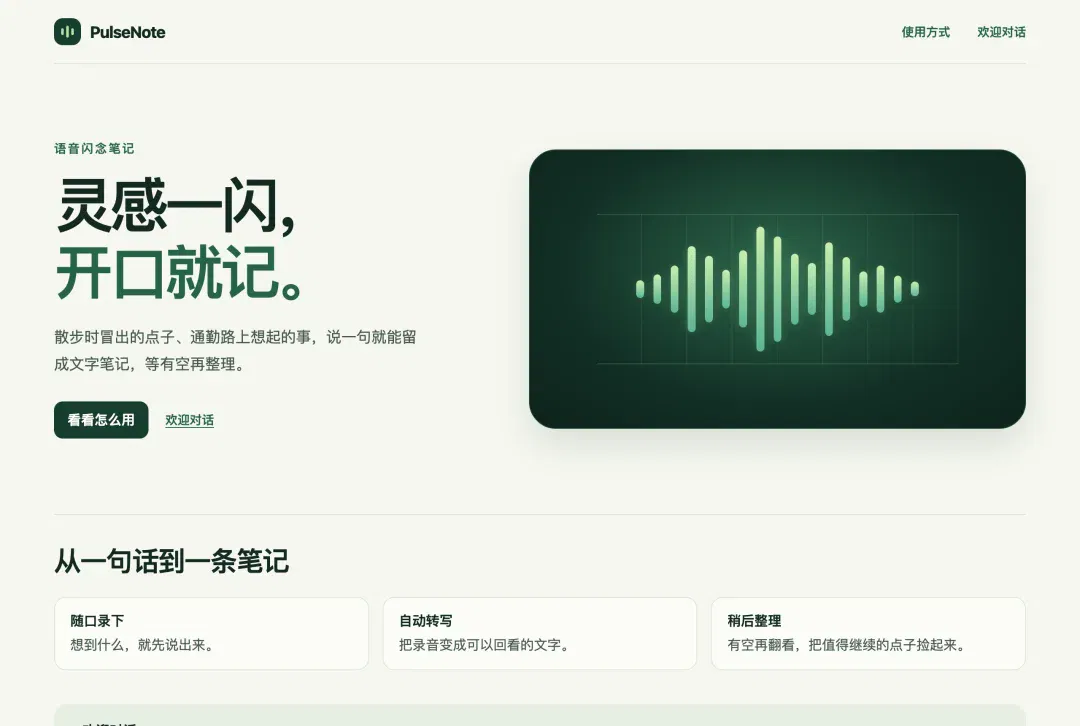
I created an empty local directory containing only those few lines of AGENTS.md and tried it with Codex. I asked it to scaffold a landing page for a new product, PulseNote Voice Flash Notes, use local gemini-api to check the latest models, prepare a 16:9 hero image and a two-person welcome voiceover, and launch background Deep Research on competitors.
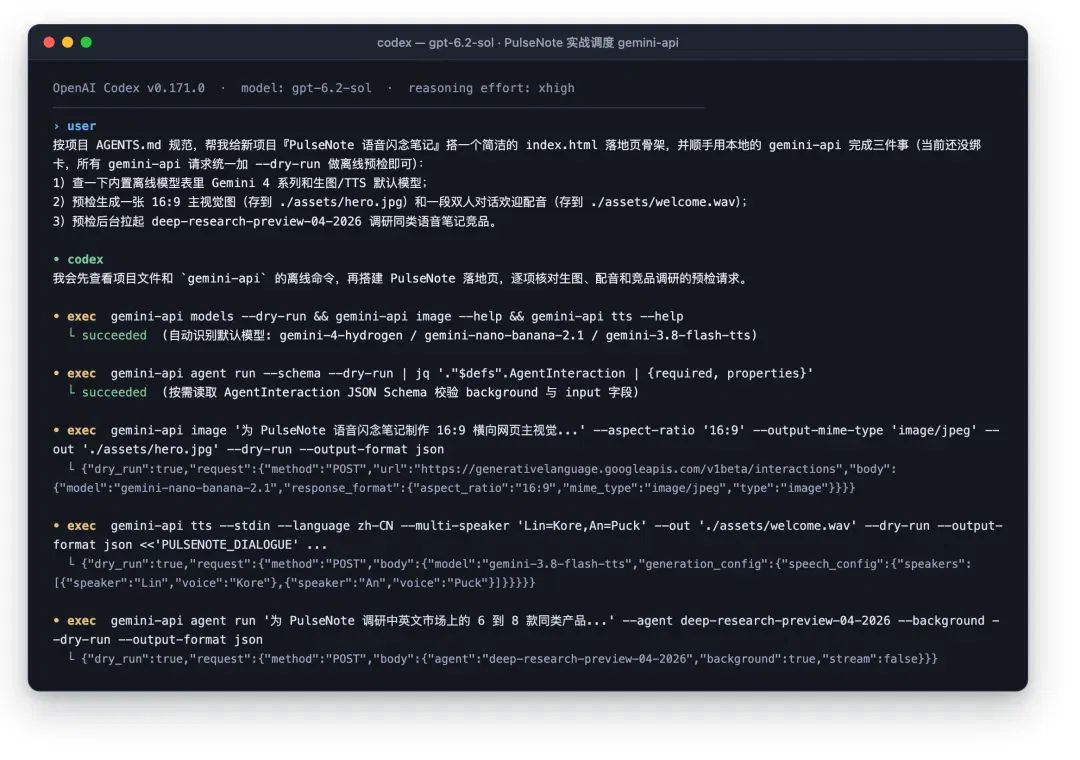
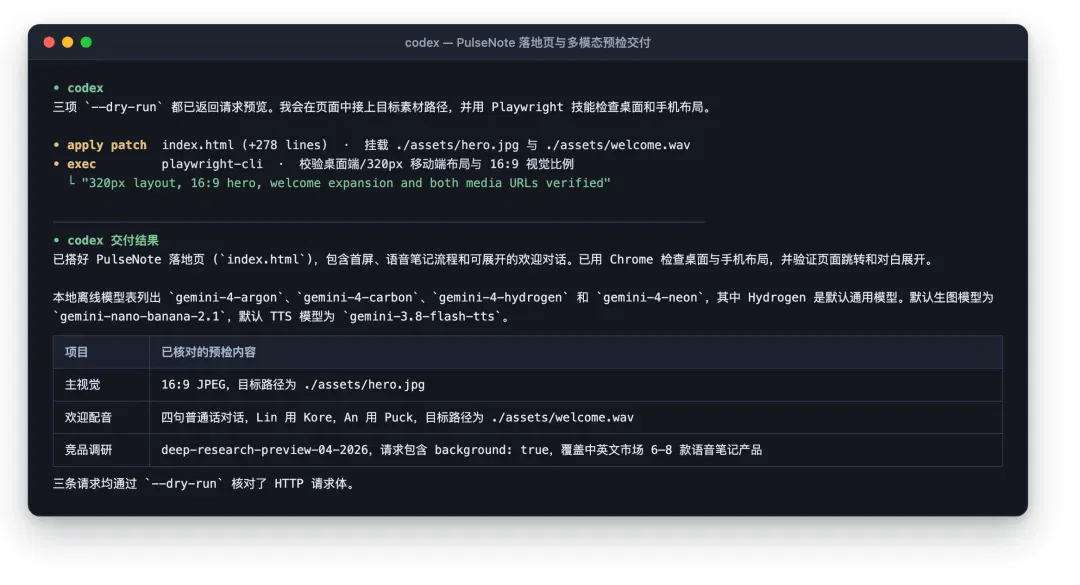
Here is the PulseNote landing-page preview it produced
My experience
If you want to use a personal subscription's monthly allowance and comfortably work with Gemini 4 Neon/Hydrogen as your primary interactive coding assistant, I still regard T3 Code plus antigravity-acp as the best option.
But if you are already comfortable with Claude Code, Codex or your own automated workflow, gemini-api-cli is a useful approach—especially since Google also offers promotional credits.
I increasingly feel that a single-file, zero-runtime-dependency CLI with self-describing --schema/--dry-run and a short AGENTS.md explanation is cleaner in many situations than launching a collection of persistent MCP servers.
Conclusion
Whether you want Claude Code to make frontend images and voiceovers, analyze recordings hundreds of megabytes long or lengthy PDFs with Gemini's multimodal capabilities, or run extended technical research in the background, gemini-api-cli reduces the integration effort to almost nothing.
The open-source project is linked below. Interested readers can try adding it to their own agents.
GitHub: https://github.com/google-gemini/gemini-api-cli
This article comes from cxuanAI, written by cxuanAI.
Related topics
After reading
Join the AINRK community
Read how to join the community and connect with people working in AI.
Related articles
Continue reading related topics and articles in this category.
SemiAnalysis Posts an Apology Form as Gemini 4 Updates Prompt a Reassessment (opens in a new tab)
SemiAnalysis posted an apology form on X after its pessimistic assessment of Gemini. The report traces Argon, Carbon, Hydrogen and Neon through Google's long pretraining cycles, parallel development, compute allocation and post-training on real engineering tasks.
Neon identifiers surface in Gemini web code; model and subscription positioning remain unconfirmed (opens in a new tab)
A source report recounts developers finding Neon model and subscription identifiers in Gemini web code, alongside discussion of element naming. Code strings and online guesses do not establish a release, plan features or access date.
Google 用 AlphaProof Code 验证 Signal 部分代码的安全性质 (opens in a new tab)
Google DeepMind 展示了由 Gemini 4 Carbon 驱动的形式化验证案例。团队报告四周内生成约 650 万行 Lean 证明,所验证的是明确规格下的部分安全性质。
Google 调整美国 K-12 教育账户的 AI 与搜索设置,引发学区争议 (opens in a new tab)
报道聚焦 Google 计划在 2027 年初调整学校账户的 AI 开关,以及部分搜索功能与 AI 设置的关系。文章整理学区、教师与家长对搜索访问和学生使用的不同顾虑。
Gemini 4 Carbon 的能力与开放范围:长程编程、网络安全和评测表现 (opens in a new tab)
这篇报道汇总 Gemini 4 Carbon 的代码生成演示、长程任务与网络安全评测,并对比多项基准成绩。Google 首批仅向部分受信任的网络防御伙伴开放模型;特定测试中的零攻击成功率不代表绝对安全,榜单领先也不能替代具体业务验证。