Claude Code and Milvus tutorial: local search, recommendations and vector retrieval
A Zilliz author builds local search, recommendation and similar-user APIs with FastAPI, Milvus Lite and MovieLens data, first checking the flow with hash vectors before switching to embeddings. The examples validate a local prototype; quality needs separate evaluation.
Editorial correction (November 18, 2026): BM2 has been corrected to BM25, and the description of the number of installments has been aligned with the topics actually listed below. The code remains the original tutorial examples.
Search and recommendations are now basic features in many internet products. Content products need search and suggested content, e-commerce needs similar products, and communities need to find people with similar interests. Even internal knowledge bases often need both keyword and semantic lookup.
But not every team has dedicated search and recommendation engineers. These requirements often end up with backend engineers without comprehensive experience in search, advertising and recommendation systems.
This article is for those teams.
We will use Claude Code, an embedding model, FastAPI and Milvus to build a search-and-recommendation prototype on a laptop, then discuss cluster migration and quality evaluation. Milvus handles vector storage, semantic retrieval, scalar filtering and BM25 retrieval. The series covers local setup, cluster migration and quality evaluation:
Part one: Build the local system. Implement keyword search, semantic search, personalized recommendations and similar-user queries, with an interactive demonstration page.
Part two: Connect to a Milvus cluster. Keep the existing implementation while addressing remote reads and writes, consistency, tenant isolation and monitoring.
Part three: Validate and improve recommendation quality. Establish evaluation, add item-co-occurrence retrieval, then determine whether fusion and fine ranking need to go live.
This installment completes the local system setup first.
01
Preparation before deployment
Before beginning, install Python 3.10 or newer and have Claude Code ready to use locally. Start Claude Code in an empty project directory, where all subsequent code and data will go.
The basic dependencies are FastAPI, Uvicorn and PyMilvus with Milvus Lite:
python -m pip install fastapi uvicorn "pymilvus[milvus-lite]"
FastAPI provides HTTP endpoints, and Uvicorn runs the service. PyMilvus is the Python client for Milvus, while Milvus Lite provides retrieval through a local database path without first deploying a separate database.
Later, adding semantic retrieval will also require sentence-transformers.
The demonstration uses MovieLens-1M, containing approximately one million ratings, 6,040 users, movie titles and genre information. To use products, articles or other business objects instead, update the item text, user behavior and filtering rules.
02
Understanding the architecture
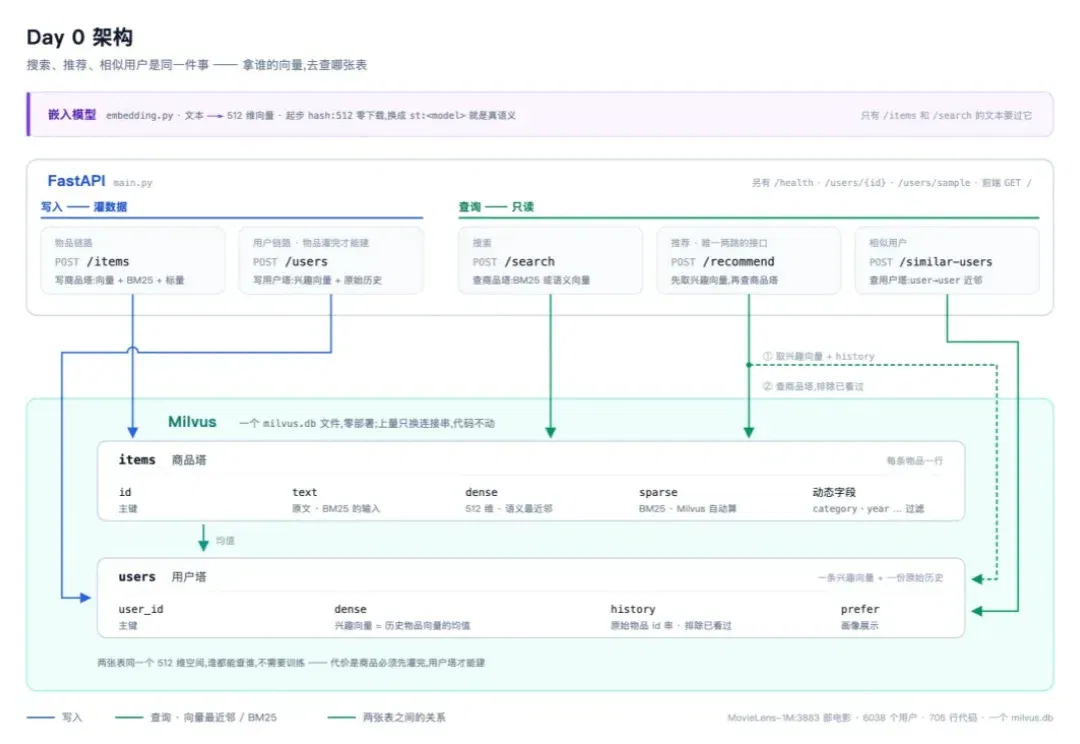
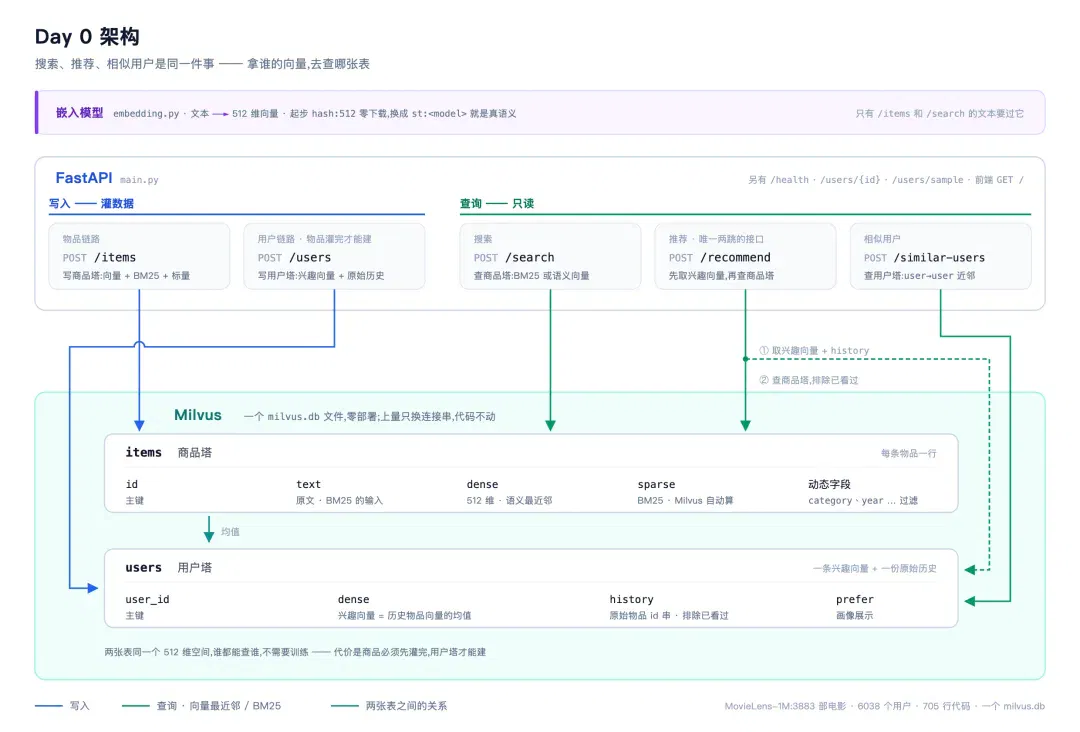
Search, recommendations and similar-user queries can share storage and services, differing only in how they query them.
Conventional search either ranks keyword matches or encodes queries and item text as vectors for semantic retrieval of nearby items. Content recommendations build an interest vector from a user's history and query items. Similar-user queries use that same interest vector to find other users.
For these three requirements, the overall design can use two collections: items stores movies and their vectors, while users stores user-interest vectors. Semantic search encodes query text and searches items; recommendations query items with the user's interest vector; similar-user search uses the same vector to query users.
Keyword search retains BM25 for explicit terms such as movie titles. It requires no embedding model and can be implemented independently first.
The code follows these responsibilities: embedding.py handles encoding, store.py handles Milvus reads and writes, and main.py exposes FastAPI endpoints. We first use hash vectors to verify the interfaces and data flow, then replace them with a real model.
Now for the practical work.
03
Implementation
Step 1: BM25 search
Begin with keyword search only, without loading a model. This lets us check writes, queries and filters before mixing data issues with model issues. Milvus's Function generates the sparse BM25 representation here; the application only submits text and does not calculate it itself.
The items collection stores id, text and sparse. The text field enables an analyzer to determine tokenization. Milvus's BM25 Function generates sparse from the text; the writer need not compute it.
For now, save category and year as dynamic fields with each record and use them to test filtering. This confirms that search and business conditions work together.
Give Claude Code this prompt:
Build a keyword-search service with FastAPI + Milvus Lite, using pymilvus's MilvusClient.
store.py: Create an items collection with id, text and sparse fields. Enable an analyzer on text, using the TEXT_ANALYZER environment variable
to select Chinese or English. Enable dynamic fields so fields such as category and year are stored as supplied and can be filtered.
Do not calculate sparse yourself; generate it from text using Milvus's native BM25 Function.
Use MILVUS_URI for the connection string, defaulting to a local file.
main.py: Provide three endpoints: batch writes, search and health checks. Also write requirements.txt.
First write two samples whose results are easy to assess manually. Keep the service running in terminal A, and run writes and queries in terminal B:
pip install -r requirements.txt
TEXT_ANALYZER=english uvicorn main:app # 终端 A,服务在 127.0.0.1:8000
# 终端 B
J='Content-Type: application/json' # 后面几步的验证命令都会用到它
curl -s localhost:8000/items -H "$J" -d '[
{"id":"1","text":"Interstellar space travel through a wormhole","category":"Sci-Fi","year":2014},
{"id":"2","text":"Toy Story toys come alive","category":"Animation","year":1995}]'
# {"upserted":2}
curl -s localhost:8000/search -H "$J" -d '{"q":"space","top_k":2}'
# 只回 id=1,score 0.66 —— 这是 BM25 分,不是相似度
curl -s localhost:8000/search -H "$J" -d '{"q":"toys","top_k":2,"filter":"year > 2000"}'
# [] —— Toy Story 是 1995,被 year 过滤掉了
These requests check writes, search and filtering respectively.
space should match the first movie. toys would match the second, but the year condition should exclude it. Although year was not declared in the schema, it can still filter results, showing that dynamic fields have been stored and used in queries.
The example BM25 scores illustrate the return format and should not be interpreted as relevance probabilities. We are validating query behavior, not checking decimal values.
If this step does not produce the expected results, check the data, tokenization and filter conditions first. Add vectors only after confirming those.
Step 2: Add item and user-interest vectors
Next, add a dense field to items and create a users collection.
Initially, calculate user interest as the mean of historical item vectors and store it in advance. Recommendations load that vector to query items; similar-user search uses it to query other users. The so-called user tower here is simply this precomputed interest representation. Training a separate user model would cost substantially more.
For encoding, use hashing for now: map words to a fixed dimension and normalize. No model download is required, and this is sufficient to check that encoding, writing, retrieval and history exclusion are connected. Assess real semantic quality after replacing it with a model.
Use 512 dimensions initially, distinct from the common 384-dimensional small models used later, such as bge-small and MiniLM, so the model switch is detectable. Add profile and sampling endpoints at this stage to inspect user state and choose demonstration subjects.
Prompt:
Add vector capabilities.
embedding.py: Provide encode(texts) and dim(). Initially implement only a hash backend, hashing words into a fixed dimension and normalizing.
Do not download any models. Leave a place to substitute a real model. Avoid 384 dimensions: matching common small models would make the later model change undetectable.
Add a dense field to items and a mode parameter to /search to select sparse or dense retrieval.
Create a users collection: interest vector = mean of historical item vectors, computed and stored in advance.
Add endpoints for recommendations, using the stored vector for user_id or computing one on demand for item_ids; similar users; profiles; and sampling.
The user tower depends on item vectors, so load all items before building it.
The collection from step one lacks a dense field. Rebuild the local test database below, then write four samples.
First stop the old service in terminal A, then delete and restart. At this point, the database contains only demonstration data that can be written again.
Write items before users because constructing interest vectors requires historical item vectors:
rm -rf milvus.db
TEXT_ANALYZER=english uvicorn main:app # 终端 A
# 终端 B
J='Content-Type: application/json'
curl -s localhost:8000/items -H "$J" -d '[
{"id":"1","text":"Interstellar space travel through a wormhole"},
{"id":"2","text":"Toy Story toys come alive"},
{"id":"3","text":"Star Wars rebels fight the empire in space"},
{"id":"4","text":"Finding Nemo animated fish adventure"}]'
curl -s localhost:8000/users -H "$J" -d '[
{"user_id":"u1","history":["1","3"],"prefer":"Sci-Fi"},
{"user_id":"u2","history":["2","4"],"prefer":"Animation"}]'
# {"upserted":2,"skipped":[]} —— 用户塔建起来了;skipped 是 history 里一个物品都不认识的用户
curl -s localhost:8000/search -H "$J" -d '{"q":"space","mode":"vector","top_k":2}'
# 走 dense 了:id=1、id=3
curl -s localhost:8000/recommend -H "$J" -d '{"user_id":"u1","top_k":2}'
# 剩下 id=2 和 id=4 —— u1 看过的 1 和 3 被排掉了,这是这一步唯一要确认的事
#(两条分数都是 0.0,谁在前面不固定,别对着顺序较真)
curl -s localhost:8000/recommend -H "$J" -d '{"item_ids":["3"],"top_k":2}'
# 不用建用户也能推:现算这批物品的均值
curl -s -X POST "localhost:8000/similar-users?user_id=u1&top_k=1"
# [{"user_id":"u2",...}]
These four samples check behavior, not recommendation effectiveness. Since u1's history contains 1 and 3, neither should appear again. The only remaining candidates are two animated films, so the results cannot establish that interest estimation works.
Specific hash-vector scores depend on the implementation, so do not compare decimal values against the examples. Before introducing a real model, prioritize clear problems such as failed writes, no valid history and ineffective exclusion.
Step 3: Import MovieLens, then switch to a real model
Once the endpoints work, replace the data with MovieLens-1M so each user has an actual rating history.
Separate preparation from import. data/load_movielens.py downloads MovieLens-1M and converts it into item and user CSV files. seed.py reads both files, imports items first and then generates user-interest vectors.
Movie text combines title and genres. The first user-data version retains the fifty most recent movies rated at least four, quickly generating profiles. Keep the original ratings file for later evaluation.
Prompt:
data/load_movielens.py: Download MovieLens-1M and convert it into two csv files.
products.csv: One movie per row, containing id, title plus genre terms, primary genre and year.
users.csv: One user per row, containing id, a list of watched movie ids and the most-watched genre.
seed.py: Read the csv files and load in batches, then run search, recommendations and similar-user queries once as a smoke test.
After stopping the old service, clear the sample database, convert the data, restart the service and import:
rm -rf milvus.db # milvus-lite 3.x 下它是个目录,-r 不能省
python data/load_movielens.py # 3883 部电影 / 6038 个用户
TEXT_ANALYZER=english uvicorn main:app # 终端 A
python seed.py # 终端 B:灌数据 + 冒烟测试
curl -s localhost:8000/health
# {"analyzer":"english","embed":"hash:512","items":3883,"users":6038} —— 两张表都灌满了
curl -s localhost:8000/search -H "$J" -d '{"q":"star wars","top_k":2}' \
| jq -r '.[]|"\(.score|.*100|round/100) \(.text)"'
# 7.83 Star Wars: Episode IV - A New Hope (1977) ...
# 7.83 Star Wars: Episode I - The Phantom Menace (1999) ...
After import, check movie count, user count and current backend first. Here, 6,038 is the number of users whose profiles were successfully generated by this processing version, not the total users in the original data.
The final smoke test in seed.py calls all three features to confirm that the real data has entered the service:
[搜索] BM25 'Star Wars'
7.83 Star Wars: Episode IV - A New Hope (1977) Action Adventure Fantasy Sci-Fi
7.83 Star Wars: Episode I - The Phantom Menace (1999) Action Adventure Fantasy Sci-Fi
[推荐] u1 —— 排除历史
0.657 Babe (1995) Children's Comedy Drama
0.629 Wide Awake (1998) Children's Comedy Drama
[相似用户] u1
u4767 (Drama, 0.908) · u413 (Drama, 0.897) · u5887 (Drama, 0.896)
Recommendations and similar-user queries still use hash vectors, so results mainly reflect lexical and genre-term relationships. Next, replace the embedding.py backend while continuing to use the other endpoints and import scripts.
sentence-transformers loads the real model, with environment variables selecting the backend and model. First startup downloads the model, which then runs locally. EMBED_MODEL specifies the model name. The following example uses a 384-dimensional model; actual dimensions depend on the selected model.
Prompt:
Add an st backend to embedding.py: a local sentence-transformers model, switched and specified through environment variables.
Automatically recreate collections when dimensions do not match the current ones.
Below, continue using the local-demo rebuilding method. Stop the old service, start the new backend and rerun seed.py. Rebuilding clears old vectors, so items and user profiles must both be regenerated.
pip install sentence-transformers
EMBED_BACKEND=st TEXT_ANALYZER=english uvicorn main:app # 终端 A
# 启动时会打印:dense 维度 512 -> 384,重建集合 —— 不用手动删库
python seed.py # 终端 B:用模型重新编码一遍
# 用一句不含任何片名的话搜
curl -s localhost:8000/search -H "$J"\
-d '{"q":"mind-bending movie about space and time","mode":"vector","top_k":5}' \
| jq -r '.[]|"\(.score|.*1000|round/1000) \(.text)"'
Example results:
0.727 Destination Moon (1950) Sci-Fi
0.723 Timecop (1994) Action Sci-Fi
0.713 Black Hole, The (1979) Sci-Fi
0.709 Time Masters (1982) Animation Sci-Fi
0.7072001: A Space Odyssey (1968) Drama Mystery Sci-Fi Thriller
The query names no movie, so the model seeks related films from the description. Submit the same query to BM25 to observe the difference between the retrieval methods.
Here the item text contains only titles and genres. The model has limited information and cannot be expected to reliably understand each film's entire plot.
Check recommendations for the same user again to confirm the profile has also been recalculated with the model:
curl -s localhost:8000/recommend -H "$J" -d '{"user_id":"u1","top_k":2}' \
| jq -r '.[]|"\(.score|.*1000|round/1000) \(.text)"'
# 0.87 Parent Trap, The (1998) Children's Drama
# 0.868 Jungle Book, The (1967) Animation Children's Comedy Musical
Passing this step means the real model has encoded the data, items and users share the same vector representation, and all three features still work. A few plausible-looking results do not establish overall recommendation quality. A later installment will build evaluation separately.
Dimension checks also cannot detect every model change. For example, bge-small-en-v1.5 and MiniLM-L6-v2 are both 384-dimensional. If old vectors remain after switching models, the dimension check reports no error.
You therefore need to record which model generated a vector batch, for example by saving st:<model-name>:<dimension> beside the database and comparing it with current configuration at startup. A local file is sufficient here. How to store and verify this across multiple instances is left for cluster migration.
Step 4: Check the complete flow through a page
Finally, add a simple page combining search, recommendations, similar users and item writes.
The page makes inputs and results easy to compare: user history is visible alongside recommendations, the current mode is clear during search, and failed writes are directly apparent. No frontend framework is needed yet.
Prompt:
Add a web page to demonstrate search, recommendations and similar-user queries.
Ideally, it should also let us add a movie live and immediately find it. No framework; keep it simple, just enough for demonstration screenshots.
Open http://127.0.0.1:8000/, add a movie, retrieve it and use it as a recommendation seed. You can also continue through the command line:
curl -s -o /dev/null -w '%{http_code}%{content_type}\n' localhost:8000/
# 200 text/html; charset=utf-8 —— 前端被后端托管着
# 写一部数据集里没有的电影,立刻搜得到
curl -s localhost:8000/items -H "$J"\
-d '[{"id":"m9999","text":"Interstellar (2014) Sci-Fi Drama"}]'
curl -s localhost:8000/search -H "$J" -d '{"q":"Interstellar","top_k":1}' \
| jq -r '.[]|"\(.score|.*100|round/100) \(.text)"'
# 8.44 Interstellar (2014) Sci-Fi Drama —— 第一
# 刚写的这部电影也立刻进了推荐池:拿它自己当种子,现算向量去召回同类
curl -s localhost:8000/recommend -H "$J" -d '{"item_ids":["m9999"],"top_k":3}' \
| jq -r '.[]|"\(.score|.*1000|round/1000) \(.text)"'
# 0.814 Close Encounters of the Third Kind (1977) Drama Sci-Fi
# 0.805 Delta of Venus (1994) Drama
# 0.793 Conceiving Ada (1997) Drama Sci-Fi
This operation connects writing, encoding and querying. New content enters search and content recommendations without retraining the model.
Finally, restart the service and check that this record remains. Once persistence is confirmed, the local demo forms a complete loop: movies can be written and retrieved, user histories generate interest vectors, the same interest representation supports recommendations and similar-user queries, and the page displays the entire process.
To use your own business data, initially keep the current endpoints and replace item text and user histories. Check whether the inputs are sufficient, filters fit the business and results merit further validation. The next installment migrates this implementation to an independent service and examines changes from remote calls, consistency and multitenancy.
About the author

Wang Xiang | Teamily ML Infra Engineer
This article was originally published by Zilliz. Author: Wang Xiang.
Related topics
After reading
Join the AINRK community
Read how to join the community and connect with people working in AI.
Related articles
Continue reading related topics and articles in this category.
Milvus 3.0 与 Elasticsearch 9.5 混合检索对比 (opens in a new tab)
Zilliz 作者在同机和相近资源配额下,用约 9.8 万条商品记录比较向量检索、BM25、融合、分组及聚合。结果适用于所用语料、索引和许可证配置,文章附复现实验。
Milvus 引入 SVS Vamana,英特尔团队比较高召回检索与内存开销 (opens in a new tab)
英特尔团队在四组数据上对比 LeanVec 与两种 HNSW 存储方式。多数配置中查询和内存表现更优,文中也列出 FP16 更快的例外及构建限制。
NeurIPS 2026 Spotlight|拒绝模型「自作主张」,VisInteract用交互搜索找回意图 (opens in a new tab)
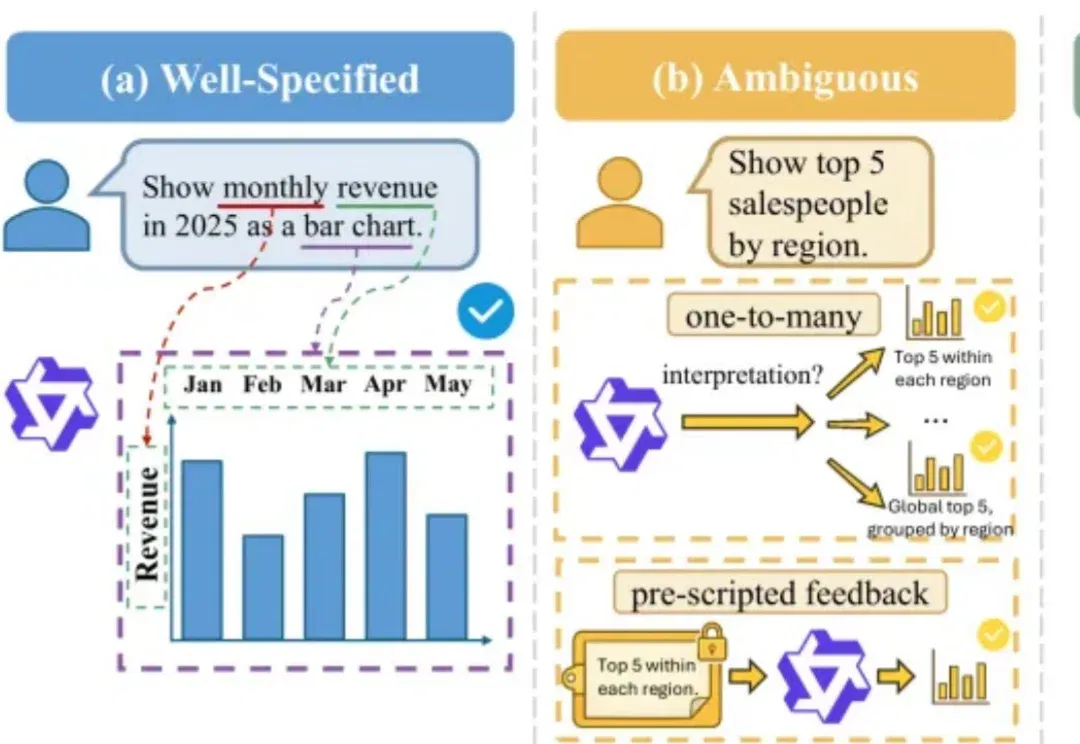
数据要让人看懂,通常得先从数据库里查出来,再画成图。文本到可视化(Text-to-Vis)做的就是这件事:用户说出想看什么,系统去库里查询,再用图表把需要的数据展示出来。
AI搜索的下一站:可信度三层过滤机制,从点击监督到答案级反馈 (opens in a new tab)
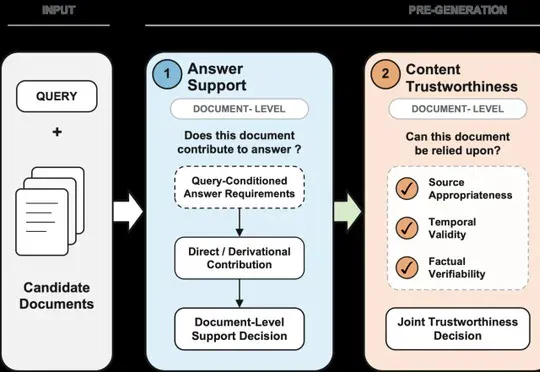
百度联合中国科学院计算技术研究所与武汉大学的研究者围绕这一现状,提出答案支撑、内容可信与上下文组织三阶段框架,并结合百度搜索工业实践,梳理了从检索排序、可信度判断、结构化上下文组织到生成后反馈的优化链路。

长期知识库怎么维护?WeKnora 维护机制拆解与Milvus 接入实测 (opens in a new tab)
给一个需要长期维护的知识库做数据库选型,通常会碰到两类问题:内容持续更新以后,框架能不能方便修改和回退;数据量和负载上来以后,底层向量数据库能不能根据需求切换。