SoloPi on real Android devices: faster execution and separate Laya decision tests
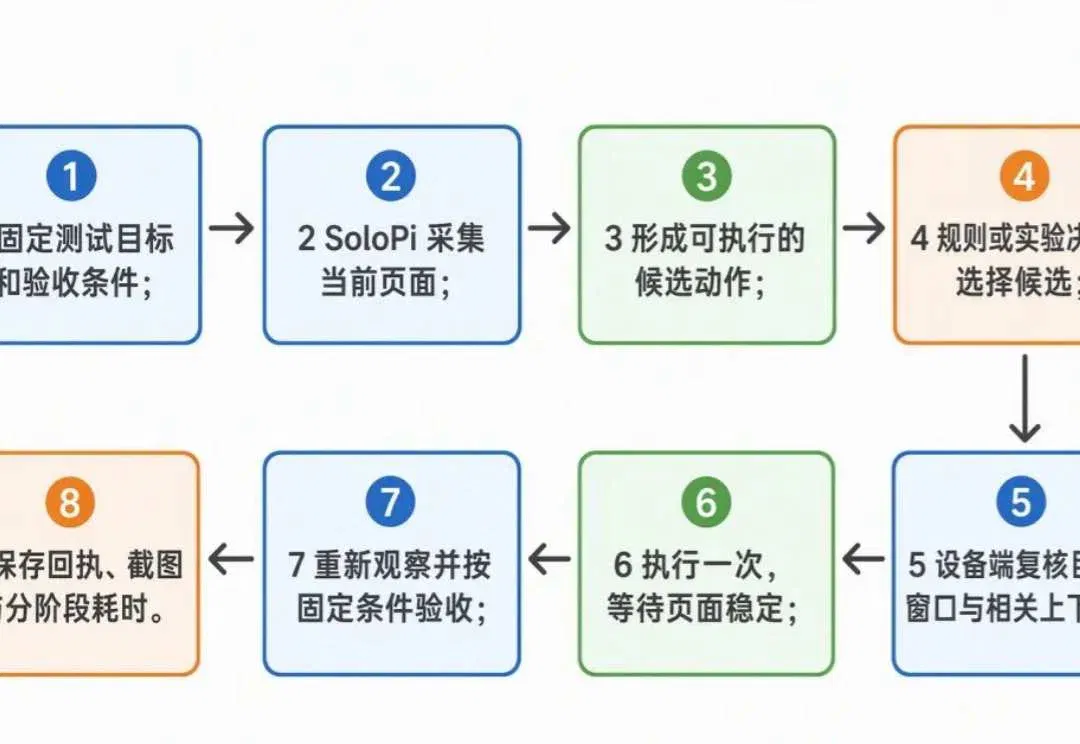
SoloPi's author compares two Alipay browsing flows and separately evaluates local text and vision models; measured speedups come from the executor, while model gains remain unproven.
Editorial correction (November 13, 2026): Corrected formatting that had joined options to their arguments in the example commands. This article describes the original author's experiments; no installation or device-operation commands were executed during this collection batch.
SoloPi is an open-source automation and AI harness project for mobile development. It retains SoloPi's recording, playback, assertion and performance-diagnosis capabilities on real Android devices, and adds agent integration, safe execution on dynamic pages, independent result assessment, unattended managed operation and evidence from the same run. This allows a device operation to yield a conclusion suitable for development and CI workflows. This article was shared on the TesterHome community website by someone involved in the project. What follows represents the author's views:
SoloPi open-source repository: https://github.com/alipay/SoloPi
Open Alipay, enter Ant Forest, open the menu and then enter reminder settings. This seemingly simple flow, when used in automated testing, requires handling page animations, pop-ups, node location and navigation waits, as well as proving that it really ended on the expected page.
Drawing on the Jev ecosystem's ideas for fast decision-making and execution, we reworked SoloPi's real-device execution pipeline and evaluated local Laya and the community Laya Vision on the same set of real pages.
The actual measured results were: the complete session time for opening the menu and returning fell from 13.214 seconds to 10.004 seconds, a 24.3% reduction; opening reminder settings and returning fell from 17.130 seconds to 15.013 seconds, a 12.4% reduction. Both times include independent re-verification, screenshots and session release.
This article explains what changed, how to use it and which gains have been verified. The execution-pipeline speedup has been established; gains from the Laya model still need more evidence. The two are evaluated separately.
I. Background and pain points
1. How fast an agent is depends on the entire execution pipeline
One reason Jev and Laya have attracted attention is that they turn many small decisions into selections from a finite set of options. For example, given the goal "open reminder settings," a model selects one of "Guide, Share, Help, Settings." Laya supports this kind of structured selection and can run locally. Laya project documentation
But selecting "Settings" is still some distance from completing a test: is the phone still on the page observed earlier? Is the button obscured? Was the click issued? Has the page finished loading? Is the page that opened actually reminder settings?
SoloPi is an automation tool for real Android devices, with existing capabilities for page capture, execution, playback and result verification. Our goal is to make these capabilities better suited to agents: local choices can be flexible, execution must be constrained, and acceptance criteria must be fixed.
This article draws on design ideas from the Jev ecosystem. The text model actually run locally was the open-weight Laya, and the vision experiment used the community Laya Vision; official Jev weights were not deployed on either a phone or a computer.
2. Real-device Alipay tests revealed three specific problems
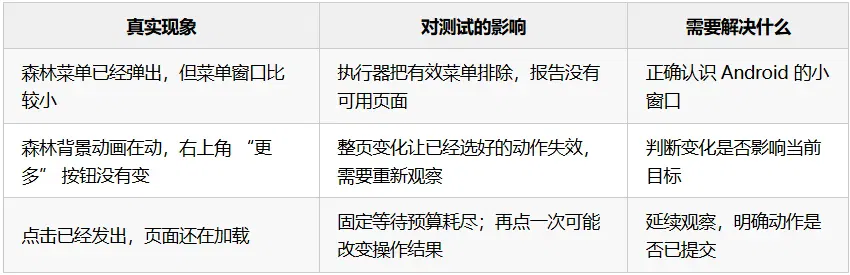
These problems consume seconds. Even if a local model takes only a dozen or so milliseconds, it cannot directly eliminate the costs of capturing the tree, communication, page loading and acceptance checks.
jev-ultrafast's published comparison also illustrates this: with the model held fixed, runtime optimization reduced median task time from 9.450 seconds to 7.092 seconds. It used alternating paired experiments and explicitly excluded initial navigation and additional independent re-verification from task timing. We drew on this experimental method and separately measured complete session time, including verification and cleanup. Upstream performance report
II. Technical approach
1. Selection, execution and acceptance each have clear responsibilities
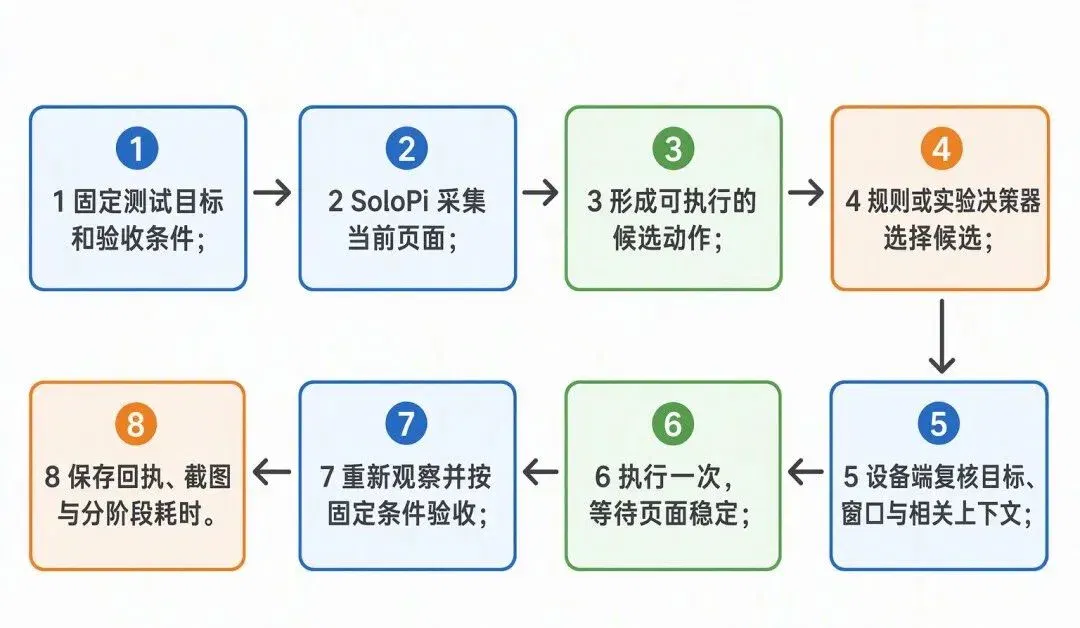
For example, for "open reminder settings," the decision layer can select only from observed candidates. SoloPi binds a candidate to the current node and checks it again before execution. The post-execution checkpoint is "Settings title + energy-related reminders + receive reminders when energy is ready to collect." A test cannot be marked as passed just because the model says it is done.
This round of real-device performance experiments used the same deterministic rules and made no model calls; text and image models were evaluated separately using frozen inputs. This makes the respective contributions of executor optimization and model capability clear.
2. Applying the browser's local-validation approach to native Android controls
The most important change is: for applicable fixed native buttons, determine whether the target and its relevant context have changed.
Take "More" in the upper-right corner of Ant Forest. Animation of the energy bubbles does not necessarily affect this button. The executor checks the target's identity, position, subtree, ancestors, adjacent and overlapping nodes, and window; it refreshes the target again before execution, then issues a single native click once the conditions are met. It still refuses execution if the target has been replaced or moved, or if relevant context has changed.
Structures such as lists, scroll containers and WebViews continue to use full-page validation. Actions lacking validation evidence or already rejected cannot bypass this through a fallback either.
Two other changes address what cannot be "seen" and what cannot be "waited for":
- Recognize actual small windows: The root node of the Ant Forest menu is only 508 pixels high. The package name, bounds, window type and active/focused state are now considered together to confirm that it is an application window, bringing the menu into the normal observation and execution flow.
- Wait for the result of an action already issued: If the page has not stabilized within 3 seconds, allow up to another 5 seconds of observation without reissuing the action. If instability persists, fail and retain the execution receipt.
Nodes are also bound to the exact tree path at observation time, reducing ambiguous relocation caused by repeated text. The execution receipt records UI_CHANGED or NO_VISIBLE_CHANGE, helping subsequent decisions understand the action's effect; business success is still determined by fixed checkpoints. This feedback interface has been implemented, but its benefit to the model was not separately quantified in this round.
The innovation in this work is mainly the engineering integration: native Android window and target validation, constraints on candidate actions, fixed acceptance checks and a complete evidence chain are connected into one flow. Local validation draws on the execution implementation in jev-ultrafast; this work adapts it for regression testing on real Android devices.
III. Implementation and use
1. What each of the five scenarios verifies
These five scenarios are not one continuous test case. They separately answer three questions: "Can we reach the page?" "Can real-device execution be faster?" and "Are the model's selections reliable?":
- Enter Ant Forest (real-device diagnosis): Find the entry on the home page and wait for the Ant Forest page to actually appear. This step checks whether the target page can be reached and is excluded from the formal speedup comparison.
- Open the menu and return (formal real-device comparison): Test whether the executor can safely complete two steps when a small pop-up and page animations are present, and pass acceptance checks after returning.
- View reminder settings and return (formal real-device comparison): Enter settings, check the reminder content and return to Ant Forest in sequence, comparing the time for the entire flow under the same acceptance criteria.
- Laya selects a service entry (offline evaluation on a computer): Give the text model several real entries, compare its selection accuracy with rules, and check whether it abstains when no suitable entry exists; it does not click the phone.
- An image model understands the page (offline evaluation on a computer): Use real screenshots to test whether the model understands pop-ups, energy bubbles and countdowns; it does not click the phone.
The speedups measured in scenarios two and three come from the real-device execution pipeline. Scenarios four and five evaluate model capability only; the gains from the former cannot be attributed to Laya.
Scenario one: enter Ant Forest from the Alipay home page.
The home page has real entries such as utility payments, mobile services and Ant Forest. The executor uses resource IDs, text and clickable ancestors to locate the Ant Forest entry, then waits for the destination page to stabilize.

Figure 1: the service area on the Alipay home page contains entries such as utility payments and Ant Forest. The test must find the Ant Forest entry on the real page.

Figure 2: after entering Ant Forest, the page title, "More" in the upper-right corner and energy bubbles are visible. These help confirm that navigation reached the target page.
This step verified the handling of slow navigation: the stabilization observation in one diagnostic run took 3.352 seconds, exceeding the original 3-second budget; extending observation produced a successful receipt. This is an example of a fix, not a success-rate statistic, and it is excluded from the subsequent timing of Ant Forest round trips.
Scenario two: open the menu, then return to Ant Forest.
This flow has two steps: click "More" and check the four items "Guide, Share, Help, Settings"; after returning, confirm that the Ant Forest title is present and the menu has disappeared.

Figure 3: clicking "More" opens a menu with "Guide, Share, Help, Settings." The executor must recognize this small window overlaid on Ant Forest before it can continue to select "Settings."
This flow covers small-window recognition, fixed-button validation and checkpoints after returning. There were 10 runs in the formal comparison, all completing independent re-verification, screenshots and session release.
Scenario three: enter reminder settings, check the content, then return for acceptance checks.
The flow is "More → Settings → Return to Ant Forest." Check the settings title and the text of two reminders. The entire process is view-only; no switches are changed.
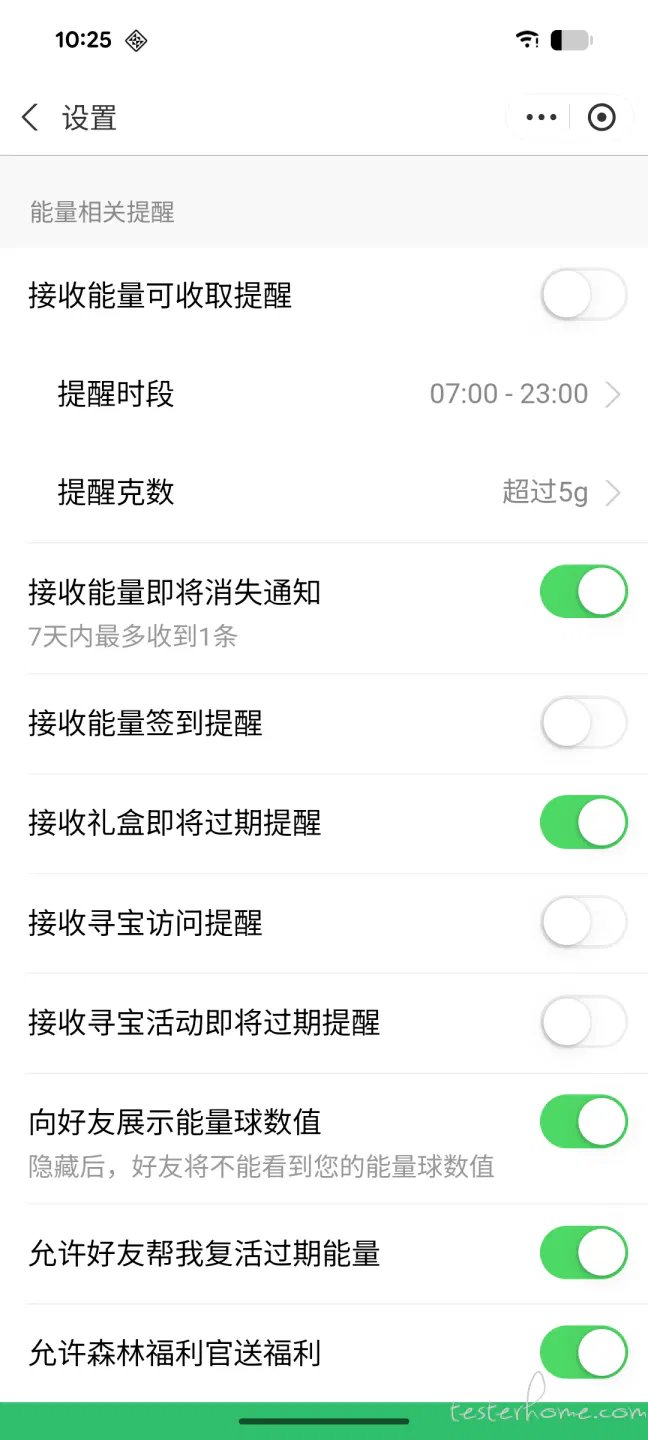
Figure 4: the reminder settings page shows options such as "Receive reminders when energy is ready to collect." The test checks the page title and reminder text; it only views the page and does not change any switches.
After clicking Back, the page must be captured again to independently confirm that it is currently Ant Forest, followed by saving the final-state screenshot and termination receipt.

Figure 5: the Ant Forest home page is visible again after returning from reminder settings. This is a final-state screenshot from a formally timed run; independent re-verification confirmed that the page had returned.
Scenario four: have Laya select from seven categories of real services.
Use the service candidates shown in Figure 1: utility payments, Yu'e Bao, mobile services, Ant Forest, Civic Center, transfers and healthcare, plus "no suitable option." Questions include direct names, paraphrases such as "look at my green energy," and goals that cannot be completed within the candidate set.
The rule baseline uses "resourceId and parent-container scope of the service grid + exact name." These seven items reuse the same text-node ID, so the ID alone cannot distinguish services. The model must face the same candidate set: for example, although "Scan" is visible at the top of the home page, it is outside these seven items, so the correct response to that question is to abstain.
A total of 14 goals were frozen, with two candidate orders and two question formulations, completing 56 local text inference runs. These are offline selection tests; no financial entries such as transfers were clicked.
Scenario five: evaluate image understanding using real pop-ups, energy bubbles and countdowns.
Image capability needs to answer questions that a text tree cannot fully express, such as pop-up occlusion, text near icons, and the correspondence between energy bubbles and countdowns.

Figure 6: a promotional pop-up covers the Ant Forest page, with "Enter the draw now" in the middle and a close button below. This image tests whether the model can distinguish the pop-up from the background.

Figure 7: after the pop-up is closed, the Ant Forest page shows energy bubbles, text labels and countdowns together. This image tests whether the model can match them correctly.
Figures 1–4 are diagnostic screenshots from different stages; Figure 5 is a final-state screenshot from a formally timed run; Figures 6 and 7 are used to evaluate the vision model. These images come from different tests and are not a continuous recording of one sequence of operations.
The vision evaluation used 7 real screenshots and 18 questions. Of these, 15 image-based questions counted toward the vision score, while 3 execution-rule questions did not. Each question was tested again with the candidate-answer order swapped; results were also compared with English questions and with no image supplied. This experiment recorded model answers only and did not let the model operate the phone.
2. Run a real-device comparison on your own phone
Prepare a SoloPi APK built from this branch, a real Android device connected to the computer, and an Alipay account that is already logged in; manually open Ant Forest. Computer control uses host mode and requires ADB and accessibility to be ready. An overlay window or exemption from battery optimization is not mandatory.
Run from the repository root:
# 将占位内容替换为 adb devices 显示的设备序列号。
SOLOPI_DEVICE="你的设备序列号"
./solopi-skill/scripts/solopi-ai --serial "$SOLOPI_DEVICE" doctor
./solopi-skill/scripts/solopi-ai --serial "$SOLOPI_DEVICE" capabilities
python3 solopi-skill/scripts/harness/examples/fastpath/benchmark_forest.py \
--serial "$SOLOPI_DEVICE"\
--comparison scoped \
--pairs 5 \
--output "$HOME/.cache/solopi-forest-comparison"
capabilities should include event-stable-v1 and target-context-v1; if doctor reports only that SoloPi's internal ADB is not connected, first run adb-connect from the same CLI, then check again. ADB remains enabled afterward.
This command runs five pairs each for the menu round trip and settings round trip, for a total of 20 runs. The baseline is legacy + full-page, and the optimized group is event-stable-v1 + target-context-v1. Both groups use the same selection rules and acceptance criteria. To study only the waiting strategy, change it to --comparison wait; both groups will retain full-page validation.
The output directory must not already exist. Results include protocol.json, per-round results.json, and each round's action receipts, independent observations, final.png and termination receipt. Check pass/fail results before comparing times. After a stale observation is rejected, the script recaptures the tree and selects again at most three times; all related time is included. It does not reissue actions when the execution result is uncertain.
3. Retest local Laya separately
The text environment uses MLX on Apple Silicon, separately from the real-device timing script. Dependencies are pinned in solopi-skill/scripts/harness/examples/fastpath/requirements-mlx-lock.txt. The evaluation script requires you to prepare a protocol JSON containing page candidates and expected answers; the protocol file used in this article's experiment was not released with the public repository. In an environment where dependencies are installed, specify the protocol and local model directory:
SOLOPI_LAYA_MODEL="/本地路径/laya-multilingual-mlx"
SOLOPI_LAYA_PROTOCOL="/本地路径/你的评测协议.json"
python solopi-skill/scripts/harness/examples/fastpath/evaluate_laya_choices.py \
--protocol "$SOLOPI_LAYA_PROTOCOL"\
--model-path "$SOLOPI_LAYA_MODEL"\
--output "$HOME/.cache/solopi-laya-choice-evaluation"
This run used aac6fef/laya-multilingual-mlx, pinned to revision f2b4faf51023039425946074e2cf1361d2db11d5. The script does not automatically download the model or operate the phone. The evaluation protocol and environment records are saved in the local experiment directory and were not released with the public repository.
The vision evaluation script is evaluate_laya_vision.py. It requires a separate PyTorch environment for the community laya-vision project, local weights, and a protocol containing original screenshot paths and hashes. The parameters are --protocol, --model-path, --output, --device mps; Linux GPUs can use cuda. The original protocol and per-question results were not released with the public repository, so the scores cannot be recalculated from this article alone. If you substitute your own images, create a new protocol and results.
The community Laya Vision uses images and text to choose from a finite set of options. This experiment actually loaded the approximately 201M-parameter weights from thaitea/laya-vision, without integrating them into the APK. These weights are marked CC BY-NC-SA 4.0; check the permitted scope of use before adopting them. Weight documentation
IV. Benefits
1. The complete real-device flows are indeed faster, with verification and screenshots retained
The experimental device was a Pixel 8 / Android 16, and the computer was an Apple M3 Pro / 36 GiB. Each flow had five alternating pairs, for 20 runs in total, all passing independent re-verification.
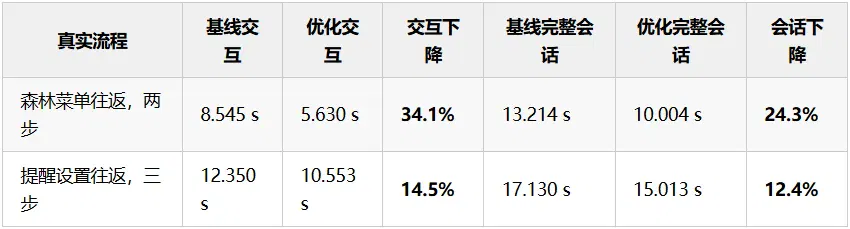
Interaction time includes selection, actions, communication, waiting, stale-observation rejection and re-observation; a complete session additionally includes initialization, independent re-verification, screenshots and session release. Both start with Ant Forest already open, excluding launching Alipay and entering Ant Forest for the first time. The flow checkpoints also differ from a browser agent's DONE, so we do not compare absolute seconds directly with the upstream project to determine which is faster.
The benefits can be traced to specific behavior: stale-observation rejections fell from 6 to 1; the optimized group used local validation for ten "More" clicks, including 3 clicks completed despite full-page changes, with subsequent acceptance checks passed. Median host CLI calls fell from 8 to 6 for the menu flow and from 9 to 7 for the settings flow. These are CLI call counts, not underlying ADB or HTTP packet counts. Per-round results and phase-by-phase times are saved in the local experiment directory.
Across the five pairs for each flow, complete sessions were faster in all five pairs; interaction time was faster in four pairs and slower in one. Another 12-run comparison changing only the waiting strategy passed in every run, but settings interaction was instead 11.4% slower. The current conclusion is therefore limited to the gains from the combined changes on these two flows. Records of the independent waiting-strategy comparison are saved in the local experiment directory.
2. Laya inference is fast, but has not yet added coverage that can be confidently adopted
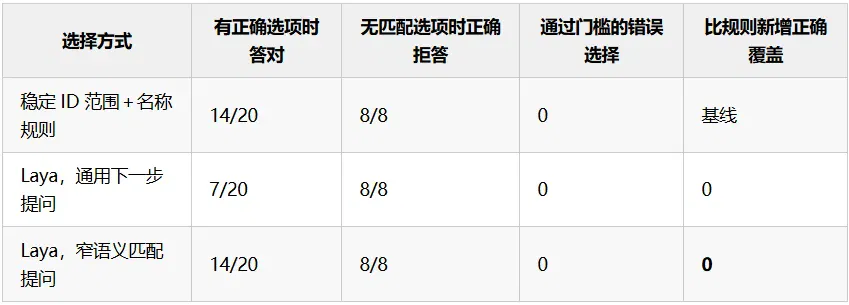
Median inference time for narrowly framed questions was 11.67 ms, versus 15.71 ms for general questions, excluding model loading and phone operations. Narrowly framed questions improved Laya's answers, but coverage under fixed thresholds remained the same as the rules. The thresholds used here were a highest candidate probability of at least 0.65 and a lead of at least 0.15. These probabilities have not been calibrated for the domain and cannot be interpreted as corresponding accuracy rates.
There was a useful signal in the raw top choices: for "look at my green energy" and "open the public-benefit tree-planting page," Laya selected Ant Forest, adding 4 correct selections over the rules across the two candidate orders. But for "collect green travel energy," it incorrectly selected Civic Center twice. The thresholds blocked all 6 selections. Follow-up work should accumulate domain samples, improve abstention and calibration, and then validate on unseen pages. The raw outputs are saved in the local experiment directory.
These results come from repeated candidate-order tests on a single page. This round included no comparison with a remote large model, nor did it measure reductions in cloud costs or script-maintenance hours. The 24.3% and 12.4% in the real-device table come from executor changes and cannot be attributed to Laya.
3. The image version has actually been evaluated, but the current weights are not yet suitable for taking over clicks
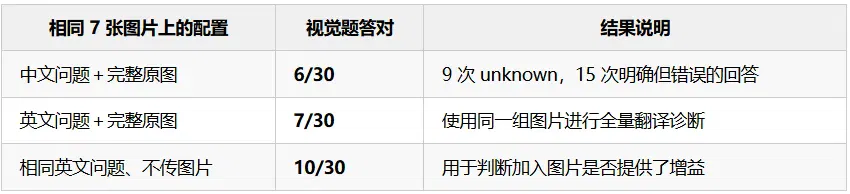
Median warm inference time with the Chinese-language configuration was 130.29 ms; first inference took 2.821 seconds, and model loading took 5.047 seconds. Inference times have been measured, but these data do not establish that images make answers more reliable. Per-question results and comparison records are saved in the local experiment directory.
This was an exploratory experiment using fixed community weights with MPS float32 and default preprocessing as a single 512-pixel image tile, without fine-tuning. All inputs passed the no-truncation check. The loader issued a configuration warning for pad_token_id, but prediction raised no errors, and logs and versions have been retained. The conclusions apply only to this configuration and cannot be generalized to the capabilities of all vision models.
4. Results ready for adoption and future directions
What is currently worth adopting is the reworked Android observation and execution pipeline. It resolves recognition of real small windows, repeated observations caused by unrelated changes, and waiting for slow navigation after an action is issued. On two Alipay flows, it delivered measured speedups that include acceptance checks.
On the model side, text and image evaluation entry points are retained, but models do not take over regression testing by default for now, and we are not yet investing in developing our own image version of Laya. The criterion for adoption in the next stage is to add correct selections that rules cannot cover across more unseen pages, while controlling erroneous approvals. Only after meeting that condition should domain fine-tuning and phone deployment be considered, giving such investment a verifiable basis.
Implementation verification also included 184 Android unit tests and 253 targeted Python tests. Cross-checks of fixed acceptance checkers for three types of real pages passed three positive examples and rejected six mismatched pages. This does not mean incorrect amounts or errors in energy being credited have been verified; this experiment made no payments and collected no energy. Test records are saved in the local experiment directory.
This article lists device conditions, experimental measurement definitions, aggregate data and real screenshots. The original protocols, per-round data and screenshot provenance records are not public, so readers currently cannot independently verify these figures. To repeat the experiment, use the public scripts above to generate new protocols, per-round results and screenshots on your own device.
V. Getting started
Laya is currently an optional local decision-maker on an Apple Silicon computer. It does not run inside the SoloPi APK and is not automatically enabled after installing the APK. The harness on the computer captures pages and generates a finite set of legal actions; Laya selects a candidate, and SoloPi on the phone rechecks and executes it. Whether the test passes is still determined by fixed acceptance criteria. Run all commands below from the SoloPi repository root.
1. Prepare the phone and matching APK
The local prerequisites are JDK 11, Android SDK/adb, Python 3.12 and an Apple Silicon Mac. After connecting the phone by USB, approve debugging authorization on the phone, install SoloPi built from the current repository and enable accessibility:
./solopi-app/gradlew -p solopi-app :portal:assembleDebug
adb install -r solopi-app/portal/build/outputs/apk/debug/portal-debug.apk
adb devices
SOLOPI_DEVICE="请替换为 adb devices 显示的序列号"
./solopi-skill/scripts/solopi-ai --serial "$SOLOPI_DEVICE" --pretty doctor
doctor reports any device conditions still missing; computer-side execution does not require an overlay window or exemption from battery optimization. Do not pair an old APK with an unknown protocol version with a new harness. If SoloPi's internal ADB is the only missing item, follow the Skill's troubleshooting procedure to run adb-connect and check again.
2. Install local Laya
Use a separate Python environment and download the public MLX weights at a pinned version. Dependencies and weights require a one-time online download; at runtime, use the local directory. The weights are not distributed with the repository or Skill:
python3.12 -m venv "$HOME/.cache/solopi-fastpath/venv"
source "$HOME/.cache/solopi-fastpath/venv/bin/activate"
python -m pip install -r solopi-skill/scripts/harness/examples/fastpath/requirements-mlx-lock.txt
export FASTPATH_MODEL_DIR="$HOME/.cache/solopi-fastpath/laya-multilingual-mlx-f2b4faf"
hf download aac6fef/laya-multilingual-mlx \
--revision f2b4faf51023039425946074e2cf1361d2db11d5 \
--local-dir "$FASTPATH_MODEL_DIR"
test -f "$FASTPATH_MODEL_DIR/model.safetensors"
See the FastPath example documentation for detailed dependencies, model sources and experimental boundaries. Hosts without Apple Silicon can currently use the default rule mode; do not treat these MLX commands as general instructions for deployment on Android devices.
3. Run an Alipay flow on a real device
First, leave the logged-in Alipay app on its home page and close pop-ups and the keyboard. List available templates, execute in Laya mode, then check the report using the artifacts directory returned by the command:
./solopi-skill/scripts/solopi-ai --pretty workflow-list
./solopi-skill/scripts/solopi-ai --serial "$SOLOPI_DEVICE" --pretty workflow-run \
--template alipay-more-services \
--mode laya \
--model "$FASTPATH_MODEL_DIR"
SOLOPI_ARTIFACTS="请替换为 workflow-run 返回的 artifacts 目录"
./solopi-skill/scripts/solopi-ai --pretty workflow-report \
--artifacts "$SOLOPI_ARTIFACTS"
You can also choose alipay-education (More Services and the Education and Public Benefit category) or alipay-settings (Me and Settings). These built-in flows only browse and return; they do not pay, submit forms or change settings. REPORT.md includes full-screen screenshots. Report success only when the workflow has completed, fixed acceptance checks have passed and all evidence is present. Omitting --mode laya --model ... uses the default rule mode, suitable for comparisons on the same phone under the same page conditions.
For complete template documentation, see Built-in Workflows. These three templates cannot directly test arbitrary apps. To integrate your own business, you must write requirements and policies and use verify-compile → verify-validate → verify-run; see Verification Engineering for entry points and constraints. Current measurements establish execution-pipeline gains only on the two flows described in this article; they do not establish that enabling Laya is necessarily faster or more accurate than rules.
This article comes from "TesterHome Community." Author: "Taixuan."
Related topics
After reading
Join the AINRK community
Read how to join the community and connect with people working in AI.
Related articles
Continue reading related topics and articles in this category.

蚂蚁与西湖心辰介绍Duo v1,探索全双工视听交互 (opens in a new tab)
Duo v1通过Intent与Realization模块衔接交互决策和音视频生成。文章报告30组交互、180项检查中通过168项,内容响应度为73.3%;复杂意图理解与长程一致性仍是团队后续优化方向。
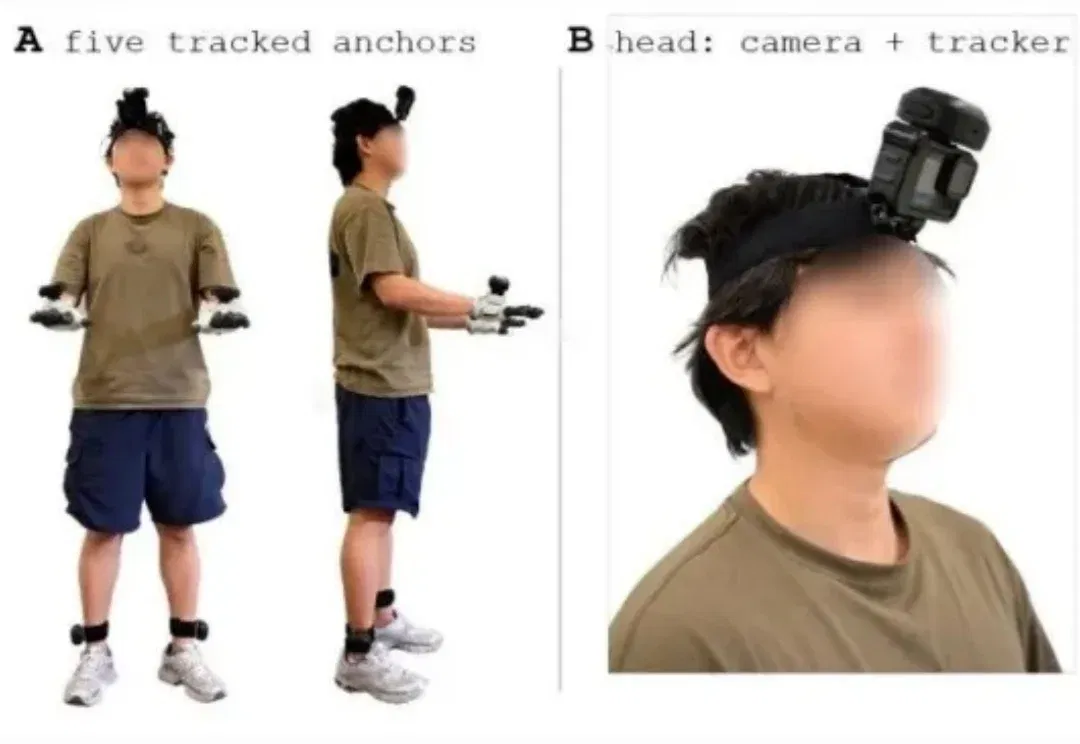
EgoExplorer captures mobile manipulation with five trackers and a camera (opens in a new tab)
Shanghai AI Lab presents a wearable capture system using trackers, gloves and a camera, plus C³ motion reconstruction, and releases 100 hours of data and code. Reconstruction and multimodal generation are assessed separately; humanoid transfer is shown only in simulation.
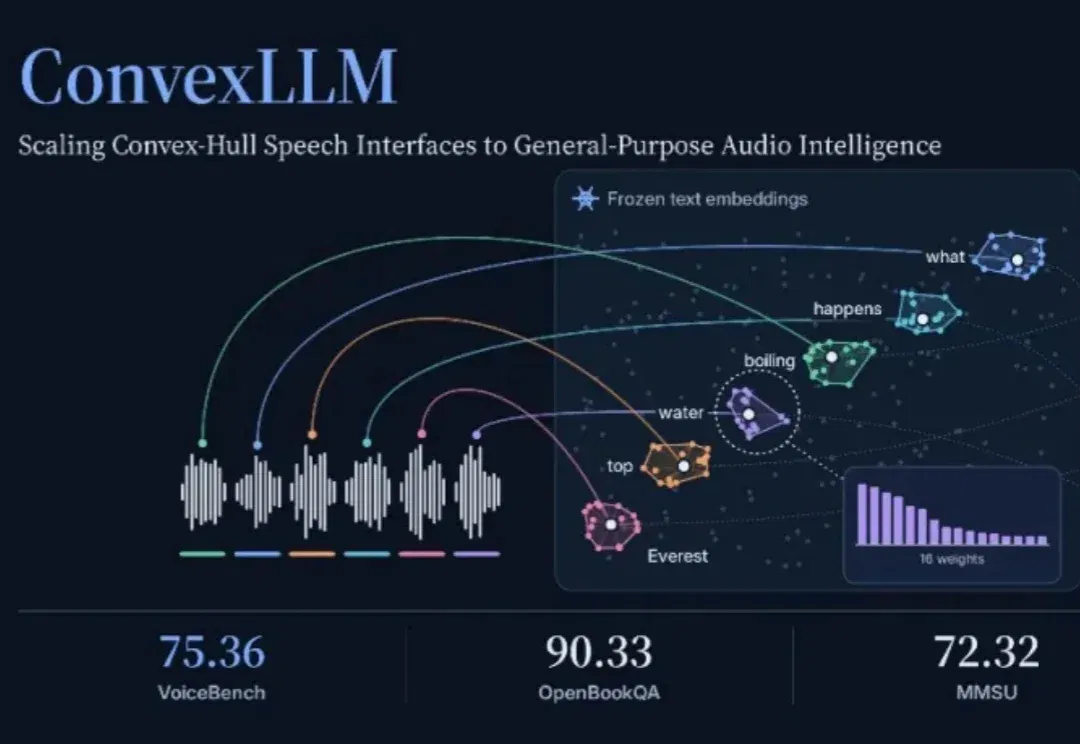
ConvexLLM connects speech to language models through frozen text embeddings (opens in a new tab)
Researchers at CUHK-Shenzhen and Microsoft propose C-Gate, mapping audio into convex combinations of frozen text embeddings. The paper reports VoiceBench gains against its listed open-model baselines, while audio understanding and transcription still involve trade-offs.
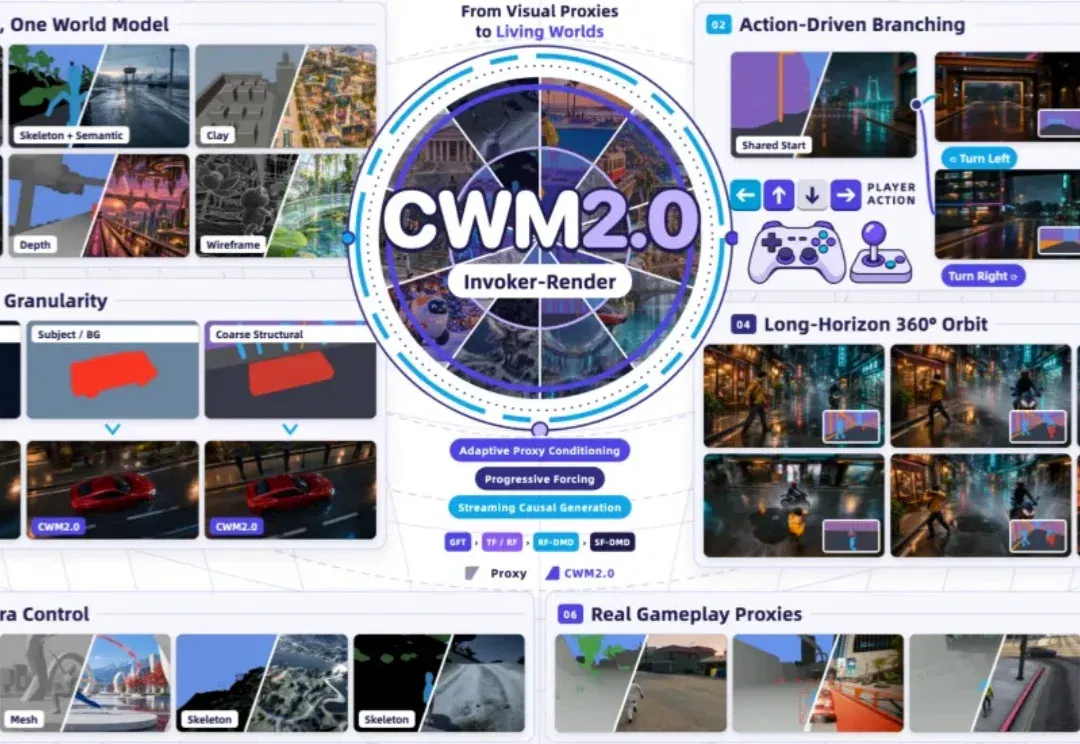
CWM2.0 open-sources generative rendering with a 30-minute racing demo (opens in a new tab)
Teams from Ant, Westlake University and Zhejiang University use a structured Proxy to control scene state and Invoker-Render to generate visuals, releasing eight-GPU streaming inference. The long demo and 140 evaluations cover specified scenes, not arbitrary stable worlds.
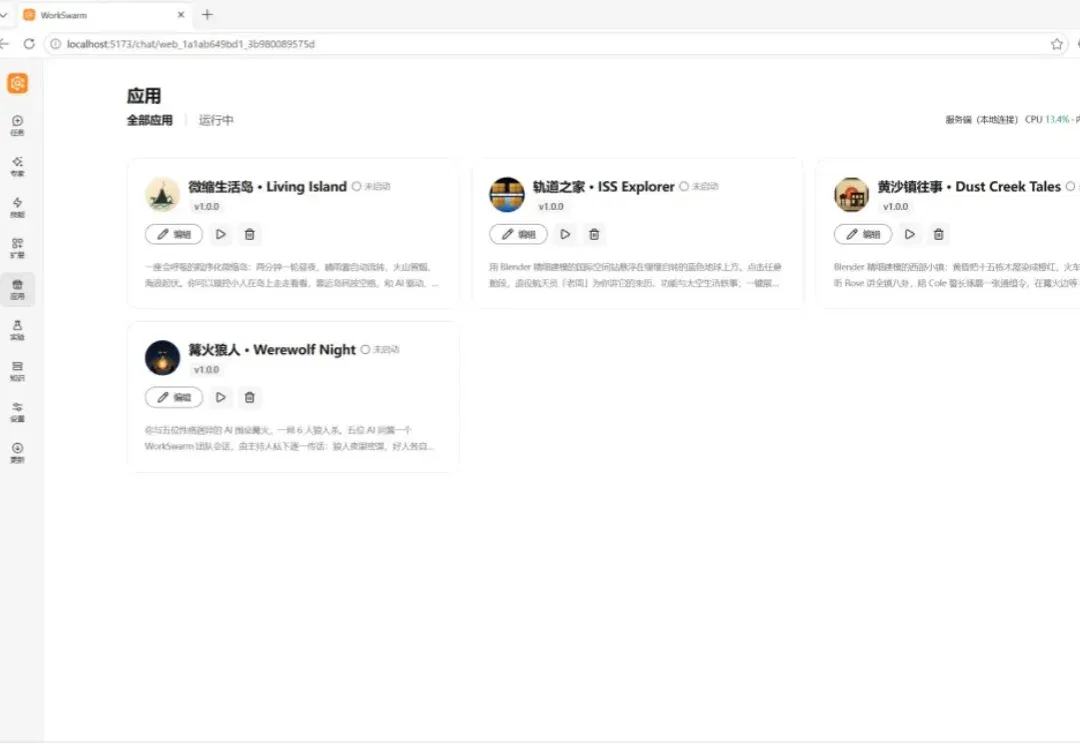
openJiuwen presents a Harnessless approach for reusing AgentOS execution tools (opens in a new tab)
openJiuwen uses app-development and swarm demos to show how built-in harness capabilities support sessions, tools and app management. Applications still define business rules and permissions; remote deployment and some capabilities remain planned or exploratory.