Alibaba Cloud Describes AgentCore Hosting for DSH and Its Governance Boundaries
The platform offers configuration-based hosting, custom images and management of existing installations, with identity, networks, logs and evaluation. Teams must still check Harness maturity and the capability matrix.
DeepSeek Harness, or DSH, is an Agent Harness that DeepSeek open-sourced under the MIT license in August 2026. It is relatively easy for an individual to use. But when it is rolled out to a department, separate deployments by different people produce disconnected session logs, plugins and credentials, without unified support for identity, networking, data and operations. On AgentCore, DSH is available alongside Qoder, Codex, Pi and QwenPaw; hosting is intended to fill precisely this gap. This article proceeds in three parts—why hosting is needed, how to integrate it into business, and how to manage it afterward—to help evaluation teams make their decisions.
DSH works for an individual, but does not build up departmental assets
Cloud Native
▍ 1.1 DSH works for an individual, but does not build up departmental assets
As an excellent open-source Agent Harness, DSH breaks model adapters, tools, sessions, sandboxes, the interface and even the Agent Loop into plugins registered on the Cordis microkernel. The session log is the sole authoritative event source, and trajectories can be replayed and branched. A Team is bounded by its root session: subagents can message one another and share a task board with dependencies. Subagents can be started in-process or driven through ACP, the Agent Client Protocol, in separate subprocesses. There are also backends that connect directly to Claude Code and Codex; the latter two types each have their own runtime, sessions and tools.
These designs let one person get results quickly: install DSH, write a few Skills, connect frequently used tools, and a real task can run from beginning to end. Rolling it out to a department does not change this merely by adding people. Ten people installing ten copies means ten disconnected sets of sessions, plugins and credentials, with nobody able to pick up where another person's session left off. DSH's Team lets the same operator work with multiple subagents inside a root session; it does not provide an environment shared by multiple people. The problem, therefore, is not whether the agent is clever enough, but that the following things are missing around it:
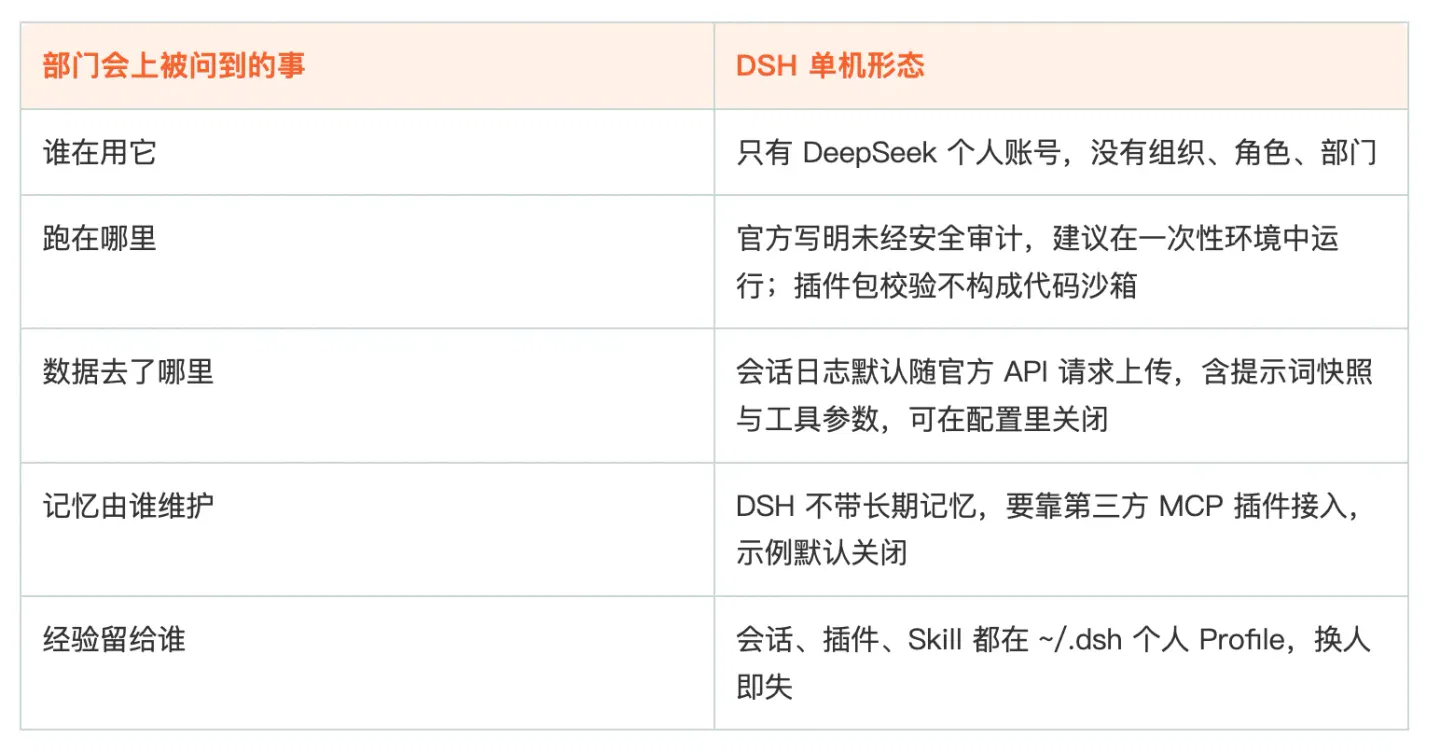
Hosting is not about wrapping DSH in an interface. It connects DSH to the enterprise's existing systems for identity, networking, data and operations. Only after that layer is connected can the same Harness move from a personal tool to infrastructure a department can depend on.
▍ 1.2 How cloud hosting changes ways of working
The following four scenarios are examples constructed from the platform's existing capabilities to illustrate changes in how people work. They are not customer case studies.
Scenario one: engineering modifies a legacy service
An order service dating from 2019 needs idempotency added. An engineer asks the agent to read the repository, locate the entry point, modify three call sites and add tests. In a standalone setup, the engineer must clone the repository locally, paste the team's commit conventions into the prompt, and handle local dependencies when running tests.
With hosting, the agent accesses code and artifact repositories inside the VPC. MCP connects to internal code search and the build platform, Skills carry the team's branching, commit and review rules, and the vault signs requests to the artifact repository on the agent's behalf. A task running into the night is unaffected by closing the laptop lid. If it fails to get things right the first time, the failed session stays on the platform and can be rerun after the configuration is changed.
Team conventions move from a document into executable Skills, and environments move from separate individual setups to a single configuration, with code staying inside the VPC. Three metrics are worth tracking after deployment: the proportion of changes that pass tests on the first attempt, the average number of rounds needed to finish a task, and the regression-set pass rate.
Scenario two: start a month-end analysis in a group chat
A manager posts a request in a Feishu group: break down last month's channel expenses by region, compare them with the budget, and produce materials for a 20-minute presentation. Previously, an analyst would manually retrieve the data, reconcile it and put it into a template.
With hosting, the agent connects to the data warehouse through MCP to retrieve data, drafts the report using a template mounted from OSS, puts the definitions and calculation conventions into a Skill, and retains key conclusions in memory. Finance adds two pieces of data in the group, and the agent updates the original task. When work resumes the next day, the conventions and previous conclusions are retrieved from memory, while the previous round's data retrieval and edits can be found in the session and Trace. Sessions are reclaimed according to their TTL; the portions that need to continue across days are handed over to the Team's Task.
The entry point stays in the software employees already use. Definitions and conventions move from personal experience into team assets, and the process has records that can be checked. Metrics worth examining are the time from request to first draft, the number of rework rounds, and the share of rework caused by inconsistent definitions or conventions.
Scenario three: on-call troubleshooting
After an alert arrives, the person on call asks the agent in the group to investigate. The agent first checks service topology and associated resources, then logs and recent changes, before offering three root-cause hypotheses and steps to verify them. For actions such as restarting or scaling, the agent only makes suggestions; execution requires confirmation by the person on call.
With hosting, the troubleshooting process remains in the Trace: which services were checked, which section of logs was read, and what evidence ruled out a hypothesis. The next day's review uses the same trajectory instead of relying on a spoken handover. Common troubleshooting procedures can be written as Skills for the next person to reuse directly.
Metrics worth examining are mean time to recovery, the proportion escalated to humans, and the proportion of diagnostic conclusions matching the root cause confirmed afterward.
Scenario four: one agent serves multiple customers
A delivery team builds the same kind of assistant for different customers: policy Q&A, ticket routing or report interpretation. In a standalone setup, a configuration is copied for every customer, while credentials are scattered across people's machines.
With hosting, every customer gets a Workspace, with credentials and OSS directories kept separate. FAQs and delivery documents are made available through MCP, while only an Endpoint and API Key are exposed externally. Differences live in configuration and assets, without duplicating code. When a customer asks about data boundaries, the team can answer in terms of Workspaces and credentials.
Metrics worth examining are the time to onboard a new customer, the number of configuration items that need changing per customer, and the proportion of audits for which all materials are ready on the first attempt.
The four scenarios share a common point: the aim is not to make the agent cleverer, but to make its inputs accessible, its outputs reviewable and its process reusable. Inputs are code, data, logs and knowledge; outputs are changes, reports, remediation and deliverables; the process consists of sessions and trajectories.
▍ 1.3 What enterprises actually gain from hosting
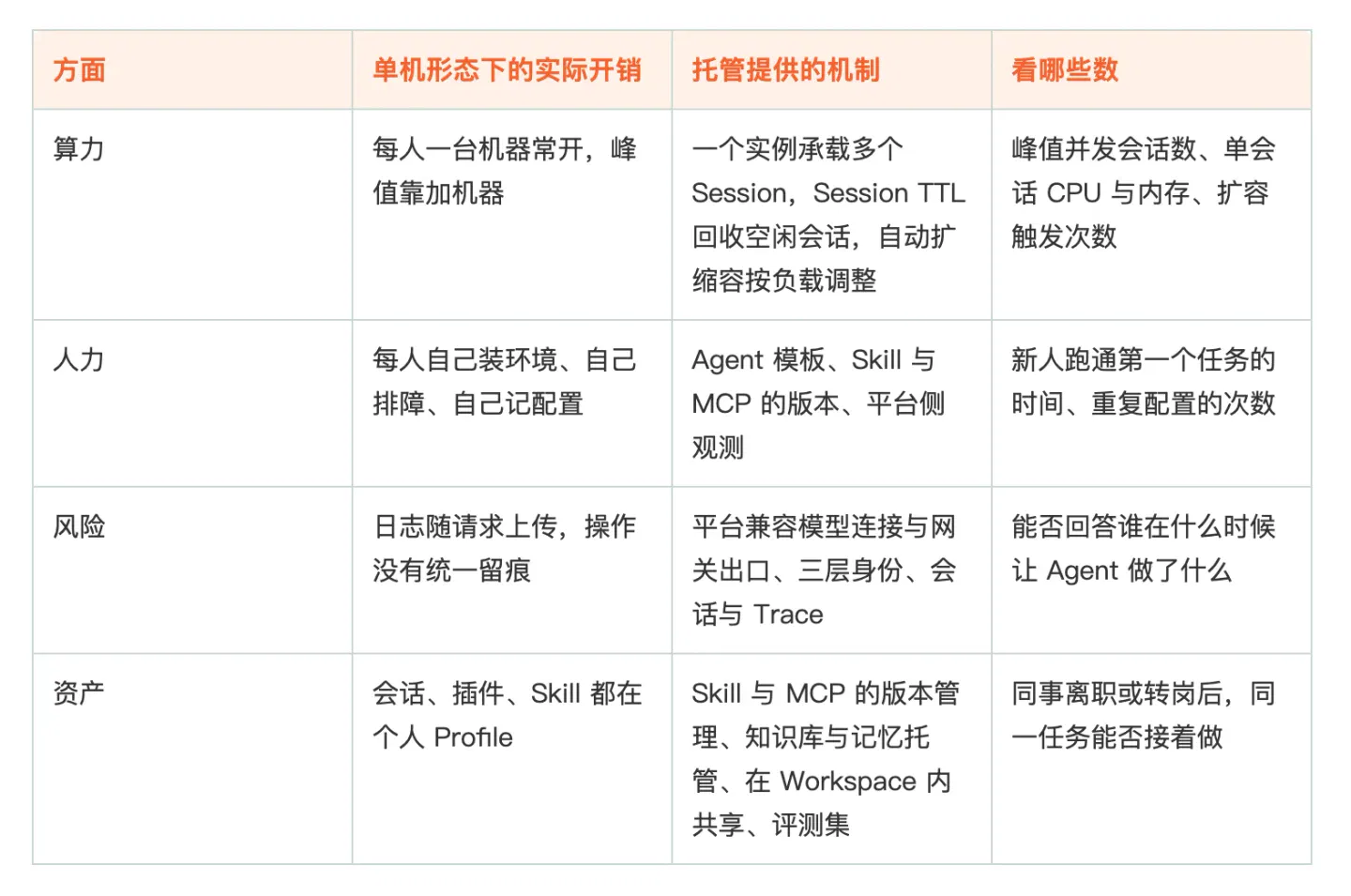
Results in compute and staffing can be seen in the first month: better machine utilization and faster onboarding for newcomers. Risk and assets become visible only when specific events occur: a colleague who used the agent leaves or changes roles and someone else must take over the task; audit or compliance asks for materials for the first time; or the team changes its model or Harness version for the first time. These are precisely the moments when the costs of standalone setups appear together. Enterprises often say they want to start with a small pilot. What it should cover is actually these three events, rather than the number of machines and time to get started. Machines and onboarding time can be added or made up for later; choosing the wrong integration approach means redoing the work.
▍ 1.4 The same hosting mechanisms, different acceptance criteria
Different people use different standards to judge whether this integration approach is worthwhile.
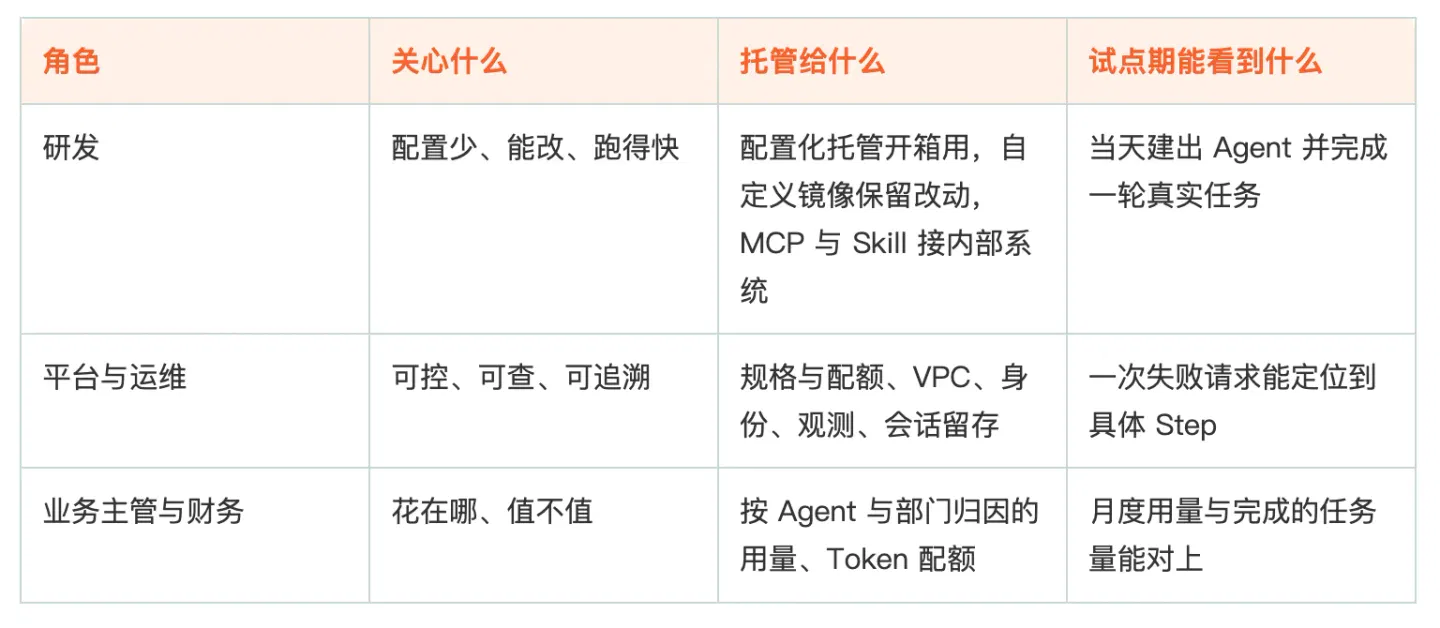
The easiest way for a pilot to fail is for engineering to be the only group that finds it useful. If the platform has no data and managers have no accounting visibility, the next budget will be hard to approve. Conversely, a pilot that offers usability the same day, traceability when something goes wrong, and clear accounting for spending will face much less resistance when expanded.
How to integrate DSH into business
Cloud Native
AgentCore is Alibaba Cloud's platform for building and governing agents. Building assembles the agent: choose a Harness, bind a model, attach Skills and MCP, and configure sandboxes and specifications. Governance covers how it runs and meets compliance requirements after deployment: instance and Session scheduling, enterprise identities and delegated credential signing, VPC and network egress, sessions and Traces, evaluation and version management, and usage accounting by agent and department.
Hosting is only part of governance: the platform maintains the runtime environment for you, but its scope extends beyond the runtime. DSH determines how the agent thinks and which tools it can call; AgentCore determines what it is assembled from, where it runs, under which identity it runs, and where to look when something goes wrong.
These capabilities are consistent across Harnesses. Whether you choose QwenPaw, Qoder, Codex, Pi or DSH, the integration approach, identity system, observability definitions and usage accounting are the same. Changing Harness does not require rebuilding these integrations.
Two things need to be decided next before the other configuration has a place to fit: choose the deployment form—where the agent runs and who maintains it—and determine the entry point through which employees will use it.
▍ 2.1 Three ways to connect DSH to AgentCore
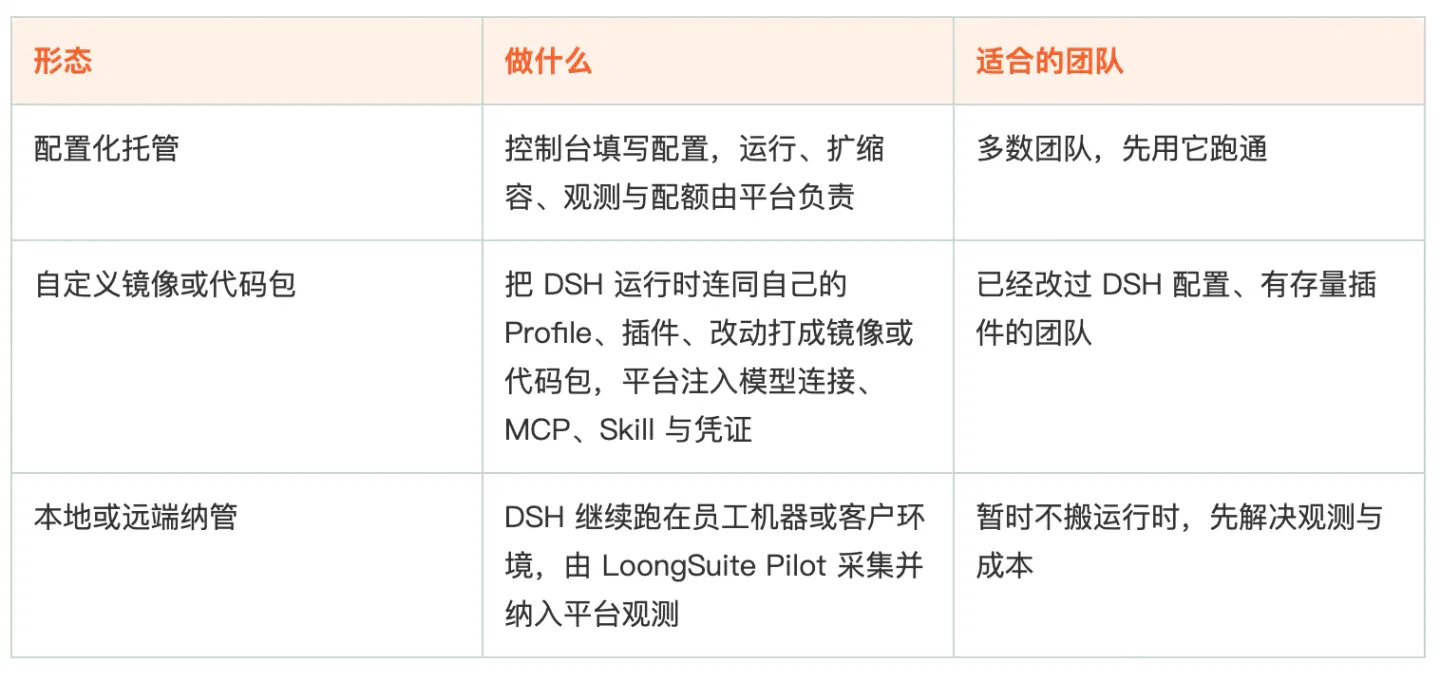
The three paths can coexist. Within the same department, a coding team may use a custom image to retain its plugin set, a business team may use configuration-based hosting directly, and an operations team may first bring existing machines under management to inspect their data. Getting one path working and then expanding to a second is more realistic than planning all three at once.
Configuration-based hosting is a single creation operation in the console, organized into four configuration areas. Models and prompts: bind a platform-compatible model connection, select a model, and enter a system prompt or choose a template to reuse role files. Assets: add Skills, Subagents, MCP, knowledge bases and credentials, and enable the memory plugin as needed. Session management: select instance specifications, the maximum number of Sessions per instance, Session TTL and automatic scaling. Networking and storage: enable public-network access or connect a VPC as needed, and use mount points when OSS data must be read. The built-in Shell and file tools do not need to be added.
The other two paths do not use this page. After a custom image or code package is uploaded, the platform injects model connections, MCP, Skills and credentials. Bringing an existing deployment under management instead involves installing Pilot on the target machine to collect data.
The relationship between instances, Sessions and context deserves a separate explanation. An instance is the computing environment in which an agent runs; a Session is a series of continuous interactions; context includes earlier conversation and tool-execution results. One agent can run multiple instances, and one instance can carry multiple Sessions. Sessions originate at entry points: direct Endpoint calls, IM channels, and chats and Tasks in collaborative instances. Here, a collaborative instance means an agent instance that joins a Team and works as a Leader or Worker; each round of its interaction with a person in a task room counts as a Session.
An existing Session continues using its original instance. During scale-out, new Sessions are preferentially assigned to ready instances that have not reached their limit. If several qualify, the one with more existing Sessions is preferred. Session TTL determines when idle sessions are reclaimed and also affects the pace of scale-in.
After configuration changes, models, prompts, Skills, Subagents, MCP and credentials support hot updates. Instance specifications, images and mount points require a restart, so changing them after a task ends is recommended.
Another prerequisite relevant to selection needs to be confirmed in advance. All three paths share the platform's model connections, while DSH's context-cache optimization depends on DeepSeek's official API contract and stops working with other model providers. Model connections must be compatible with the chosen Harness. When using the official API to obtain the caching benefit, session-log uploads must be explicitly disabled or stripped by field. This requires separate configuration; hosting does not disable them by default.
▍ 2.2 Entry points: Endpoint, IM and Team
Entry points are not limited to the web. Hosted Harnesses support direct Endpoint access, DingTalk, Feishu, WeCom, and chats and Tasks in collaborative instances. Employees ask questions in their existing work software while the agent runs on the platform; accounts, permissions and auditing remain on the platform side.
External applications integrate through the AG-UI protocol. Replies return as a stream of individual events, and continued conversation uses the same threadId. Integration requires only an Endpoint and API Key; the application does not need separate modifications for every agent.
Work that needs to continue across sessions and days is handed to TeamHarness. Once an agent joins a Team, it is assigned Leader or Worker status. The Leader creates tasks and delegates subtasks to Workers, with execution moving into task rooms. After a task is created, users do not have to keep the original conversation connected; the platform sends notifications of status changes as a Bot. Startup timeouts, runtime timeouts, lost session connections and final-state archiving are all handled by the platform, without people having to watch them. Trying the complete workflow with a real task before configuring it is recommended.
How to manage it after integration
Cloud Native
Management truly begins after integration is complete: identity, credentials and networking; observability and evaluation; the order of implementation; and, finally, the boundaries that need to be understood in advance.
▍ 3.1 Identity, credentials, networking and auditing
Several issues that arise in procurement reviews are handled by the platform after hosting, without each department having to build its own systems.
Resources are divided by Workspace, keeping departments from being mixed together. Within this boundary, identity has three layers. Business identity records who is represented—uid, tenant and cloud account. Execution identity records which Session and run are involved. Resource identity records which tools, Skills, sandboxes and subagents may be called. Inbound access uses IAM or OAuth; outbound signing is delegated to the credential vault, and the application holds no long-term keys. The four scenarios in section 1.2 map to three kinds of permission: retrieving data and checking logs are queries, changing code is modification, and delivery to outside parties is external access. These capabilities ultimately have to map to the three identity layers above. If those layers do not line up, permissions cannot be explained clearly.
Networking is restricted by default. Public-network access must be explicitly enabled. Accessing a service inside a VPC requires permission not only on the platform side, but also from the target service itself. Reading data in OSS uses mount points.
Usage and rate limiting are counted on the platform side. Token quotas and agent-level concurrency limits are both set and enforced on the platform, without relying on the application to keep its own accounts.
Session logs and configuration changes remain on the platform side and can be retrieved by agent and session when audit materials are needed. Custom images are retained by version; cross-version rollback and plugin-level version management are still being developed.
▍ 3.2 From observability to evaluation and tuning
DSH's session logs are naturally suited to observability. System prompts, tool schemas, model requests, streamed output, tool-call results, permission changes and cancellation reasons are all appended to the same log, and trajectories are divided into three levels: Turn, Step and tool call. The weakness is on the collection side: the native OTLP Logs plugin is disabled by default, and standalone users must inject the collection plugin into $DSH_HOME/cordis.patch.yml.
After integration, Pilot handles this step. In a hosted setup, the platform does it on the user's behalf; for an existing deployment brought under management, Pilot is installed on the machine running DSH. After discovering a DSH instance, Pilot injects the collection plugin without modifying DSH's source. Connection status can be verified with loongsuite-pilot status and info. Once the data enters the platform, it is organized into three layers:
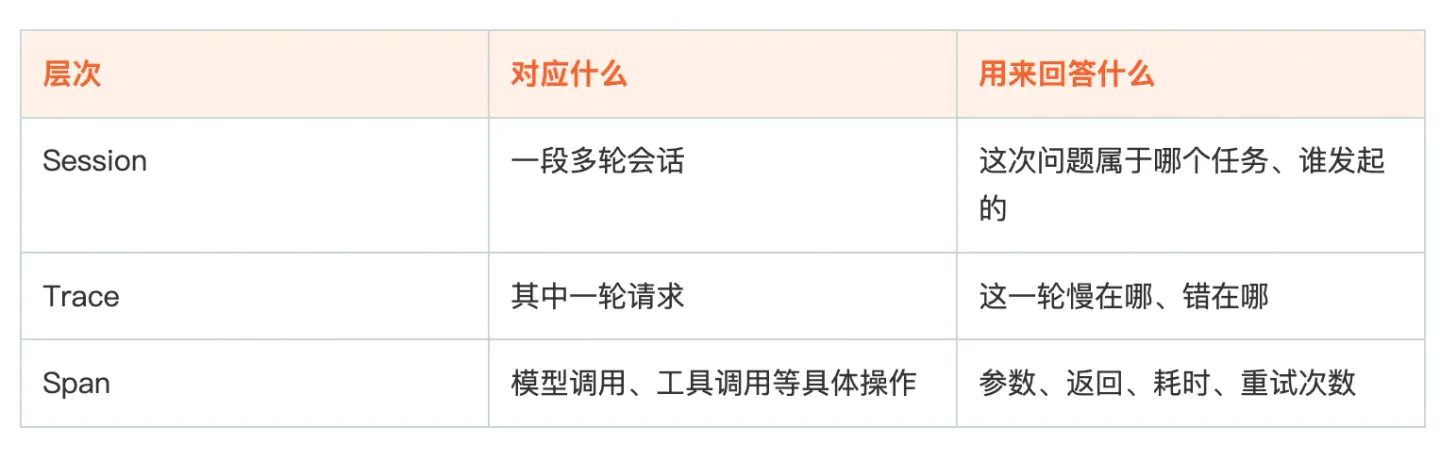
Whether a Trace is usable is checked against three acceptance criteria. Steps must be complete: model calls and every tool call have a Span, with readable inputs and outputs. Nesting must be correct: subagents and asynchronous tasks retain their parent Spans. Metadata tagging must be correct: business fields survive propagation and are attached to the corresponding Span. If an enterprise already has its own tracing system based on OTel Context, the two tracing systems need independent context keys; otherwise, subagent Spans will be attached to the wrong parents.
Evaluation does not rely only on model scoring. The platform supports three types of evaluator: Code, LLM and Agent-as-a-Judge. The AgentCore team's published evaluation practice uses ten tasks from terminal-bench 2.1 and adds three orthogonal deterministic evaluators: task completion, red-line rule checks and execution-process reliability. All are implemented with rule-based scripts, avoiding the variance and leniency bias introduced by LLM scoring. The resulting conclusions measure the combined capabilities of the Harness and model, and the same criteria can be used to compare a different Harness.
The metrics mentioned in the four scenarios can be calculated because every step has a place in the chain. A failed session can be traced to its Trace, located at a Step, and added to a regression set; the same tasks can be rerun after a configuration change or a switch of model. This chain connects observability, evaluation and tuning: first inspect the Trace to find the step where the problem occurred, then use the same evaluator to calculate scores before and after the change, retaining it only if the score improves. If any link is missing, effectiveness can only be judged by impression.
▍ 3.3 A replicable implementation sequence
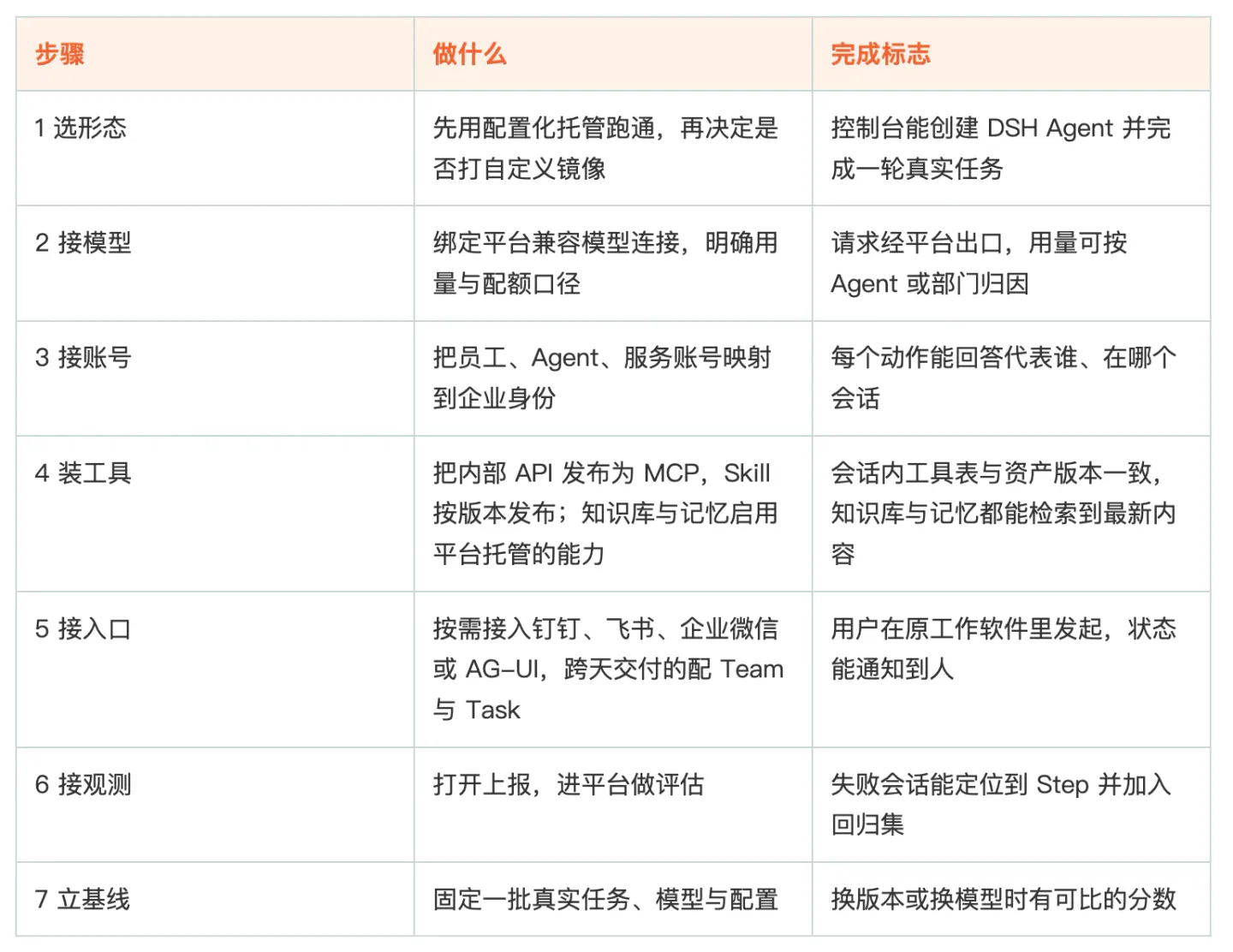
One possible timeline is to get one scenario working in week one, connect tools, accounts and entry points in weeks two through four, and, starting in week five, freeze the task set and record the first baseline. The first three steps determine whether it can run; the last four determine whether it can be managed and changed after it is running. Common sticking points are steps four and six: tool assets have no versions, or observability is installed but nobody looks at the scores.
▍ 3.4 Boundaries to understand
Hosting addresses operation and governance; it does not change DSH's maturity. All current DSH tags are alpha or rc, and the official recommendation is explicitly to run it in disposable environments. Hosting provides session-level isolation and platform-side retention, but does not promise that every version can enter a core production workflow directly.
Knowledge bases, memory, TeamHarness, observability and evaluation are enabled item by item according to each Harness's capability matrix. For items not listed, what can actually be configured in the console takes precedence. Evaluation and regression capabilities are already available; platform-pushed Harness version updates are released in staged rollout batches.
For solo use, pursuing the lowest unit price made possible by DSH's cache, or situations without compliance and collaboration requirements, a standalone deployment plus a one-click script is still cheaper. Hosting's value becomes apparent when multiple people share it, multiple tasks run in parallel and auditing is required.
A simple way to judge whether hosting is worthwhile is this: can a newcomer take over the same task and continue with the previous person's session, tools, permissions and evaluation baseline? Only then has the Harness truly become part of the organization.
If you are interested in AgentCore, you are welcome to join the AgentCore User Support Group for more information. DingTalk group number: 185130001370.
- AgentCore official website: https://www.aliyun.com/product/agentcore
- AgentCore quick start: https://help.aliyun.com/zh/agentcore/agentcore-quick-start-1
This article comes from the WeChat public account Alibaba Cloud Native and was written by Alibaba Cloud Native.
Related topics
After reading
Join the AINRK community
Read how to join the community and connect with people working in AI.
Related articles
Continue reading related topics and articles in this category.
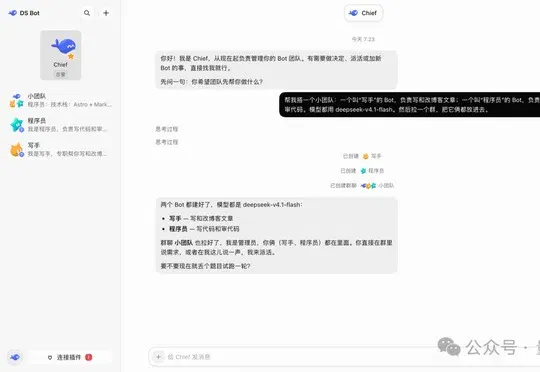
DeepSeek Bot来了!民间版,DSH装个插件就能用 (opens in a new tab)
非官方 DeepSeek-Bot 基于 DeepSeek Harness 以 DSH 插件形式上线,支持多 Bot 独立角色与模型、长期记忆及主管协同,并可通过 DSH 桌面端和 Web 端安装使用。
16 个超火的 DeepSeek Harness 插件,大肥鱼已经落后 2 个版本了。。。 (opens in a new tab)
DeepSeek Harness 是 DeepSeek 官方最新开源的 AI Agent 运行环境,简称 DSH。你可以把它理解成一个高度可定制的 AI 编程工具,对标 Claude Code 和 Codex,核心理念是「一切皆插件」。本期我就来带大家鉴赏一大波 DeepSeek Harness 热门插件,有实用的、也有好看的。

姜宇辉的AI分身:知识助手与“另一个自己”之间 (opens in a new tab)
南方周末通过学者、用户与Second Me创始人的访谈及记者试用,观察AI分身的学术辅助、情感连接和商业化尝试,也呈现知识可靠性、人格边界、版权与隐私方面的疑虑。

智动未来据报完成亿元级Pre-A+融资,资金用于产线与服务机器人部署 (opens in a new tab)
机甲觉醒报道,智动未来宣布完成亿元级Pre-A+轮融资,由中美绿色基金领投、南曦创投联合领投,资金拟用于广州产线、服务场景部署和世界模型研发。“智子世界”仍属技术预览,商业化效果待更多应用数据检验。

范式智能介绍Phai-A1与Phai-M1,强调国产算力后训练优化 (opens in a new tab)
范式智能介绍面向代码与Agent场景的Phai-A1,以及面向真人影视的音画同步模型Phai-M1。公司展示了单卡运行和视频生成能力,并称模型在昇腾平台完成专项后训练优化。